55
DateDate
DateDate
Date
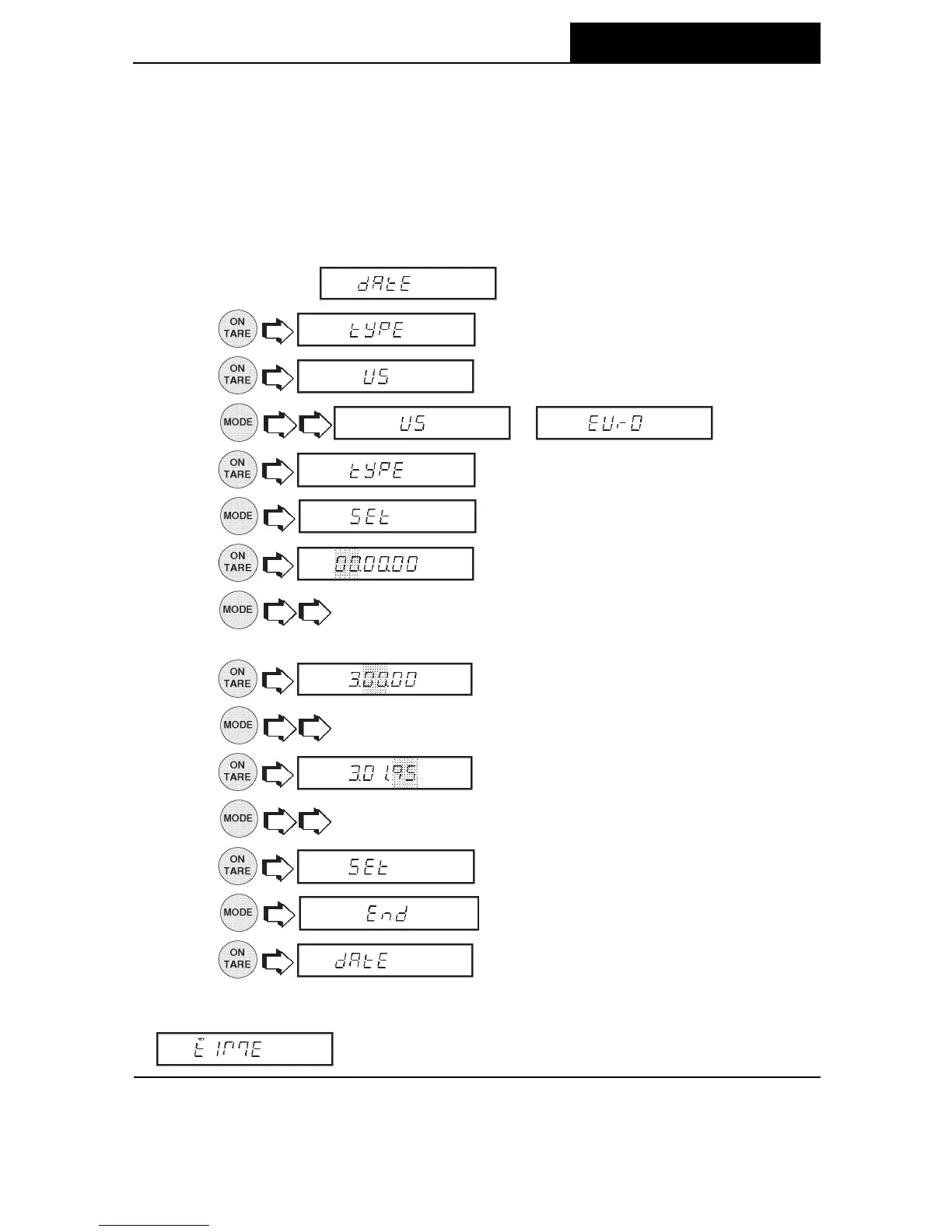
Date is a feature which enables the balance to be set to a U.S.A. date standard or
European date standard. U.S. standard has the month, date followed by the year each
separated by (/) in the printout. The European date standard has the day first, followed
by the month and then the year each separated by a period. The default setting is US
Standard.
1. Access the submenu which is under Setup menu.
2.
.
3.
.
4.
or .
5.
.
6.
.
7.
flashes first two digits.
8.
to change the first flashing digit to current month for US or day
for European standard.
9.
.
10. to change flashing digit.
11.
.
12.
to change year.
13.
.
14.
.
15.
.
NOTENOTE
NOTENOTE
NOTE: At power up, if Time in the GLP submenu is set to ON, the display flashes
for about 1.5 seconds to prompt setting of time and date .
MENUS






 To Next Page