51
Check Weighing Options (Cont.)Check Weighing Options (Cont.)
Check Weighing Options (Cont.)Check Weighing Options (Cont.)
Check Weighing Options (Cont.)
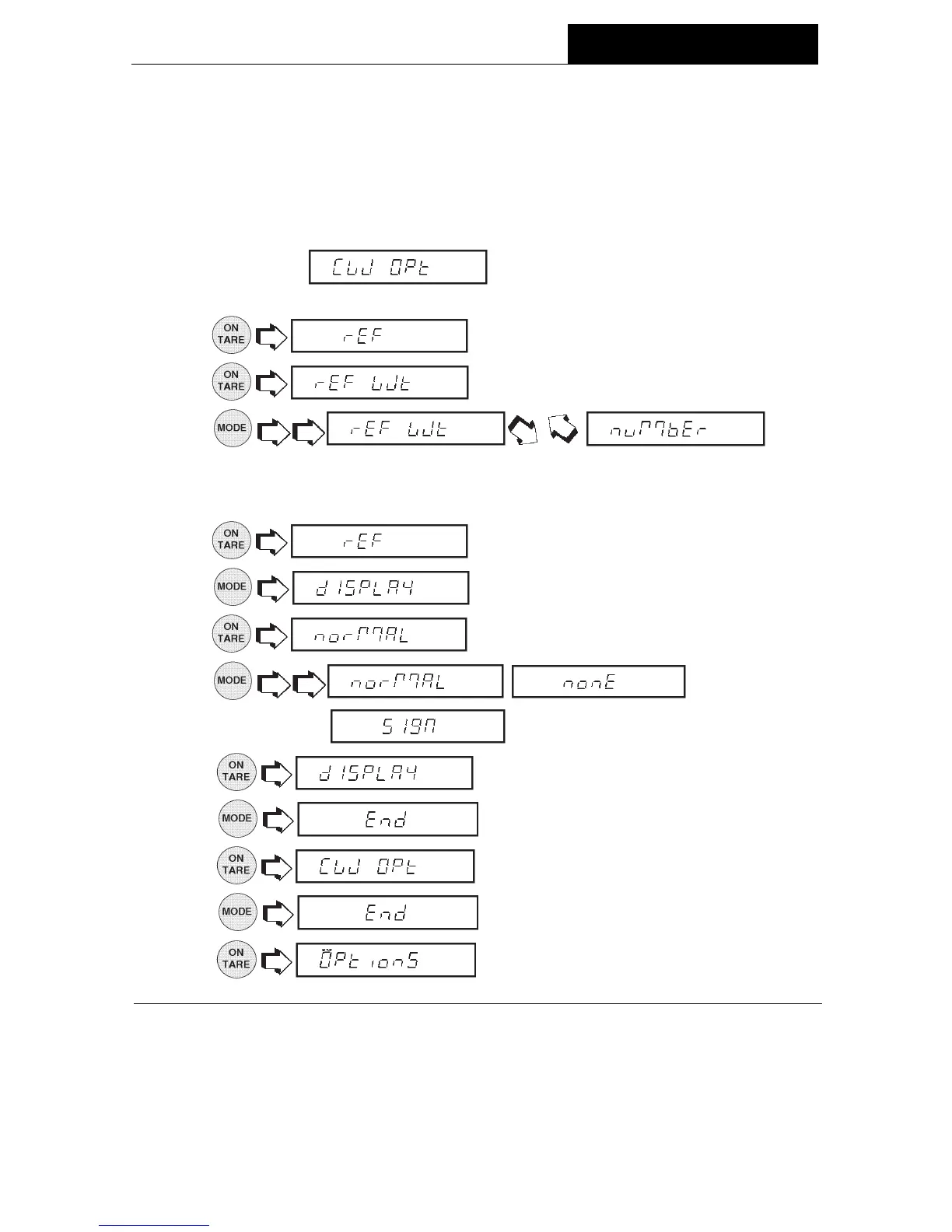
The following procedure describes how to set up the balance for all choices. Before
starting, the Check Weighing option must have been selected under the Functions
submenu.
1. Access the
submenu under the Setup Options sub
menu.
2.
(reference).
3.
(reference weight).
4.
.
If REF WT is selected, a sample reference is used later to set the weight
parameter into the balance. If NUMBER is selected, a number representing the
sample weight has to be entered manually. See section titled Check Weighing.
5.
.
6.
.
7.
.
8. , ,
.
9. .
10.
.
11.
.
12.
.
13.
.
MENUS




 To Next Page