Adventurer Pro
EN-26
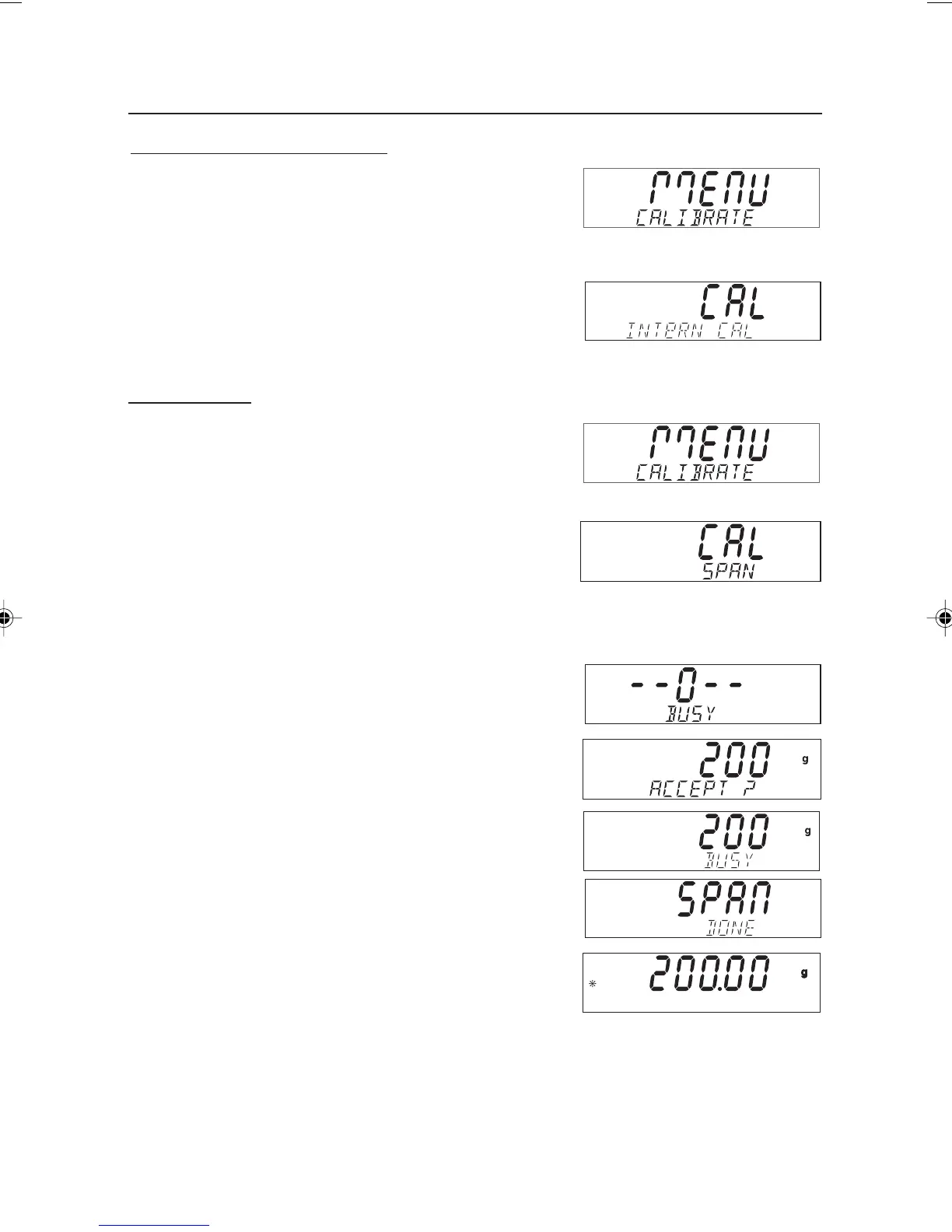
With the balance on, press and hold the
Menu-Cal
button
until MENU is displayed, then release the button. CALIBRATE
(blinking) is displayed.
Note: If the balance has InCal, press the No button to advance
to span calibration.
Press the Yes button to enter span calibration.
Press the Yes button to initiate span calibration.
First the zero reading is taken. Next the display shows the
default span calibration weight value.
Press No to change to an alternate calibration weight. Press
Yes when the desired calibration weight is displayed.
Place the specified calibration weight on the platform. After
calibration, remove the weight from the platform.
To abort calibration at any time, press the Exit button.
Internal Calibration (InCal models)
Models equipped with the internal calibration can be calibrated
without using an external weight. With the balance on, press
and hold the
Menu-Cal
button until MENU CALIBRATE is
displayed, then release the button.
Press Yes to initiate the internal calibration process. When
internal calibration is finished, the balance returns to the
currently selected mode.
Span Calibration
6 page 21 to 30.pmd 3/3/2005, 9:33 AM26









 To Next Page