EasyManua.ls Logo

OHAUS AV53 - Button Control Functions

OHAUS AV53
60 pages
Print Icon
To Next Page IconTo Next Page
To Previous Page IconTo Previous Page
Loading...
Adventurer Pro
EN-14
Function
Operation is
dependent on the
application
mode.
Mode
Change
application
mode.
Back
Reverts back to
previous menu
item.
Decrements a
value being
entered.
Primary
Function
Secondary
Function
Menu
Function
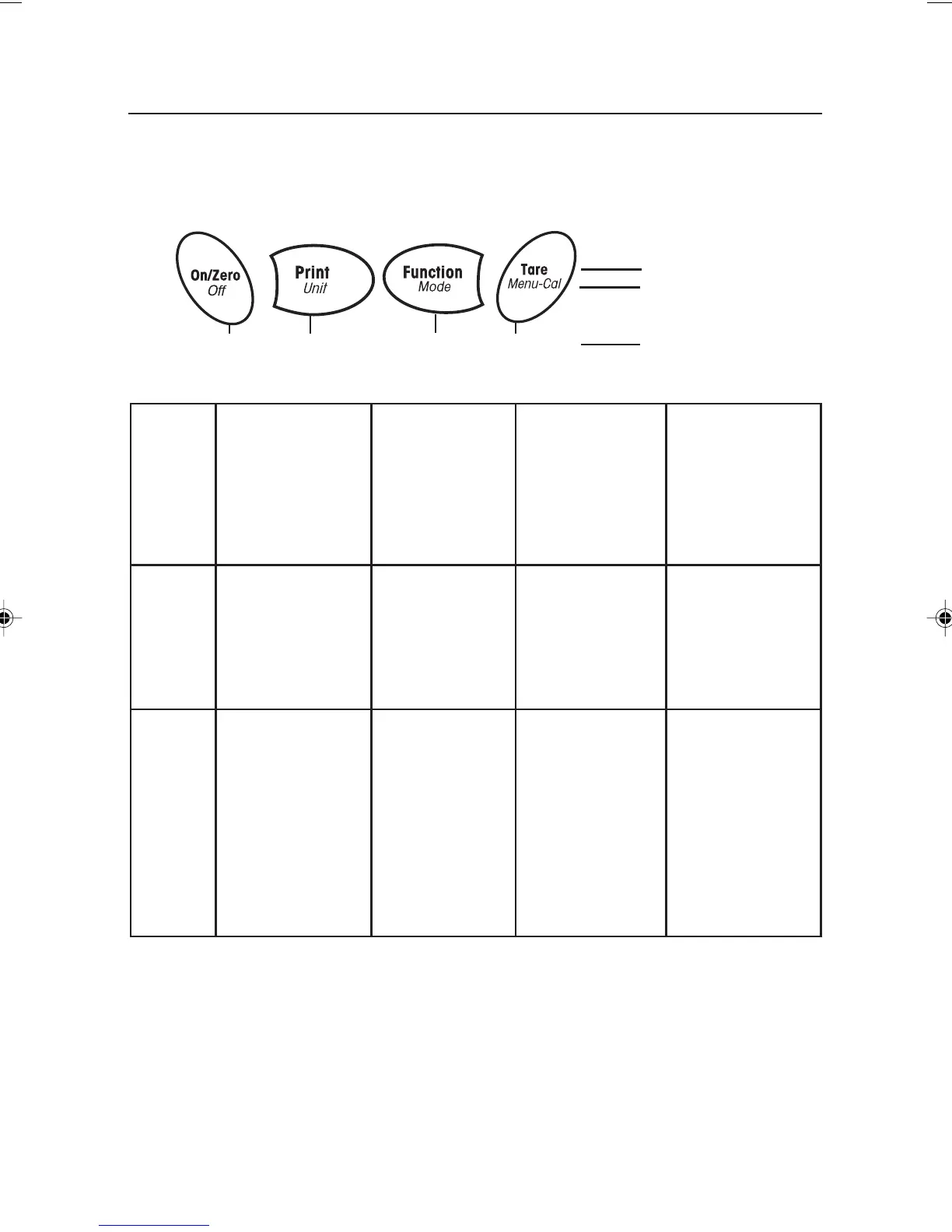
3.2 Button Control Functions
Four multifunction buttons are used to to operate the balance and navigate the menus. The
function of each button is shown below.
Press and Release
Menu Function
On/Zero
If balance is off,
turns balance on.
If balance is on,
sets zero.
Off
Turns balance off.
Yes
Accepts the
current (blinking)
setting on the
display.
Print
Sends current
display value to
the serial
interface.
Unit
Change
weighing unit.
No
Rejects the
current setting
(blinking) on the
display.
Increments a
value being
entered.
Tare
Performs tare
operation.
Menu-Cal
Enter the User
menu.
Calibration is the
first sub-menu.
Exit
Immediately
exits menu mode.
Aborts a
calibration in
progress.
Press and Hold
Yes No Back Exit
5 page 14 to 20.pmd 3/3/2005, 9:33 AM14

Table of Contents

Related product manuals