EN-51Adventurer Pro
5.4.2 Connections
RS232 Interface
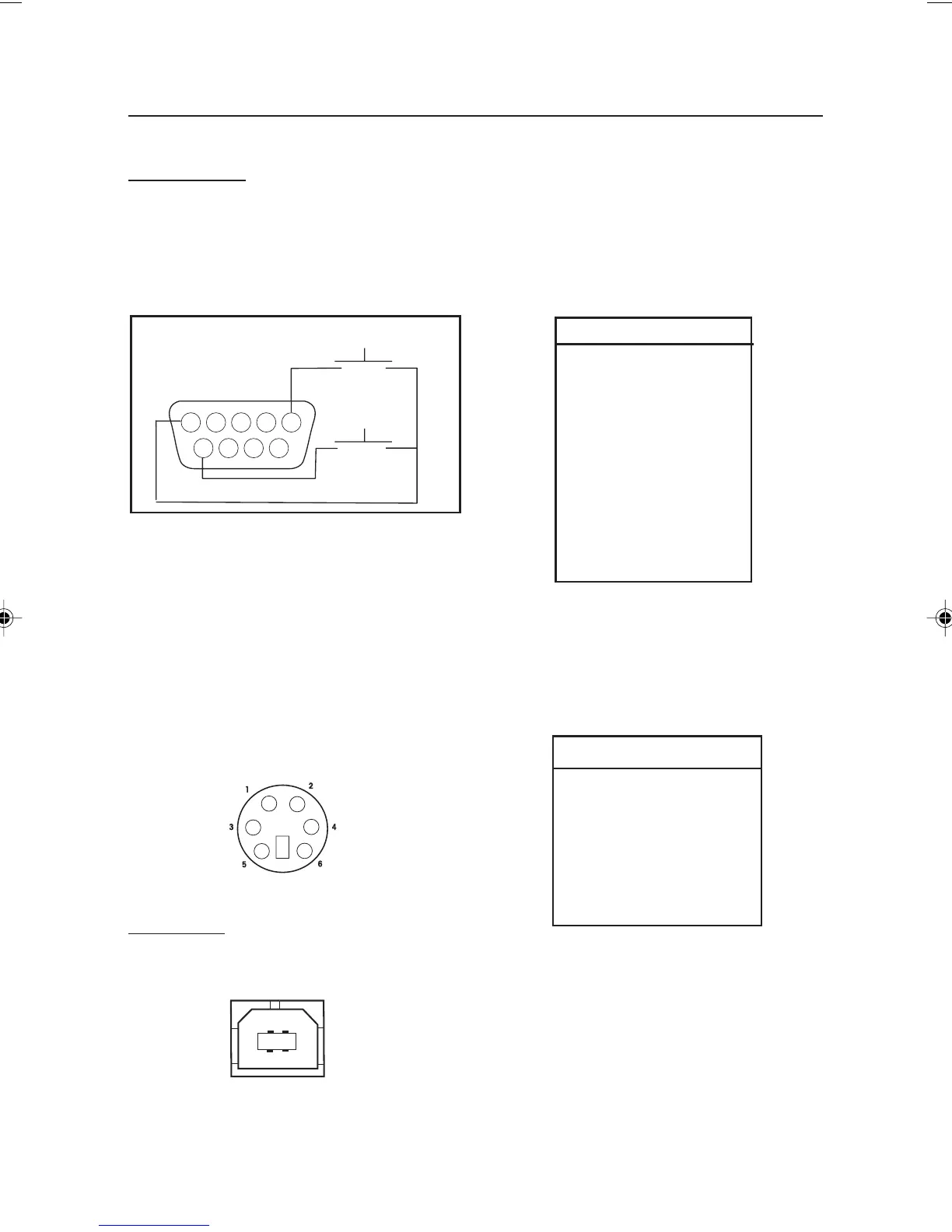
On the rear of the balance, the 9-pin female
subminiature “D” connector COM 1, is provided
for interfacing to other devices. The pin
connections are shown in the illustration below.
COM 1 Connector
COM1 Pin Connections
1 – Remote Tare
2 – TxD
3 – RxD
4 – DSR
5 – Ground
6 – DTR
7 – CTS
8 – RTS
9 – Remote Print
COM 2 MINI DIN Connector
TARE*
PRINT*
* External PRINT and/or TARE switches may be
installed as shown in the diagram. Momentary
contact switches must be used. To enable this
feature, contact Ohaus Aftermarket.
A 6-pin Mini DIN connector is provided when
the optional second RS232 interface is
installed.
COM2 Pin Connections
1 – TxD
2 – RxD
3 – Ground
4 – Vout
5 – reserved for future use
6 – No connection
COM 2 USB Type B Connector
USB Interface
A USB Type B connector is provided when the
optional USB interface is installed.
8 page 41 to 52.pmd 3/3/2005, 9:33 AM51









 To Next Page