2
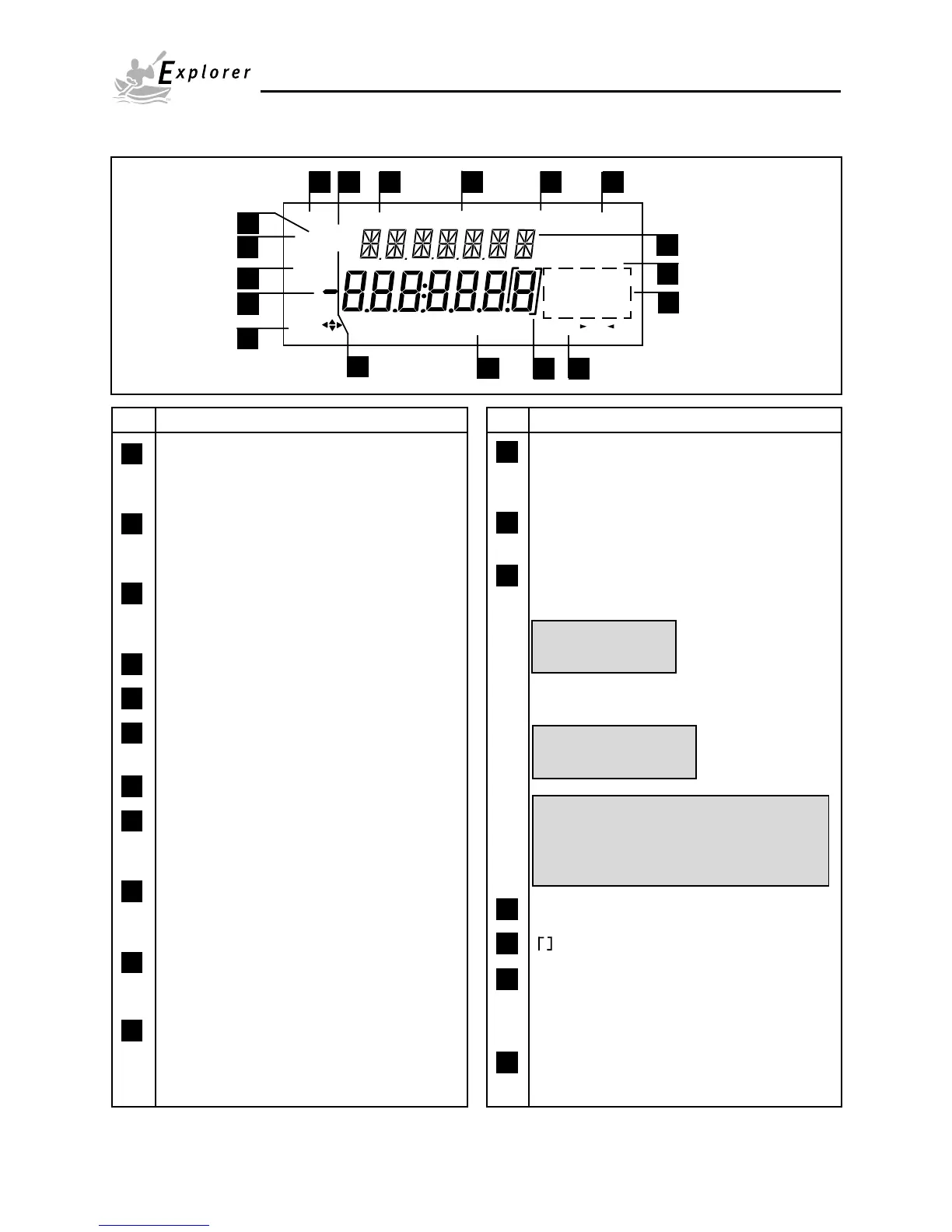
OVERVIEW OF DISPLAY INDICATORS
Stable
Mode
Units
Setup
Custom
Use keys to change,
B/G
NET
P T
Center
of Zero
press - O/T -
% PG N
lb ozcti
mg
press Enter
kgdwt
Change
1
2
3
4
5
6
7
8
9
10
11
12
13
14
15
16
1718
No. Function
1 Use (Pointer Group) key to change - used to
prompt the user while navigating through the
menu system.
2 Standard (7) segment numeric characters.
Seven characters are available and are used
for displaying weight values.
3 Center of Zero - Indicates Center of Zero in
Legal For Trade (LFT) has been selected in
menu.
4 P - This symbol is not used.
5 T - This symbol is not used.
6 Stable - Indicates that the measured value has
become stable.
7 B/G - This symbol is not used.
8 Change - Is displayed together with Mode,
Units or Setup signifying that a change to
balance settings is being performed.
9 Mode - Is displayed when the Mode button is
pressed. Allows the user to know what area of
the balance menu is being addressed.
10 Units - Is displayed when the Units button is
pressed. Allows the user to know what area of
the balance menu is being addressed.
11 Setup - Is displayed when the Setup button is
pressed. Allows the user to know what area of
the balance menu is being addressed.
No. Function
12 (British Flag) - Are (14) segment alpha numeric
characters. Seven characters are used to
present features and functions.
13 Custom - The user can input a factor to meet
unique unit measure applications.
14 Symbols for weighing modes, include:
% - Percent weighing.
PC - Parts counting.
GN - Grain.
N - Newtons.
m - Mommes.
mg - Milligrams.
g - Grams.
kg - Kilograms.
dwt - Pennyweight.
lb - Pounds.
oz - Ounces.
ct - Carats.
t - Taels. Taels are available in three
types; Hong Kong, Singapore, and
Taiwan.
ti - Tical.
ozt - Ounces troy.
15 press # -This symbol is not used.
16 - Differentiated digit for LFT.
17 press Enter - Used as a prompt to the user to
press the Enter button. The
menu item displayed is
accepted/selected.
18 NET - Not Used
NOTE: Availability of shaded weighing units
subject to local regulations.













 To Next Page