Ethernet Interface EN-3
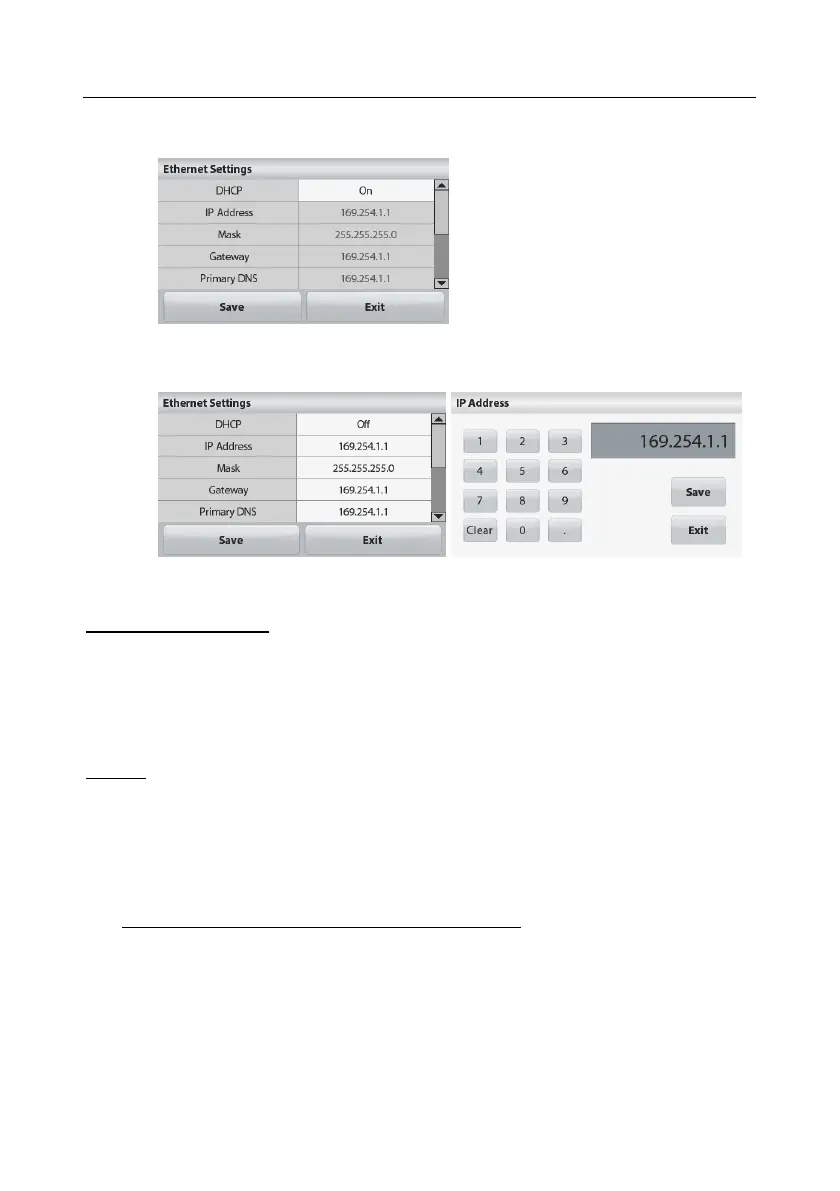
DHCP is set to "On"
The IP Address will be automatically assigned by the IP share or router.
DHCP is set to "Off"
The user can setup the IP Address, Mask, Gateway, Primary DNS,
Alternate DNS and Host Name in the white field shown below.
Note: The Ethernet parameters can also be set refer to the Section Ethernet
Configuration.
Ethernet Connection
The Interface has a preset IP Address. The Port Number is always 9761 and
cannot be changed.
OPERATION
Output
With the interface installed the balance will operate in several ways according to the
settings.
Print format can be switched by xFMT user command.
New Scout Print Format (Default Format):
Output String (Non Check Weighing Applications):
[weight] 11 characters (right justified)
[space] 1 character
[unit] 5 characters (right justified)
[space] 1 character
[stability indicator] 1 character; "?" when unstable, space when stable
[space] 1 character
[T/N/G/PT] 2 characters (right justified)
[Term] 2 characters





 To Next Page