6
Trooper Scale
3. OPERATION (Cont.)
3.5 Gross/Net/Tare Recall Operation
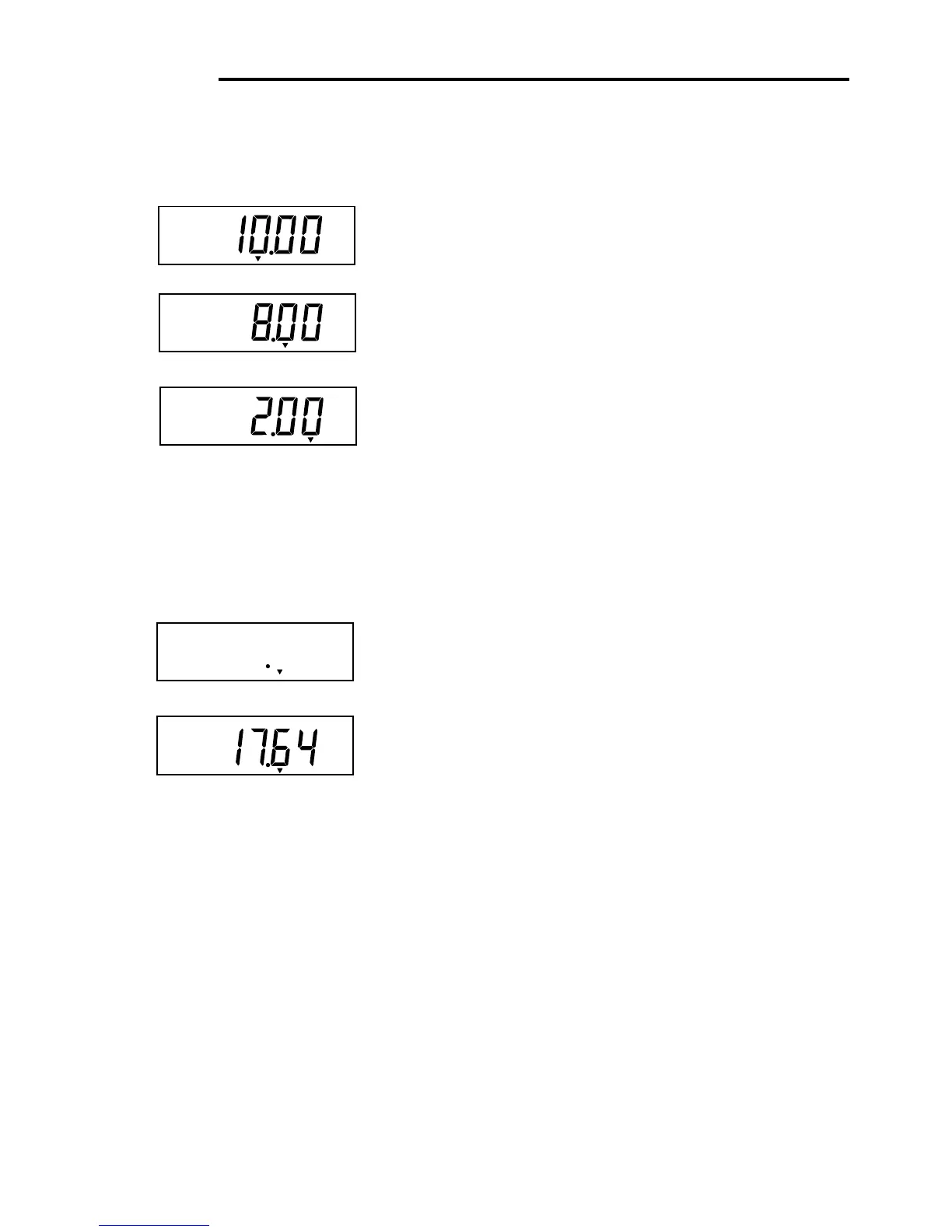
When a container has been placed on the platform and
tared, it's weight is stored in memory. Adding material to
the container is shown as NET weight. The gross weight is
a combination of the tared weight and the material. The G/
N/T/
MENU
button allows switching between GROSS, NET
and TARE weights.
Repeately press (short presses) the G/N/T/
MENU
button
to cycle through Gross, Tare and Net readings. The
sample illustrations indicate a tare weight of 2kg simu-
lating a container, a net weight of 8kg which would be
the material in a container and a gross weight of 10kg
which is the total weight of the container and material.
After 3 seconds, display returns to Net weight.
Tare
3.6 Unit Switch Operation
To switch measuring units, proceed as follows:
Press and hold PRINT/
UNITS
button until display
changes to selected measuring unit. Depending on which
units are enabled in the menu, you have a choice of g,
lb, kg or oz. The display sample indicates 8kg load
changed to lbs shown as a net weight because a tared
weight of 2kg was used and stored in memory.
Gross
Net
kg
*
kg
*
kg
*
lb
*
lb
*
Net
Net








 To Next Page