1
Trooper Scale
No. Designation Function
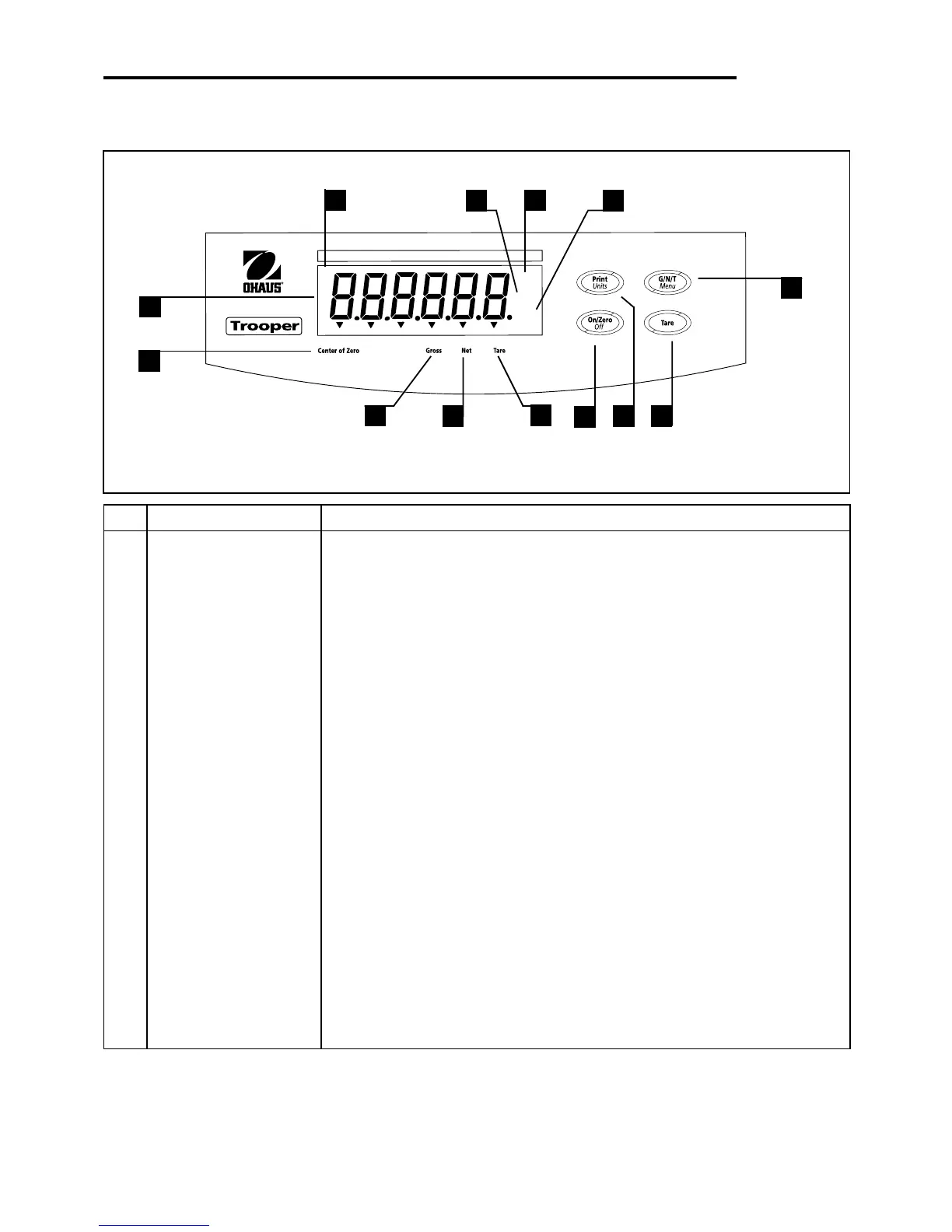
1 Display LCD display, indicates weight, modes and setup information.
2 Center of Zero LCD indicator prompt, indicates center of zero when within +/- 0.25d.
3 Gross LCD indicator prompt, indicates gross weight.
4 Net LCD indicator prompt indicates net weight.
5 Tare LCD indicator prompt indicates tare weight.
6 ON/ZERO/OFF button Turns Scale on or off. Secondary use, provides zero function.
7 Print/Units button Short press, prints data which is displayed on the Scale.
Long press, changes unit of measure. Longer press, enters counting mode.
When in menus, each press advances horizontally through the menus.
Finalizes a menu selection.
8 Tare button When pressed, enters tare value into memory.
9 G/N/T/Menu button Recalls Gross/Net/Tare. Long press allows entry into menus. When in
menus, advances through individual menu items.
10 kg LCD indicator, when lit, indicates weight in kilograms.
g LCD indicator, when lit, indicates weight in grams.
11 lb LCD indicator, when lit, indicates weight in pounds.
12 oz LCD indicator, when lit, indicates weight in ounces.
OVERVIEW OF CONTROLS AND DISPLAY FUNCTIONS
lb
kg
oz
BAT
*
1
2
3
4
5
6
8
9
10
7
11
13
12








 To Next Page