12345678901234567890123456
1
6
12345678901234567890123456
MAIN MENU
CAL
SEt uP rEAd Print LOCSW
CALIBRATION
SPAN Y
LIN Y
Legal for Trade
ON, Off, Can
Zero
2%,18%, 100%
Calibration Unit
lb or kg
F Capacity, cannot be
changed.
Graduation Size
.001, .002, .005...
Calibration Point
5kg, 10kg...
Save Settings
* Reset N or Y
to Factory Settings
* Averaging Level
HI or LO
* Stability Level
0.5, 1, or 3
*Unit g switch
ON or OFF
*Unit kg switch
ON or OFF
*Unit lb switch
ON or OFF
* Unit oz switch
ON or OFF
(See Note)
*Auto Zero Tracking
0.5, 1 or 3
*Auto Off Timer
ON (5 min) or OFF
*Retain Zero Data
ON or OFF
Backlight
ON, OFF or AUTO
EP (Service mode)
ON or OFF
* Save Settings
* Reset
to Factory Settings Yes
or No
* Baud Rate set
1200, 2400, 4800
9600, 19,200
*Parity Bit set
NONE, Even, or Odd
*Data Length set
7 or 8
*Stop Bits set
1 or 2
Auto Print
ON, OFF, cont, On Sta-
bility
Interval
1 to 3600 seconds
Stable
ON or OFF
* Save Settings
SETUP Lock
Switch set
ON, OFF
* READOUT
Lockout Switch set
ON, OFF
* PRINT Lockout
Switch set
ON, OFF
CALIBRATION
Lockout Switch set
ON, OFF
* Save Settings
12345678901234567890123456789012123456789012345678901234567890121234567890123456789012345678901212345678901234567890
1
234567890123456789012345678901212345678901234567890123456789012123456789012345678901234567890121234567890123456789
234567890123456789012345678901212345678901234567890123456789012123456789012345678901234567890121234567890123456789
234567890123456789012345678901212345678901234567890123456789012123456789012345678901234567890121234567890123456789
234567890123456789012345678901212345678901234567890123456789012123456789012345678901234567890121234567890123456789
234567890123456789012345678901212345678901234567890123456789012123456789012345678901234567890121234567890123456789
234567890123456789012345678901212345678901234567890123456789012123456789012345678901234567890121234567890123456789
234567890123456789012345678901212345678901234567890123456789012123456789012345678901234567890121234567890123456789
234567890123456789012345678901212345678901234567890123456789012123456789012345678901234567890121234567890123456789
234567890123456789012345678901212345678901234567890123456789012123456789012345678901234567890121234567890123456789
234567890123456789012345678901212345678901234567890123456789012123456789012345678901234567890121234567890123456789
234567890123456789012345678901212345678901234567890123456789012123456789012345678901234567890121234567890123456789
234567890123456789012345678901212345678901234567890123456789012123456789012345678901234567890121234567890123456789
234567890123456789012345678901212345678901234567890123456789012123456789012345678901234567890121234567890123456789
234567890123456789012345678901212345678901234567890123456789012123456789012345678901234567890121234567890123456789
234567890123456789012345678901212345678901234567890123456789012123456789012345678901234567890121234567890123456789
234567890123456789012345678901212345678901234567890123456789012123456789012345678901234567890121234567890123456789
234567890123456789012345678901212345678901234567890123456789012123456789012345678901234567890121234567890123456789
234567890123456789012345678901212345678901234567890123456789012123456789012345678901234567890121234567890123456789
234567890123456789012345678901212345678901234567890123456789012123456789012345678901234567890121234567890123456789
234567890123456789012345678901212345678901234567890123456789012123456789012345678901234567890121234567890123456789
234567890123456789012345678901212345678901234567890123456789012123456789012345678901234567890121234567890123456789
234567890123456789012345678901212345678901234567890123456789012123456789012345678901234567890121234567890123456789
234567890123456789012345678901212345678901234567890123456789012123456789012345678901234567890121234567890123456789
234567890123456789012345678901212345678901234567890123456789012123456789012345678901234567890121234567890123456789
234567890123456789012345678901212345678901234567890123456789012123456789012345678901234567890121234567890123456789
234567890123456789012345678901212345678901234567890123456789012123456789012345678901234567890121234567890123456789
234567890123456789012345678901212345678901234567890123456789012123456789012345678901234567890121234567890123456789
234567890123456789012345678901212345678901234567890123456789012123456789012345678901234567890121234567890123456789
234567890123456789012345678901212345678901234567890123456789012123456789012345678901234567890121234567890123456789
234567890123456789012345678901212345678901234567890123456789012123456789012345678901234567890121234567890123456789
234567890123456789012345678901212345678901234567890123456789012123456789012345678901234567890121234567890123456789
234567890123456789012345678901212345678901234567890123456789012123456789012345678901234567890121234567890123456789
234567890123456789012345678901212345678901234567890123456789012123456789012345678901234567890121234567890123456789
234567890123456789012345678901212345678901234567890123456789012123456789012345678901234567890121234567890123456789
234567890123456789012345678901212345678901234567890123456789012123456789012345678901234567890121234567890123456789
0
12345678901234567890123456789012123456789012345678901234567890121234567890123456789012345678901212345678901234567890
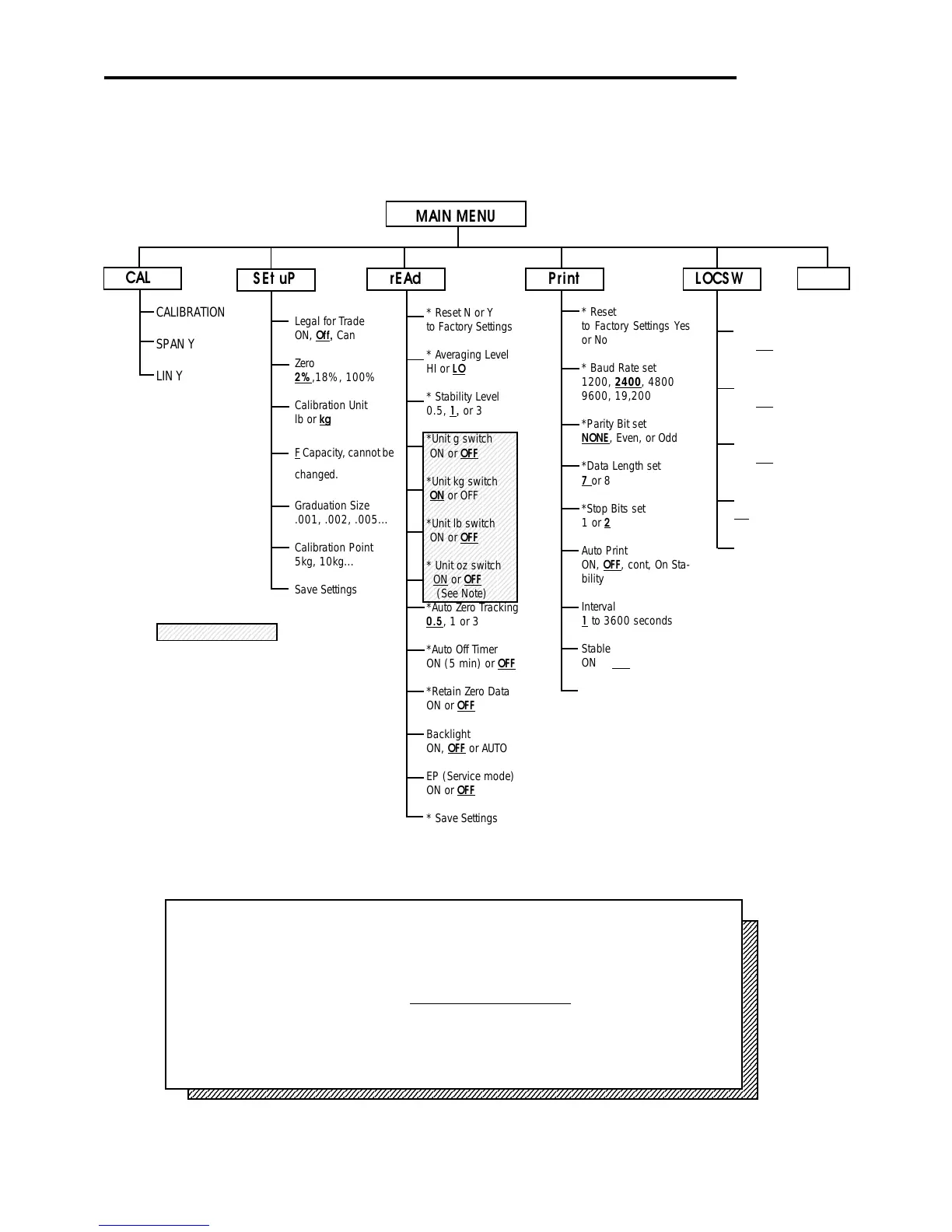
Press (G/N/T/
MENU
) to enter the display submenu or select a displayed setting.
Press (PRINT/
UNITS
) to change the displayed submenu or setting.
Factory default settings are shown in
underlined and boldface type.
When CAL switch on the circuit board is in the LFT position, all of the menus can be
reached except CALIBRATION Menu, but only the submenus which are marked ' ' can be
setup, see menu structure.
Quit
NOTE:
FOR SHADED AREA
Whichever unit is used for calibration is au-
tomatically set to "ON" and does not appear
inthe READ menu. For details about units in
the shaded area, refer to paragraph 4.6.
4.4.2 Menu Structure
The following table illustrates the menu structure in the Trooper Scale.
*








 To Next Page