EasyManua.ls Logo

Ohmeda Biox 3700 - Page 107

Default Icon
130 pages
Print Icon
To Next Page IconTo Next Page
To Previous Page IconTo Previous Page
Loading...
COMPUTER
INTERFACE
CONTROL
MODE
Computer
Communication
with
Ohmeda
Biox
3700
Oximeter
CONTROL
MODE
This
mode
allows
the
user
to
send
the
Oximeter
commands.
Entering
and
Enabling
Entering
and
enabling
this
mode
are
done
simultaneously.
The
Control
Mode
can
only
be
used
in
the
Auto-Output
Mode
and
return
to
the
Auto-Output
Mode
after
the
command
is
completed.
Enabling
the
Control
Mode
changes
the
Oximeter
parameters
without
touching
the
front
panel.
In
the
Control
Mode
changes
appear
on
the
Oximeter.
All
options
available
in
this
mode
are
preceeded by an ESCAPE C.
EXAMPLE
Suppose
you
want
to
change
the
oximeter
Pulse
Volume
setting
to
one.
You
need
to:
*
Use
the
box
below,
to
determine
which
capital
letter
corresponds
with
the
Pulse
Volume.
The
letter
H
corresponds
with the Pulse Volume.
*
Use
the
box
below,
to
determine
if
the
Pulse
Volume
can
be
set
to
one.
The
parameter
for
the
Pulse
Volume
is
zero
to
ten.
Therefore,
the
Pulse
Volume
can
be
set
to
one.
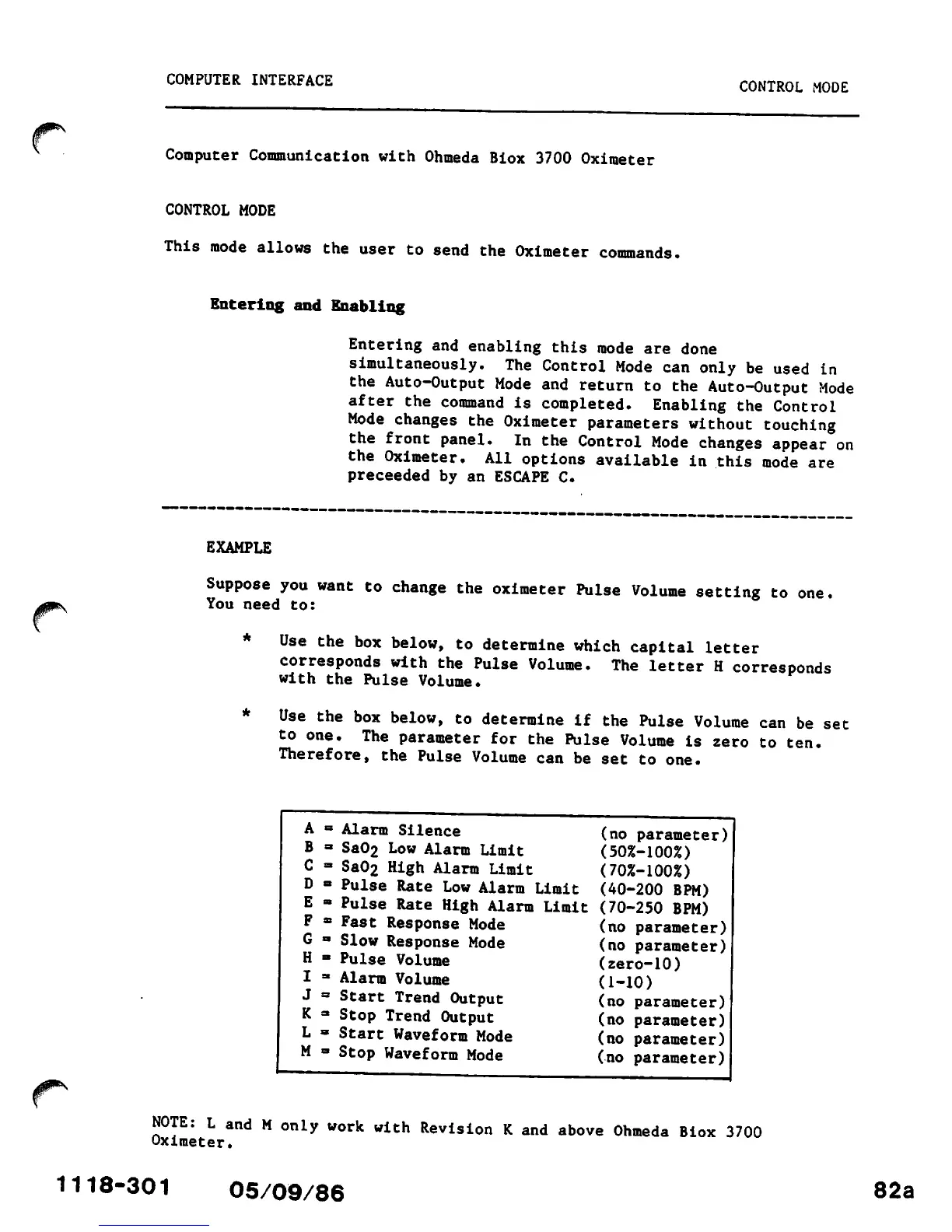
A
=
Alarm
Silence
(no parameter)
B
a Sa02 Low Alarm
Limit
(50%-100%)
C
- Sa02 High Alarm
Limit
(70%-100%)
D
• Pulse Rate Low Alarm
Limit
(40-200 BPM)
E
38
Pulse
Rate
High
Alarm
Limit
(70-250 BPM)
F
* Fast
Response
Mode
(no
parameter)
G
a Slow
Response
Mode
(no parameter)
H
•
Pulse
Volume
(zero-10)
I
3
Alarm
Volume
(1-10)
J
=
Start
Trend
Output
(no parameter)
K
=*
Stop
Trend
Output
(no parameter)
L
a Start Waveform Mode
(no
parameter)
M
• Stop Waveform Mode
(no
parameter)
NOTE:
L
and
M
only
work
with
Revision
K
and
above
Ohmeda
Biox
3700
Oximeter.
1118-301
05/09/86
82a