EasyManua.ls Logo

Ohmeda Biox 3700 - Page 112

Default Icon
130 pages
Print Icon
To Next Page IconTo Next Page
To Previous Page IconTo Previous Page
Loading...
1118-301
COMPUTER
INTERFACE
While
in
the
Slave
Mode,
the
oximeter
does
NOT
acknowledge
any
commands
that
it
does
not
recognize.
When
incorrect
commands
are
sent
to
the
oximeter,
the
oximeter
does
nothing
until
it
receives
a
familiar
command.
The
oximeter
does
not
automatically
go
back
to
the
Auto-Dump
Mode.
To
exit
from
the
Slave
Mode
depress
back
to
the
Auto-Dump
Mode.
ESCAPE
0
in
succession.
This
brings
you
CONTROL-MODE
This
mode
allows
the
user
to
send
the
oximeter
commands
anytime
in
any
mode.
It
allows
the
user
to
control
the
parameters
of
the
oximeter
without
touching
its
front
panel.
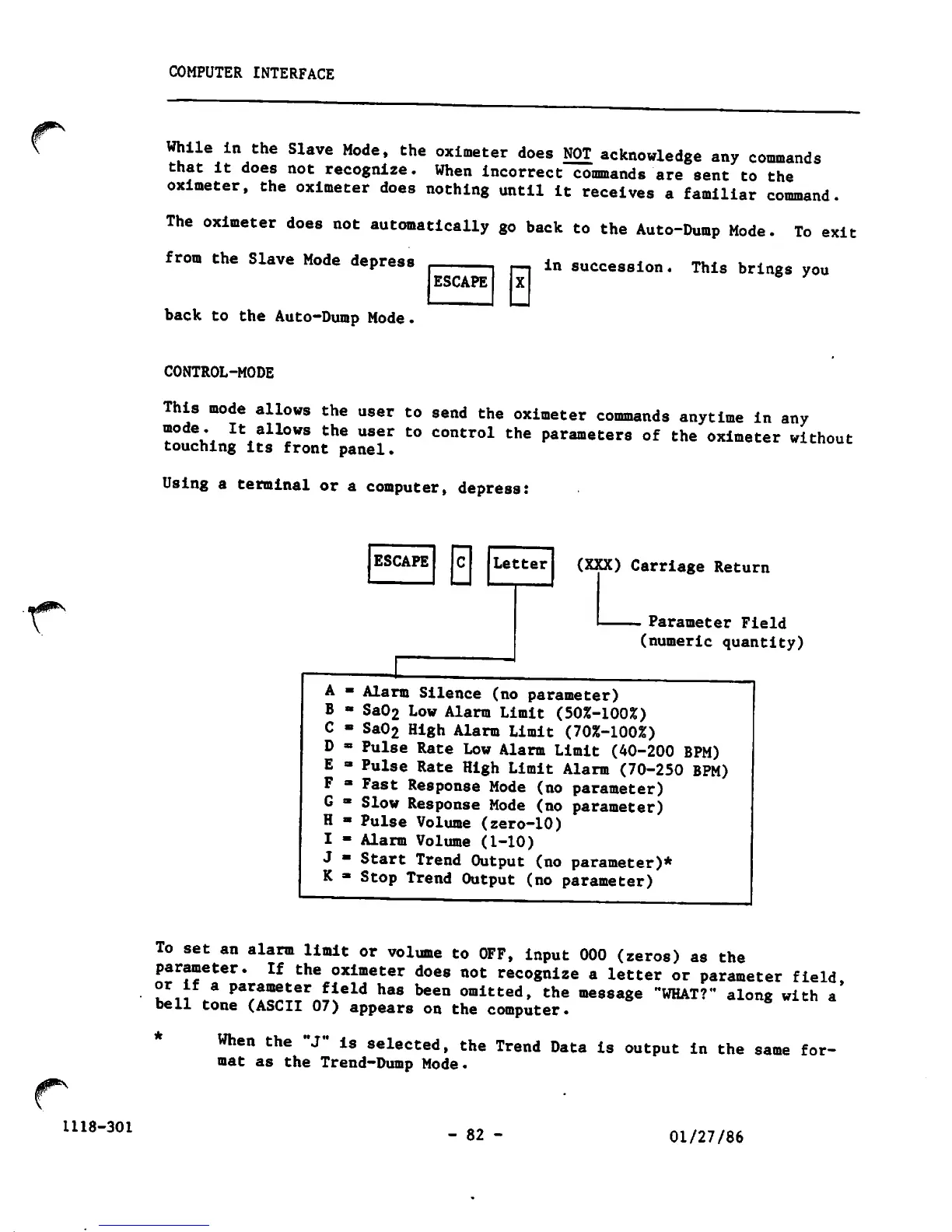
Using
a
terminal
or
a
computer,
depress:
A
B
C
D
E
F
G
H
I
J
K
ESCAPE
0
Letter
(XXX)
Carriage
Return
-
Parameter
Field
(numeric
quantity)
Alarm
Silence
(no
parameter)
Sa02
Low
Alarm
Limit
(50%-100%)
Sa02
High
Alarm
Limit
(70%-100%)
Pulse
Rate
Low
Alarm
Limit
(40-200
BPM)
Pulse
Rate
High
Limit
Alarm
(70-250
BPM)
Fast
Response
Mode
(no
parameter)
Slow
Response
Mode
(no
parameter)
Pulse
Volume
(zero-10)
Alarm
Volume
(1-10)
Start
Trend
Output
(no
parameter)*
Stop
Trend
Output
(no
parameter)
To
set
an
alarm
limit
or
volume
to
OFF,
input
000
(zeros)
as
the
parameter.
If
the
oximeter
does
not
recognize
a
letter
or
parameter
field
or
If
a
parameter
field
has
been
omitted,
the
message
"WHAT?"
along
with
a*
bell
tone
(ASCII
07)
appears
on
the
computer.
When
the
"J"
is
selected,
the
Trend
Data
is
output
in
the
same
for
mat as
the
Trend-Dump
Mode.
-
82
-
01/27/86

Other manuals for Ohmeda Biox 3700

Related product manuals