EasyManua.ls Logo

Ohmeda Biox 3700 - Page 63

Default Icon
130 pages
Print Icon
To Next Page IconTo Next Page
To Previous Page IconTo Previous Page
Loading...
jg^\
1118-301
STATUS
MESSAGES
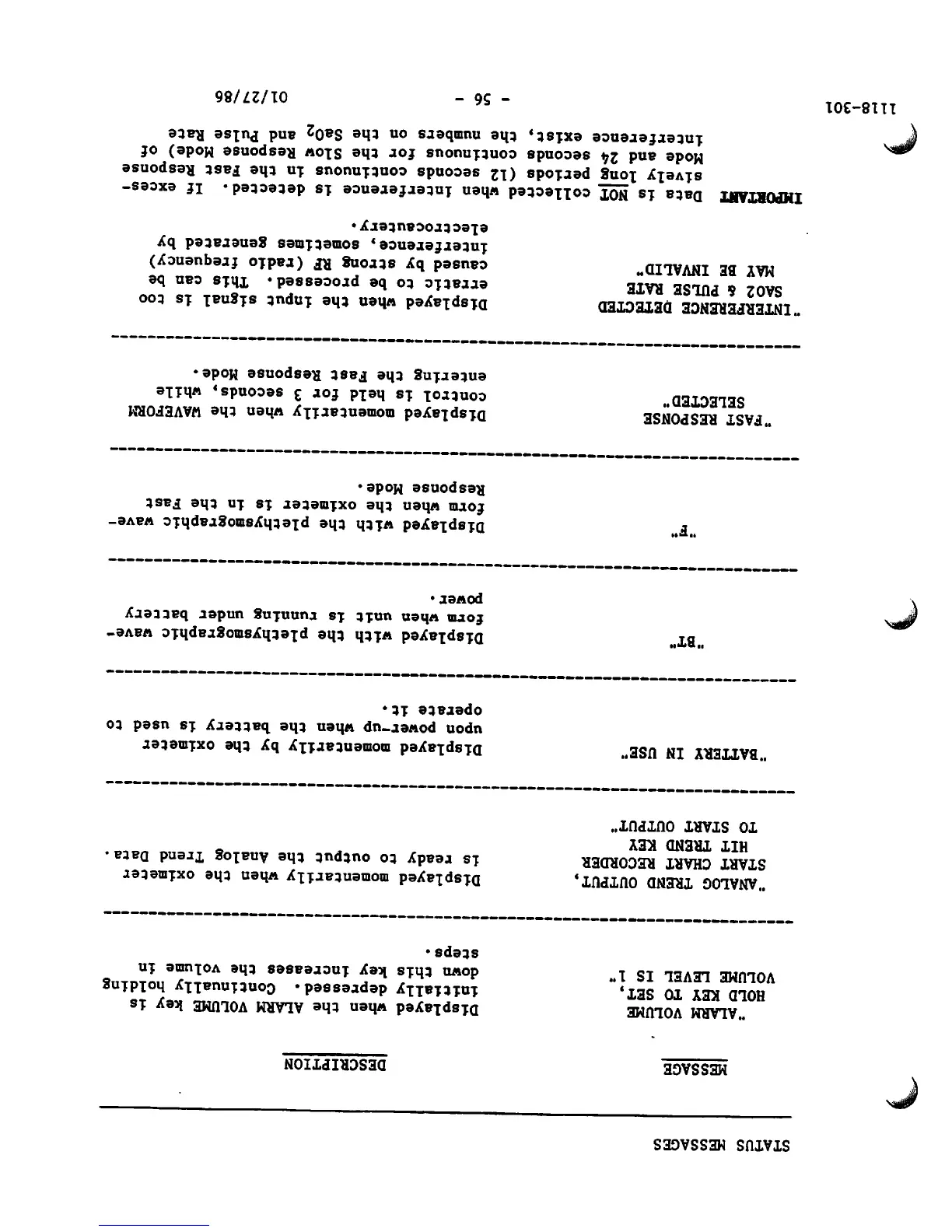
MESSAGE
"ALARM
VOLUME
HOLD KEY TO SET,
VOLUME
LEVEL
IS
1'
"ANALOG
TREND
OUTPUT,
START
CHART
RECORDER
HIT
TREND
KEY
TO
START
OUTPUT"
'BATTERY
IN
USE'
"BT"
FAST
RESPONSE
SELECTED"
'INTERFERENCE DETECTED
SAO2 & PULSE RATE
MAY
BE
INVALID"
DESCRIPTION
Displayed
when
the
ALARM
VOLUME
key
is
initially
depressed.
Continually
holding
down
this
key
increases
the
volume
in
steps.
Displayed
momentarily
when
the
oximeter
is
ready
to
output
the
Analog
Trend
Data.
Displayed
momentarily
by
the
oximeter
upon
power-up
when
the
battery
is
used
to
operate
it.
Displayed
with
the
plethysmographic
wave
form
when
unit
is
running
under
battery
power.
Displayed
with
the
plethysmographic
wave
form
when
the
oximeter
is
in
the
Fast
Response Mode.
Displayed
momentarily
when
the
WAVEFORM
control
is
held
for
3
seconds,
while
entering
the Fast Response
Mode.
Displayed
when
the
Input
signal
is
too
erratic
to be processed. This can be
caused
by
strong
RF
(radio
frequency)
interference,
sometimes
generated
by
electrocautery.
IMPORTANT
Data
is
NOT
collected
when
interference
is
detected.
If
exces
sively
long
periods
(12
seconds
continuous
in
the
Fast
Response
Mode
and
24
seconds continuous
for
the
Slow
Response
Mode)
of
interference
exist,
the
numbers
on
the
Sa02
and
Pulse
Rate
-
56
-
01/27/86

Other manuals for Ohmeda Biox 3700

Related product manuals