EasyManua.ls Logo

Ohmeda Biox 3700 - Page 67

Default Icon
130 pages
Print Icon
To Next Page IconTo Next Page
To Previous Page IconTo Previous Page
Loading...
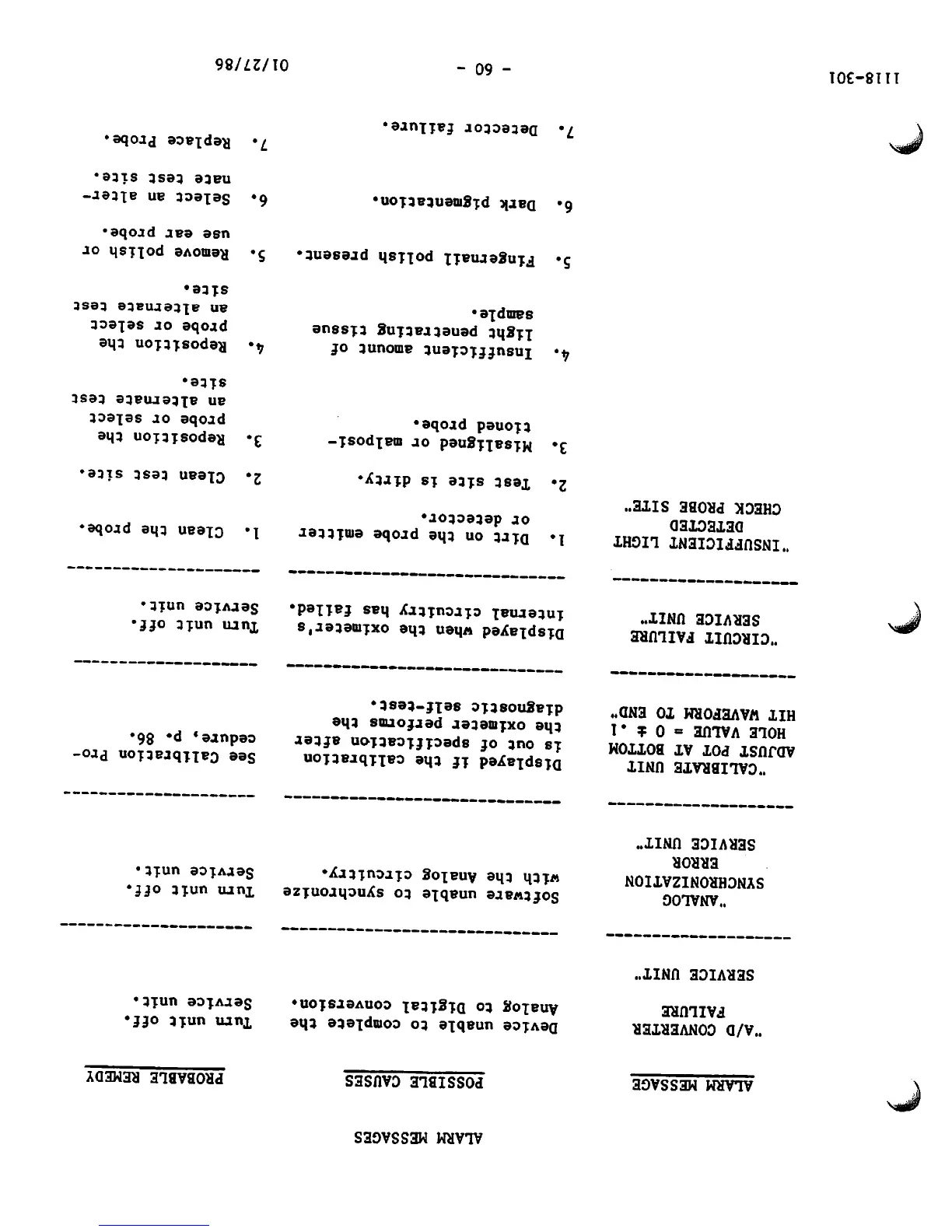
1118-301
ALARM
MESSAGE
'A/D
CONVERTER
FAILURE
SERVICE
UNIT"
"ANALOG
SYNCHRONIZATION
ERROR
SERVICE
UNIT"
"CALIBRATE UNIT
ADJUST POT AT BOTTOM
HOLE VALUE = 0 ± .1
HIT WAVEFORM TO END"
'CIRCUIT FAILURE
SERVICE
UNIT"
'INSUFFICIENT LIGHT
DETECTED
CHECK PROBE SITE"
ALARM
MESSAGES
POSSIBLE
CAUSES
Device
unable
to
complete
the
Analog
to
Digital
conversion.
PROBABLE
REMEDY
Turn
unit
off.
Service
unit.
Software
unable
to
synchronize
Turn
unit
off.
with
the
Analog
circuitry.
Service
unit.
Displayed
if
the
calibration
is
out
of
specification
after
the
oximeter
performs
the
diagnostic self-test.
See Calibration Pro
cedure,
p.
86.
Displayed
when
the
oximeter's
Turn
unit
off.
internal
circuitry
has
failed.
Service
unit.
1.
Dirt
on
the
probe
emitter
or
detector.
2.
Test
site
is
dirty.
3.
Misaligned
or
malposi-
tioned
probe.
4.
Insufficient
amount
of
light
penetrating
tissue
sample.
5.
Fingernail
polish
present.
6.
Dark
pigmentation.
7.
Detector
failure.
-
60
-
!•
Clean
the
probe.
2.
Clean test
site.
3.
Reposition
the
probe or select
an
alternate
test
site.
4.
Reposition
the
probe or select
an
alternate
test
site.
5.
Remove
polish
or
use
ear
probe.
6. Select an alter
nate
test
site.
7.
Replace
Probe.
01/27/86

Other manuals for Ohmeda Biox 3700

Related product manuals