EasyManua.ls Logo

Ohmeda Biox 3700 - Page 82

Default Icon
130 pages
Print Icon
To Next Page IconTo Next Page
To Previous Page IconTo Previous Page
Loading...
COMPUTER INTERFACE
DIGITAL INTERFACE
EXAMPLE
EQUIPMENT NEEDED
*
Requires
a
board
for
the
IBM
that
supports
Serial
Communication
with
the
same
serial
port
connections
as
the
Ohmeda
Biox
3700
Oximeter
PROCEDURE
Connectors
Male
(DB-25P)
to
Female
(DB-25P)
Interface
Cable
with
pins
1,
2,
3,
& 7
connected
oh
both
ends
of
the
cable.
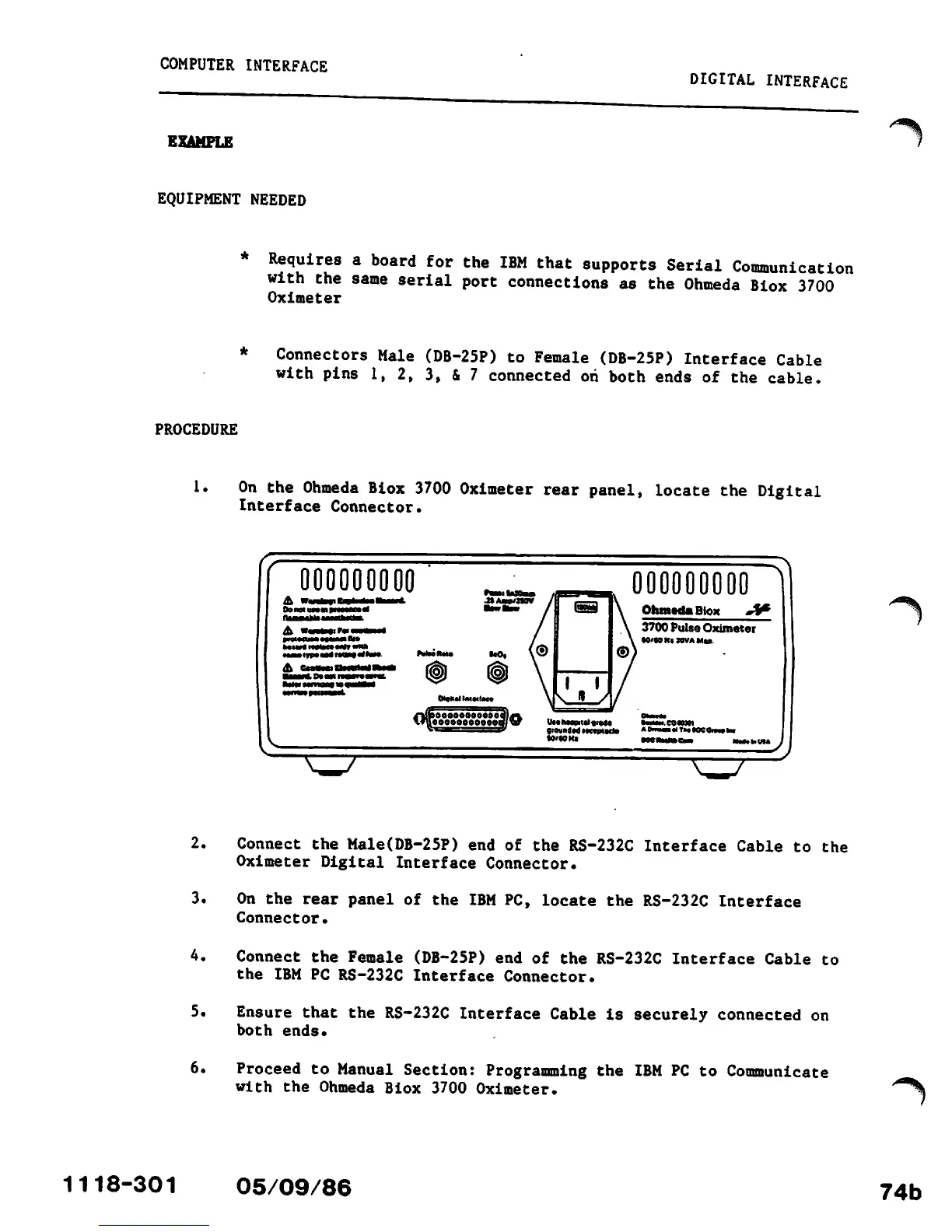
1.
On
the
Ohmeda
Biox
3700
Oximeter
rear
panel,
locate
the
Digital
Interface
Connector.
000000000
Ob
not
iim
in
ptMMC
tt
A
Wwfetihx
iTP*
—*
nam
••
*"••
Doom
nsmflMl
Ik
^^r
U«.
Mmm
flr
ad.
CO
RK1
SIOUnd.dl.nptM).
AOmM.MTM.OCOlw.lM
000000000
Ohmeda
Btox
*XP
3700
Pulse
Oximeter
H'WHinVAMu
x^z
$
2.
Connect
the
Male(DB-25P)
end of the
RS-232C
Interface
Cable to
the
Oximeter Digital
Interface
Connector.
3.
On
the
rear
panel
of
the
IBM
PC,
locate
the
RS-232C
Interface
Connector.
4.
Connect the Female
(DB-25P)
end of the RS-232C Interface Cable to
the IBM PC RS-232C Interface Connector.
5.
Ensure
that
the
RS-232C
Interface
Cable
is
securely
connected
on
both
ends.
6.
Proceed
to
Manual
Section:
Programming
the
IBM
PC to
Communicate
with
the Ohmeda Biox 3700 Oximeter.
1118-301
05/09/86
/^^k
^^\
74b

Other manuals for Ohmeda Biox 3700

Related product manuals