10044 Planer OLIVERMACHINERY.NET 33 | Page
Inspect / Replace Poly V-Belt
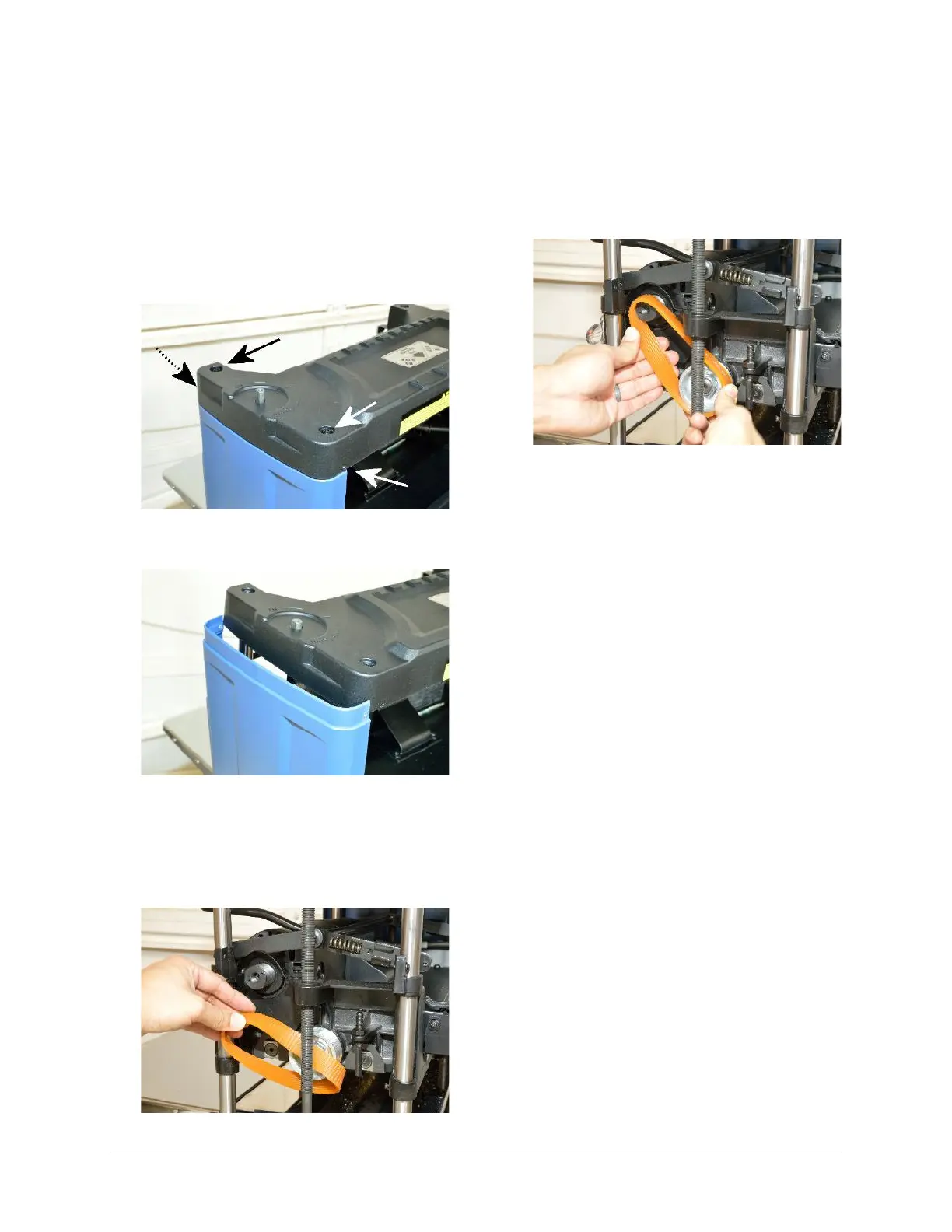
1. Disconnect the planer from the power
source!!
2. The drive belt of the planer is located behind
the right panel. To access the drive belt,
begin with removing the cutterhead
elevation crank.
3. Loosen four screws that hold the top panel
in place.
4. Slightly lift the top panel and remove the
right panel.
5. Inspect the drive belt for signs of aging.
Replace the belt as needed.
6. To replace the drive belt, remove the old
belt from the pulleys by walking it out from
the pulleys, or simply cut it off.
7. Install new belt by gently walking the belt
back into the pulleys. A new belt can be very
tight, so walk the belt back to the pulleys one
groove at a time on each pulley. Refrain from
using tools to pry the belt back in place as it
may overstretch the new belt and damage
the pulleys.
8. Rotate the pulleys and make sure the drive
belt is fully seated into the grooves of the
pulleys.
9. Reinstall side panel and cutterhead
elevation crank when belt maintenance
completes.


 To Next Page