36 | Page Oliver Machinery 10044 Planer
Adjust Carriage Elevation Chain Tension
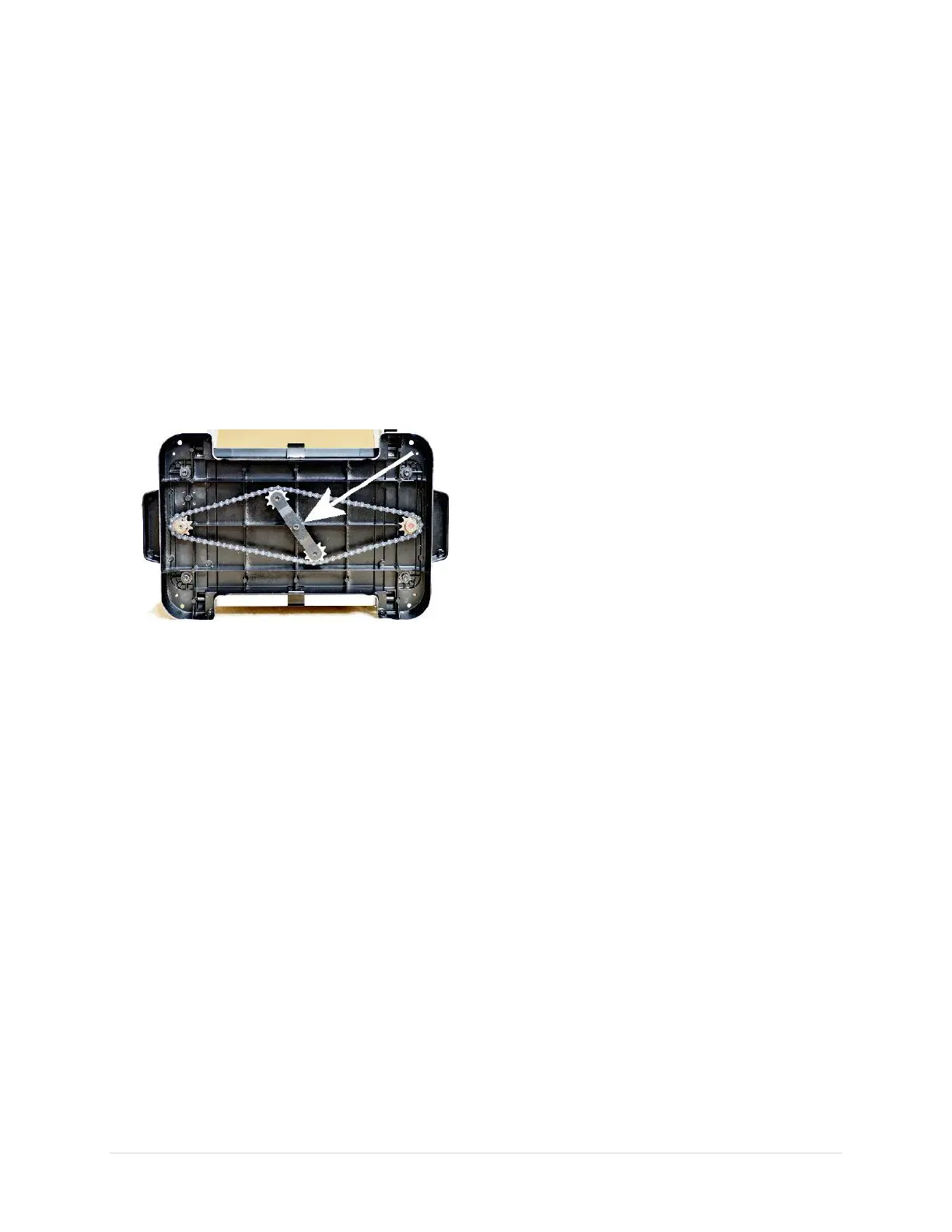
Carriage elevation chain tension was set in the
factory and does not require adjustments
initially. Over time, the chain may stretch.
Tighten the chain if excessive play is felt when
adjusting the height of the cutterhead.
1. Disconnect the planer from the power
source!!
2. Turn the planer sideways to expose the
chain which is located underneath the base
of the planer.
3. Loosen the hex cap screw that locks the
chain tensioner.
IMPORTANT: Keep the chain on the
sprockets while adjusting its tension. If the
chain falls off from the sprockets, it can take
some time to recalibrate the planer.
4. Rotate the chain tensioning bracket to
tighten the chain, then retighten the locking
cap screw. The chain should deflect by
approximately 3/8" when it is compressed
between sprockets. The chain is too tight if
the cutterhead elevation crank becomes
difficult to turn.
5. Clean and lubricate chain as needed.


 To Next Page