Advanced Operations (cont.)
Imperial / Metric Unit Change
The iCarver default unit is Metric scale in mm, unit can be switched to Imperial in inches.
Example: Change Unit from Metric (mm) to Imperial (inches)
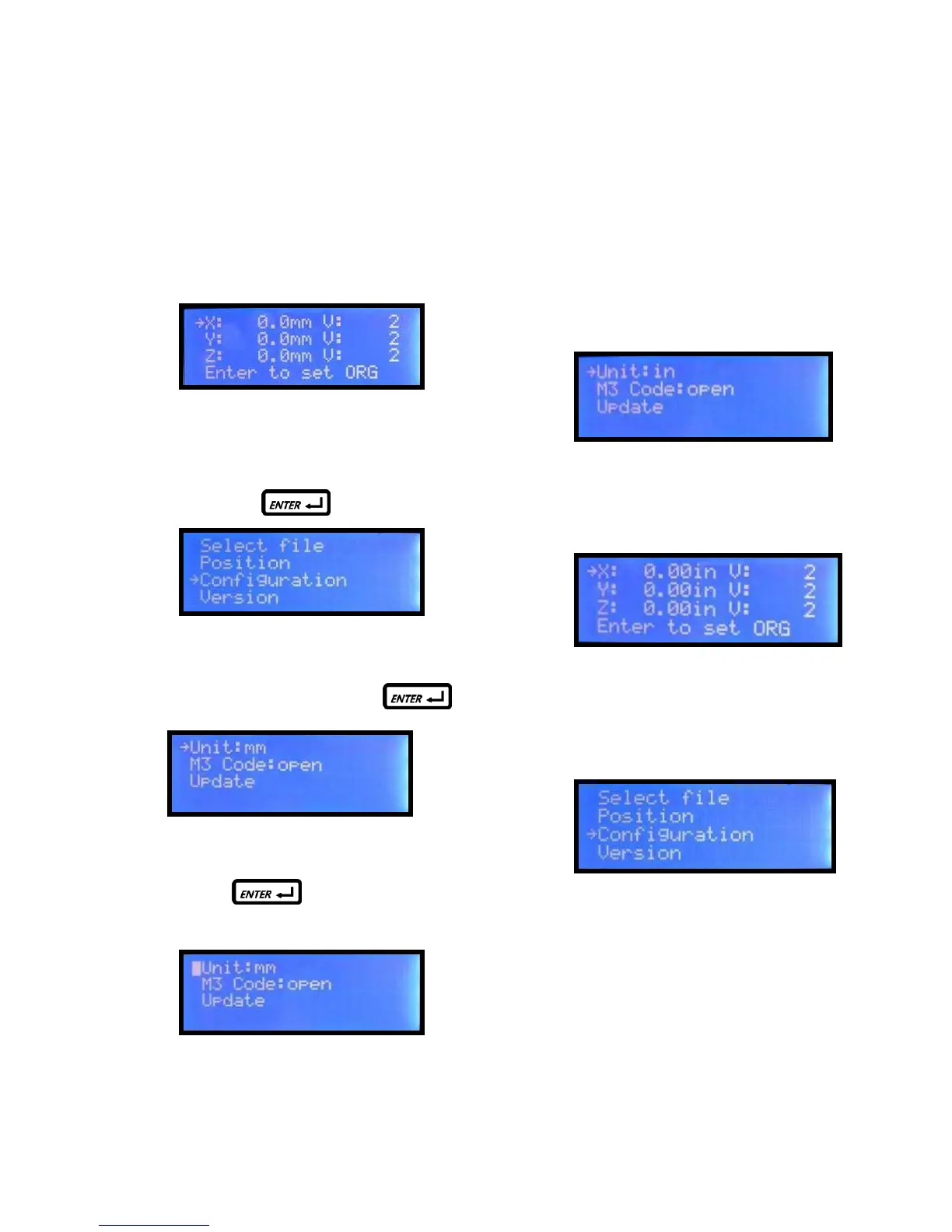
Step 1. Default is metric unit display:
Step 2. Select “Configuration” on main manual
and press
Step 3. Select “Unit:mm” and press
Step 4. Press and cursor
turns to block flash which means it is ready
to edit. Press the up or down key to
change the setting from mm to inches.
Step 5. Press “Down” key on keypad to change to
Imperial unit, “Unit:mm” will change to
“Unit:in”.
Step 6. Press “Back” key on keypad, to restore
cursor from block flash to “→”.
Step 7. Press “Back” key on keypad to return to
the main screen
The display now is in Imperial inches
Unit change is completed. The system will
keep this setting after power off.
User can follow the same procedure to
set metric unit to mm.


 To Next Page