44
EN
2
Exposure
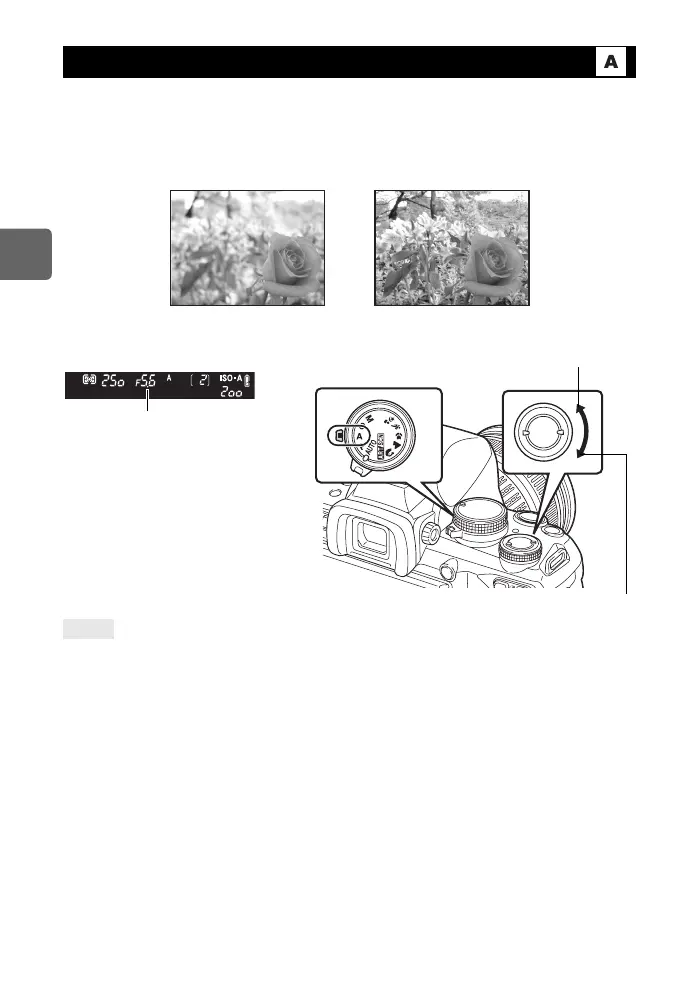
The camera sets the optimum shutter speed automatically for the aperture value you have
selected. When you open the aperture (decrease the aperture value), the camera will focus
within a shorter range (shallow depth of field) and produce a picture with a blurred
background. When you close the aperture (increase the aperture value), the camera will
focus within a longer range. Use this mode when you wish to add changes to the background
representation.
Set the mode dial to A and turn the control dial to set the aperture value.
To check the depth of field with the selected aperture value:
j See “Preview function” (gP. 47).
To change the exposure adjustment interval:
j This can be set in 1/3 EV, 1/2 EV or 1 EV increments. g“EV STEP” (P. 99)
Shutter speed is blinking:
j The optimum exposure cannot be obtained. For details, see “Exposure warning
display” (gP. 130).
Aperture priority shooting
TIPS
When the aperture
value (f-number) is
decreased
When the aperture
value (f-number) is
increased
Open the aperture (f-number is decreased)
Aperture value
Viewfinder Close the aperture (f-number is increased)
s0030_e_00_0_unified.book 44 ページ 2009年7月3日 金曜日 午後4時11分


 To Next Page