93
EN
8
Customizing your camera
8 Customizing your camera
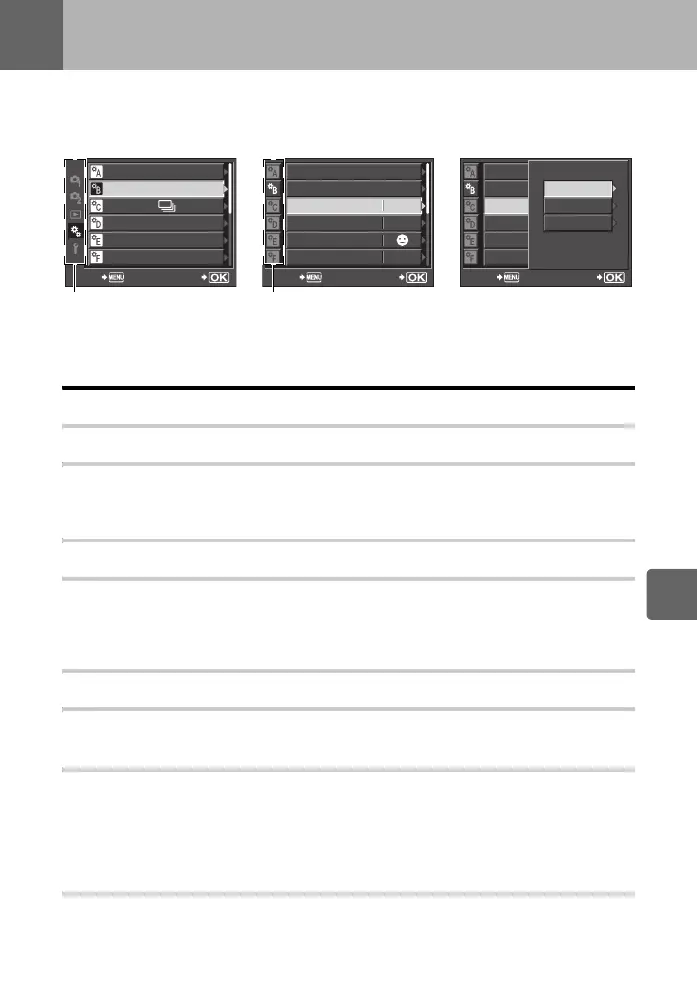
Use the Custom Menu to customize the shooting functions. The Custom Menu has 9 tabs (R
toZ) that are divided according to the functions to be set.
In the default setting, the Custom Menu is not displayed. To customize the functions, set
[c MENU DISPLAY] in the Setup Menu to [ON] to display the Custom Menu. (gP. 23)
For details on using the menu lists, see “Setting on the menu” (gP. 22).
R AF/MF
LIVE VIEW AF MODE gP. 36
AF ILLUMINAT.
The built-in flash can be set to function as an AF illuminator. This makes focusing easier in
low-light conditions using AF mode. To use this function, raise the flash.
AF MODE gP. 54
C-AF LOCK
When set to [ON], during focusing with C-AF mode, this prevents the focus from changing
even if the distance to the subject suddenly changes. This is effective when shooting at a
location where something passes in front of or behind the subject.
AF AREA gP. 56
AF AREA POINTER
When set to [OFF], the AF target does not light in the viewfinder when the subject is in focus.
AF SENSITIVITY
You can set the range of the AF target for focusing when [AF AREA] is set to M.
[NORMAL] The camera focuses using a range that is somewhat larger than the selected
AF target.
[SMALL] The camera focuses only within the selected AF target. When [SMALL] is
selected, the setting display for [AF AREA] becomes o.
RESET LENS
When set to [ON], this resets the focus of the lens (infinity) each time the power is turned off.
AF/MF
BUTTON/DIAL
RELEASE/
DISP/PC
EXP/
e
/ISO
#
CUSTOM
SET
BACK
DIAL FUNCTION
DIAL DIRECTION
OFF
AEL/AFL
AEL/AFL MEMO
;
FUNCTION
S1/C2/M1
SET
MY MODE SETUP
---
BACK
OFF
S1/C2/M1
DIAL FUNCTION
DIAL DIRECTION
AEL/AFL
AEL/AFL MEMO
;
FUNCTION
SET
MY MODE SETUP
BACK
AEL/AFL
C-AF
MF
S-AF
Use fg to select [c], then
press i.
Use fg to select tab R to
Z, then press i.
Use fg to select a function,
then press i.
s0030_e_00_0_unified.book 93 ページ 2009年7月3日 金曜日 午後4時11分


 To Next Page