88
EN
6
Playback functions
This function lets you copy images to and from the xD-Picture Card and CompactFlash or
Microdrive. This menu can be selected if both cards are inserted. The selected card is the
copying source. g“r/p” (P. 103)
Single-frame copy
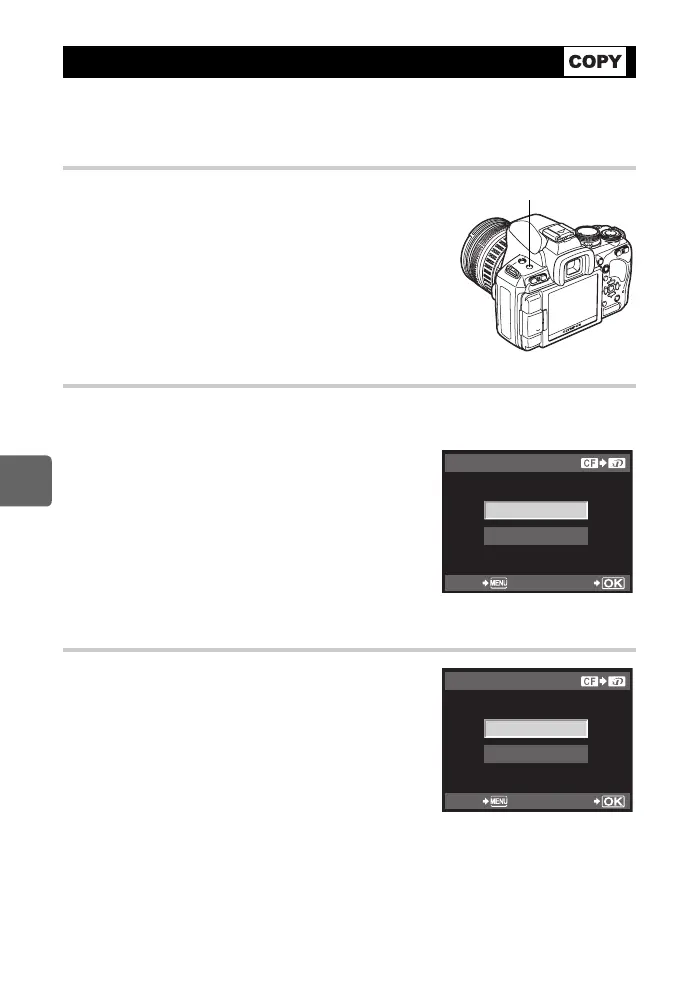
1 Play back the image you want to copy and press the
COPY/< button.
2 Use fg to select [YES], then press the i button.
Copying selected frames
This function lets you select multiple images and copy them all at the same time during
single-frame playback or index display.
1 Display the images you want to copy and press the
i button.
• The selected images will be shown with v.
• To cancel your selection, press the i button again.
2 Press p to display the next images you want to
copy and press the i button.
3 After you have selected the images to copy, press
the COPY/< button.
4 Use fg to select [YES], then press the i
button.
Copying all the frames
1 MENU[q][COPY ALL]
2 Press i.
3 Use fg to select [YES], then press the i
button.
Copying images
COPY/< button
COPY SELECT
YES
NO
BACK SET
YES
NO
COPY ALL
BACK SET
s0030_e_00_0_unified.book 88 ページ 2009年7月3日 金曜日 午後4時11分


 To Next Page