52
EN
2
Exposure
The higher the ISO value, the greater the camera’s light sensitivity and the better its ability to
shoot in low light conditions. However, higher values may give pictures a grainy appearance.
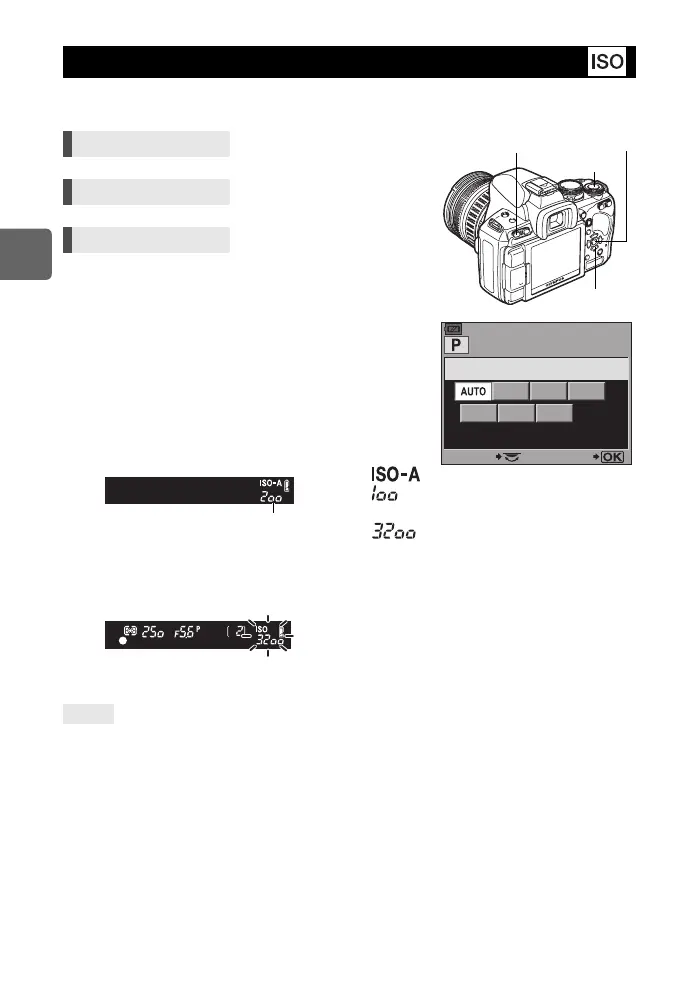
[AUTO] : The sensitivity is set automatically
according to the shooting conditions. For
[ISO-AUTO SET], you can set the default
(value normally used when the optimal
exposure can be obtained) and upper limit
(upper limit of ISO that automatically
changes). g“ISO-AUTO SET” (P. 100)
[100 - 3200] : Fixed ISO sensitivity. [ISO STEP] can be
changed to [1/3EV] or [1EV]. g“ISO
STEP” (P. 99)
Setting display
• 125 and 1250 are displayed in the viewfinder as 120 and 1200, respectively.
Display after setting
To automatically set the optimal ISO in M mode:
j Normally, the AUTO setting is not available in M mode, but you can set it for use in all shooting
modes. g“ISO-AUTO” (P. 100)
ISO sensitivity setting
Direct button ISOj
Super control panel ip: [ISO]
Menu MENU[c][V][ISO]
Viewfinder
AUTO :
100 :
3200 :
Viewfinder
When set to [AUTO], ISO-A and the
ISO value determined by the camera
are displayed. For all other settings,
ISO and the set value are displayed.
When set to 2000 or a higher value,
ISO blinks.
TIPS
ISO
1600
100 200 400
800
SELECT SET
3200
ISO button
i button
j
MENU button
When set to [AUTO], the
default value is displayed.
–
–
s0030_e_00_0_unified.book 52 ページ 2009年7月3日 金曜日 午後4時11分


 To Next Page