177
EN
Additions/modifi cations by fi rmware update
15
V Exp/p/ISO
The following setting in the custom menus (MENU c V) is modifi ed (P.96).
[Anti-Shock
z
] modifi ed
Option Description
g
Anti-Shock z [Anti-Shock z] is changed to [Anti-Shockz] in
X Shooting menu 2.
171
Z Movie
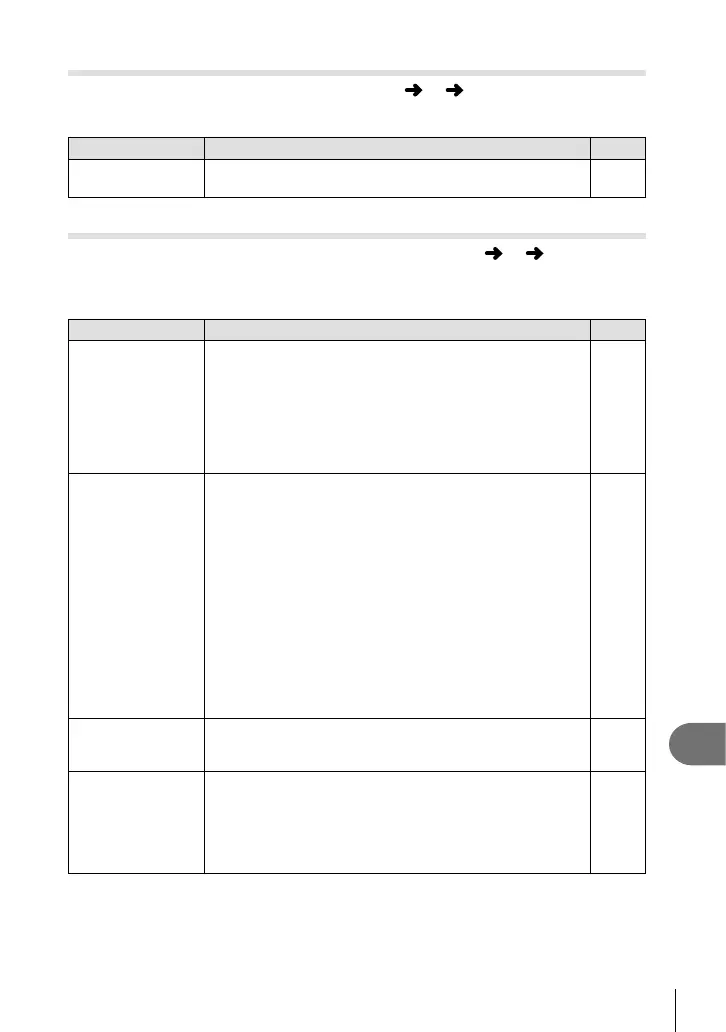
The following settings are added to the custom menus (MENU c Z) (P.100).
[PCM Recorder
K
Link], [Time Code Settings], [
n
Info Settings] and
[
n
Shutter Function] added
Option Description
g
PCM Recorder
K
Link
[Camera Rec. Volume]: When set to [Inoperative], the
sound recording settings on the camera are disabled and
the settings on the IC recorder are applied to movie sound
recording.
[Slate Tone]: Select [On] to enable to produce slate tones.
[Synchronized ]Rec.]: When set to [On], the IC recorder
simultaneously starts/ends recording sound when the
camera starts/ends recording a movie.
175
Time Code
Settings
Set the time codes to record when shooting a movie.
[Time Code Mode]: Set [Drop Frame] (drop frame) to record
time codes corrected for errors with respect to recording
time and [Non-DF] (no drop frame) to record uncorrected
time codes.
[Count Up]: Set to [Rec Run] to use time codes that only run
during recording and [Free Run] to use time codes that also
run when recording has stopped, including when the camera
is powered off.
[Starting Time]: Set a starting time for the time code. Set
[Current Time] to set the time code for the current frame to
00. To set to 00:00:00:00, select [Reset]. You can also set
time codes using [Manual Input].
The time code is not recorded with Motion JPEG movies
shot in H or I.
―
n
Info Settings
You can select the content of the information displayed on
the movie recording screen. To hide an item, select the item
and press Q to clear the checkmark.
―
n
Shutter
Function
In movie mode, the following shutter button options are
available.
[mode1]: Use the shutter button to shoot still images.
[mode2]: Press the shutter button all the way down to start
and stop movie recording. In mode2, you cannot control
recording using the R button.
―















 To Next Page