176
EN
Additions/modifi cations by fi rmware update
15
T Release/j
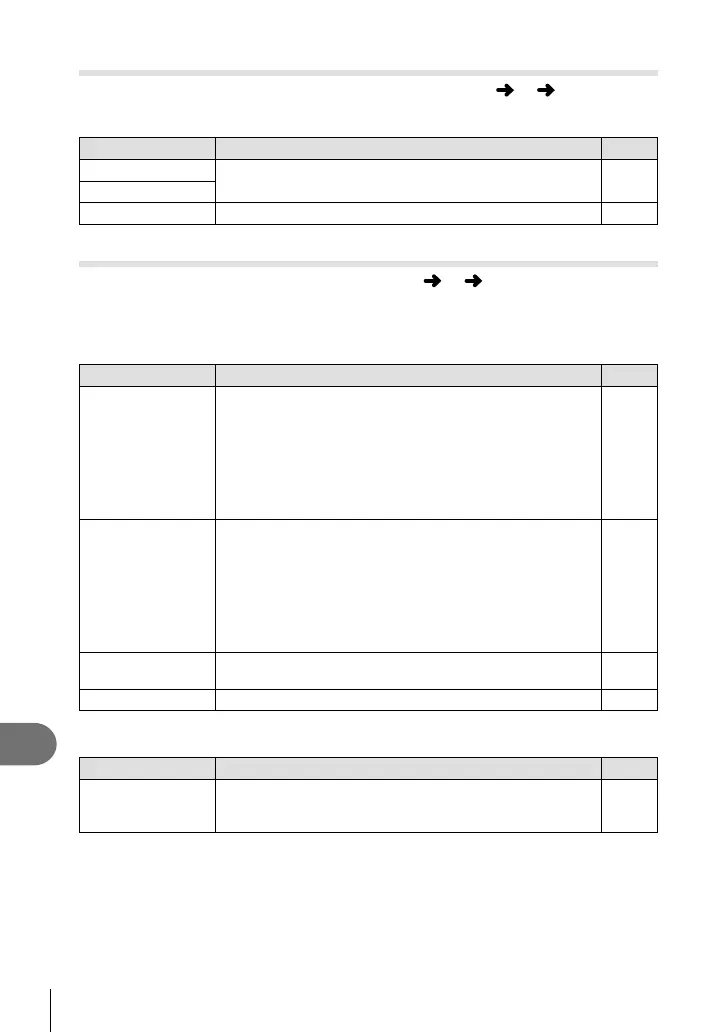
The following settings are added to the custom menus (MENU c T) (P.94).
[ ♥j L fps], [ ♥j H fps] and [Image Stabilizer] added
Option Description
g
♥j L fps
Choose the frame advance rates for silent shooting. Figures
are the approximate maximums.
57, 172
♥j H fps
Image Stabilizer
The option is moved from X Shooting Menu 2.
―
U Disp/8/PC
The following settings in the custom menus (MENU c U) are modifi ed/added
(P.95).
[G/Info Settings], [Live View Boost], [Expand LV Dyn. Range] and
[Peaking Settings] modifi ed
Option Description
g
G/Info Settings
Choose the information displayed when the INFO button is
pressed.
[q Info]: Choose the information displayed in full frame
playback.
[LV-Info]: Choose the information displayed when the
camera is in shooting mode in [Custom1] and [Custom2].
[G Settings]: Choose the information displayed in index
and calendar playback.
109
Live View Boost Shoot while checking the subject even under low-light
conditions.
In M mode, you can use this setting when shooting with
bulb/time or live composite.
[On1]: Prioritize smoothness of display.
[On2]: Prioritize image visibility in dark conditions.
This will make the response to button operations on the
camera slower.
―
Expand LV Dyn.
Range
[Expand LV Dyn. Range] is changed to [S-OVF].
178
Peaking Settings You can change the edge enhancement color and intensity. ―
[Menu Recall] added
Option Description
g
Menu Recall Set to [Recall] to display the cursor at the last position of
operation when you display a menu. The cursor position will
be retained even when you turn off the camera.
―





 To Next Page