EasyManua.ls Logo

Olympus GX53 - User Manual

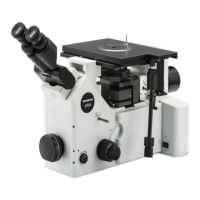
Olympus GX53
92 pages
Print Icon
To Next Page IconTo Next Page
Loading...
Instructions
Notes
This instruction manual is for the Olympus microscope.
To ensure safety, obtain optimum performance and to familiarize yourself fully with the use of this
product, we recommend that you study this manual thoroughly before operating this product, and
always keep this manual at hand when operating this product.
Retain this instruction manual in an easily accessible place near the work desk for future reference.
For details of products included in the configuration of this microscope, see page 10.
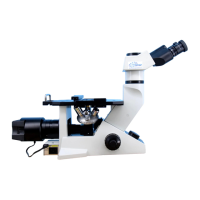
Inverted system metallurgical microscope
GX53
Optical Microscope and Accessory

Table of Contents

Questions and Answers

  • E
    Eric SilvaAug 4, 2025
    What to do if the lamp does not turn ON in my Olympus GX53 Microscope?
    • M
      Mark JamesAug 4, 2025
      If the lamp in your Olympus Microscope does not turn on, there are a couple of potential reasons. First, the lamp may be burned out, in which case you should replace it with a new lamp. Alternatively, the lamp may not be properly attached; ensure that the lamp is securely attached.
  • T
    Todd PattersonAug 9, 2025
    What to do if the field of view is dark on my Olympus GX53 Microscope?
    • M
      matthew06Aug 9, 2025
      If your Olympus Microscope's field of view is dark even though the lamp is on, it could be due to several reasons. First, check if the field diaphragm and aperture diaphragm are narrowed down; if so, open the aperture diaphragm sufficiently, and also open the field diaphragm until it circumscribes the field of view. Another possibility is that the light path selection knob is not at the proper observation light path position; ensure it is correctly set. Lastly, verify that the ND filter with low transmittance is not engaged in the light path; if it is, select the proper transmittance.
  • B
    Brandon BaileyAug 14, 2025
    Why does the lamp burn out quickly in my Olympus GX53?
    • J
      Joshua McbrideAug 14, 2025
      If the lamp in your Olympus Microscope burns out quickly, it might be because you are not using the proper lamp. Replace it with a proper lamp to resolve this issue.
  • H
    Hannah GrayAug 19, 2025
    Why is the field of view obscured on my Olympus GX53?
    • J
      Justin MckinneyAug 19, 2025
      If your Olympus Microscope's field of view is obscured or not evenly illuminated, several factors could be the cause. Ensure the light path selection knob, eyepiece/camera light path selection knob, scale slider or the dummy slider are moved to the stop position according to the purpose and that the polarizer and the analyzer are slided to the stop position according to the purpose. Also, make sure the revolving nosepiece and the filter slider are set to the click position properly and the BF/DF selection lever is set to the click position properly. Check that the lamp housing and the revolving nosepiece are correctly attached. Additionally, verify that the field diaphragm is sufficiently open and centered.
  • J
    James SanfordAug 25, 2025
    Why does the lamp turn ON and OFF on my Olympus Microscope?
    • C
      Corey WilliamsAug 26, 2025
      If the lamp in your Olympus Microscope turns on and off, it is likely that the lamp is about to burn out. Replace it with a new lamp to resolve this issue.
  • G
    griffincharlesAug 29, 2025
    How to fix Olympus Microscope when the main switch does not turn ON?
    • M
      Ms. Olivia PerryAug 29, 2025
      If the main switch of your Olympus Microscope does not turn on, the power cord might not be completely connected. Ensure that the power cord is fully connected.

Summary

Introduction

Configuration of Instruction Manuals

Details manuals for microscope and accessory compatibility.

Intended Use

Specifies the product's application for industrial observation.

Safety Precautions

Installation Safety

Guidelines for stable installation and avoiding hazards.

Electrical Safety

Precautions regarding power cords, grounding, and electrical hazards.

Component Safety

Warnings for handling lamps and liquid light guides.

Prevention of Injury and Fire

Advisories against disassembly, fire hazards, and injury from parts.

Nomenclature of Units

Microscope Unit Identification

Identifies major microscope components and their locations.

List of Combinable Units

Unit Compatibility Chart

Tables showing compatible units for various observation methods.

Basic Operations

Reflected Light Observation Procedures

Step-by-step guide for BF/DF observation setup.

Turning ON the Main Switch

Instructions for powering on the microscope and its components.

Selecting Observation Method and Light Path

Switching observation modes and adjusting light distribution.

Placing and Moving Sample

Procedures for positioning and manipulating specimens on the stage.

Focusing the Microscope

Steps for achieving sharp focus using coarse and fine adjustments.

Adjusting Brightness

Methods for controlling illumination intensity.

Adjusting Observation Tube

Setting interpupillary distance and diopter for comfortable viewing.

Adjusting Aperture and Field Diaphragms

Optimizing image quality using diaphragms.

Using Filter Sliders

Instructions for inserting and using various optical filters.

Observing with Mercury Burner

Specific steps for using the mercury lamp illumination.

Various Observation Methods

DIC Observation

Setup and usage for Differential Interference Contrast.

Polarization Observation

Procedures for simple polarization microscopy.

Transmitted Light Brightfield

Setup for observing specimens with transmitted light.

Analyzer;Polarizer Usage

How to install and adjust analyzers and polarizers.

DIC Slider Usage

Steps for inserting and adjusting the DIC slider.

MIX Slider Usage

Instructions for using the MIX slider for reflected light.

Image Acquisition

Attaching Camera Adapter

Guide to connecting cameras for image capture.

Replacement of Optical Parts

Replacing Eyepiece

Step-by-step instructions for eyepiece replacement.

Replacing Objective

Procedure for swapping microscope objectives.

Replacing Halogen Bulb

Guide for changing the halogen lamp.

Replacing Mercury Burner

Instructions for replacing the mercury burner.

Replacing Filter

Steps for installing or changing filters.

Troubleshooting

Optical System Issues

Common problems with lamps and illumination.

Image Quality Issues

Problems related to glare, blur, and visibility.

DIC Observation Issues

Troubleshooting specific to DIC microscopy.

Focusing Knob Issues

Problems with coarse/fine focusing mechanisms.

Observation Tube Issues

Problems with eyepieces and interpupillary distance.

Control Box;Hand Switch Issues

Troubleshooting for electronic components.

Specifications

Microscope Frame Specifications

Technical details of the main microscope unit.

Observation Tube Specifications

Details on available binocular and trinocular tubes.

Light Source Specifications

Technical data for LED and halogen illumination.

Optical Performance List

Objective Performance Data

Tables detailing performance of objectives with various eyepieces.

Assembly

Assembly Diagram

Visual guide showing assembly order of microscope components.

Attaching Light Sources

Procedure for connecting LED, mercury, or halogen light sources.

Attaching Objectives and Revolving Nosepiece

Steps for mounting objectives and the nosepiece.

Connecting Cables

Guide for connecting interface and control cables.

Connecting AC Adapter and Power Cord

Instructions for power connection.

Attaching Filters and Condenser

Steps for installing filters and the condenser.

Attaching Camera Adapter and PC Connection

Guide for connecting cameras and linking to a PC.

Preventive Inspection Sheet

Illumination Device Inspection Checklist

Table for routine checks of illumination components.

Proper Selection of Power Supply Cord

Certified Power Cord Guidelines

Information on selecting approved power supply cords.

Olympus GX53 Specifications

General IconGeneral
BrandOlympus
ModelGX53
CategoryMicroscope
LanguageEnglish

Related product manuals