30
4.3.5.2 Configuration - Recording Active
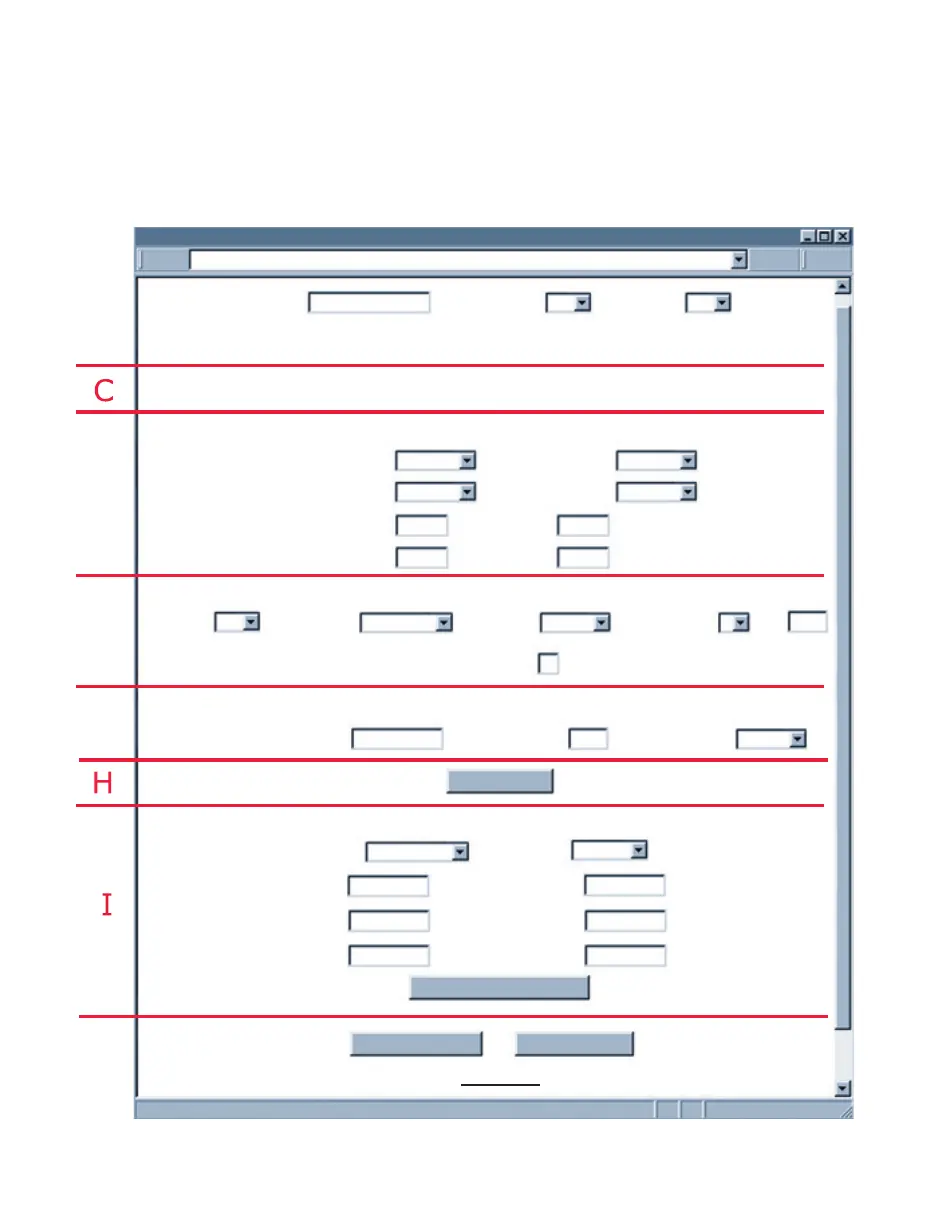
Once the Clock Time has exceeded the Start Time, click on the “Read Settings” button,
followed by the “Update” button, to refresh the Configuration page.
Section C will have a new message Flash Recording On, and Section I will still show
the current Recording Settings.
Stop Recording Button: Click on this button to stop an ongoing recording.
Figure 4.14 Configuration (Recording Active)
http://192.168.1.50
CONFIGURATION
Terminal Server
Alarm Setup
2-MegaBytes Flash Card 0 Kbytes Used Space
Flash Recording On. AC Power On. Check Battery
Remote Access (Tunneling)Remote Access (Tunneling)
Update
Stop Recording
Remote IP Address:
Remote Port:
Remote Access:
TCP/UDP:
Server Type: Forward CR
Number of
Connections
Port:
2000
Command
TCP
2000
Disable
0.0.0.0
Main Menu
Disable
Time Stamp:
Disable
Alarm 1 Temperature:
Unlatch
Enabled Alarm 1:
Disable
Alarm 2 Humidity:
Unlatch
Enabled Alarm 2:
50.0
SP1_L:
80.0
nnn.n
nnn.n
SP1_H:
60.0
SP2_L:
90.0
nnn.n
nnn.n
SP2_H:
5
Read Settings
Hard Reset
Address
Title:
Data_Record_Test
Degree Unit:
F
LCD/PWR:
ON
Recording Settings
Type:
Full Flash
Clock Date:
06/01/2009
Start Date:
06/01/2009
EndDate:
12/12/2009
mm/dd/yyyy
mm/dd/yyyy
mm/dd/yyyy
hh:mm:ss
hh:mm:ss
hh:mm:ss
Time:
12:01:53
Time:
12:01:00
Time:
12:01:00
Interval:
10_sec



 To Next Page