CONNECTING OMNIFI
3 Connecting Omnifi
5
Ethernet Connection
Follow the procedure below to set up your Omnifi Digital Media
Streamer with Ethernet. Refer to the following figures to help you
make the correct connections.
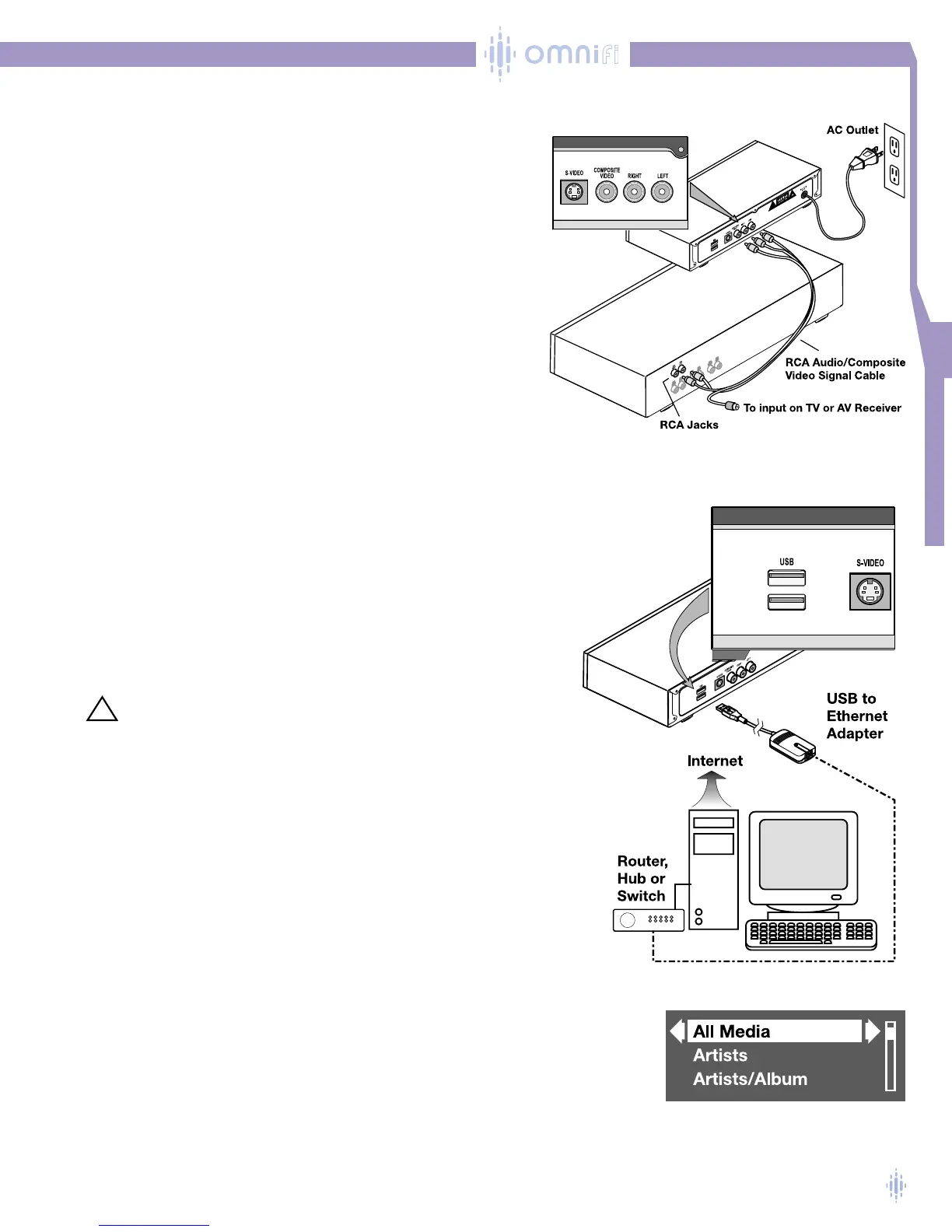
1. Place Omnifi near your stereo receiver (close enough so that
the RCA cable can reach your stereo).
2. Plug one end of the audio signal cable into the RCA jacks on
the back of Omnifi. Connect white to left and red to right. Plug
the other end of the audio cable into the corresponding left and
right RCA jacks on your stereo receiver. Use either the CD
inputs or the auxiliary inputs (or other inputs if these are
already in use). Figure 4.
3. Plug the yellow connector into the composite video jack on the
back of Omnifi and the other end into the corresponding jack
on your TV or AV receiver.The TV interface is optional.
NOTE: Omnifi’s default TV output mode is Composite Video.
If you are using an S-Video cable to connect the system,
you will have to change the Settings function on the
Omnifi. See Chapter 6 for details about the Settings functions.
4. Plug the USB connector for the Ethernet adapter into one of the
USB ports on the back of Omnifi. Figure 5.
5. Plug an Ethernet cable into the jack on the Ethernet adapter and to
your network hub, router or switch.
6. Plug the Omnifi power cord into an AC outlet.The first time you
plug your Omnifi DMS into AC power, Omnifi will start up.You will
see the Omnifi logo on the display and on the OSD (on Screen
Display) if you are using the TV interface.
NOTE: For Omnifi to start properly, SimpleCenter must be running
and active on the network.
CAUTION! Do not defeat the safety purpose of the polarized
plug.A polarized plug has two blades with one
wider than the other.The wide blade is provided
for your safety. If it does not fit into your outlet,
consult an electrician for replacement of the
obsolete outlet.
NOTE: For best results, do not plug your Omnifi into a switched
power output on your stereo receiver. Use an unswitched AC
power outlet so that your Omnifi will turn on instantly.
Omnifi will find SimpleCenter on your network.The Omnifi will show
a list of all compatible media servers. If you have a single PC on the
network and SimpleCenter is operating, the Omnifi display will show
SIMPLECENTER (Your Computer Name). Select this server (using
the SELECT button) and you will see your Media Library categories,
figure 6.
7. Switch on your stereo receiver, and ensure the stereo receiver is in the correct
input mode (if you used the auxiliary inputs, ensure your stereo is in auxiliary
mode; if you used the CD inputs, ensure your stereo is in CD mode).
Figure 4
Figure 5
Figure 6



 To Next Page