PLAYING MUSIC
4 Playing Music
13
Additional Top Levels - Based on the new media services offered through
SimpleCenter.
There may be a variety of additional levels included here. Media
services are shown in detail in the Channels mode in SimpleCenter.
See Chapter 5 for more information.
Playing Tracks on Your Omnifi Digital Media Streamer
When you use the Select button or the Play button to activate playback of a track,
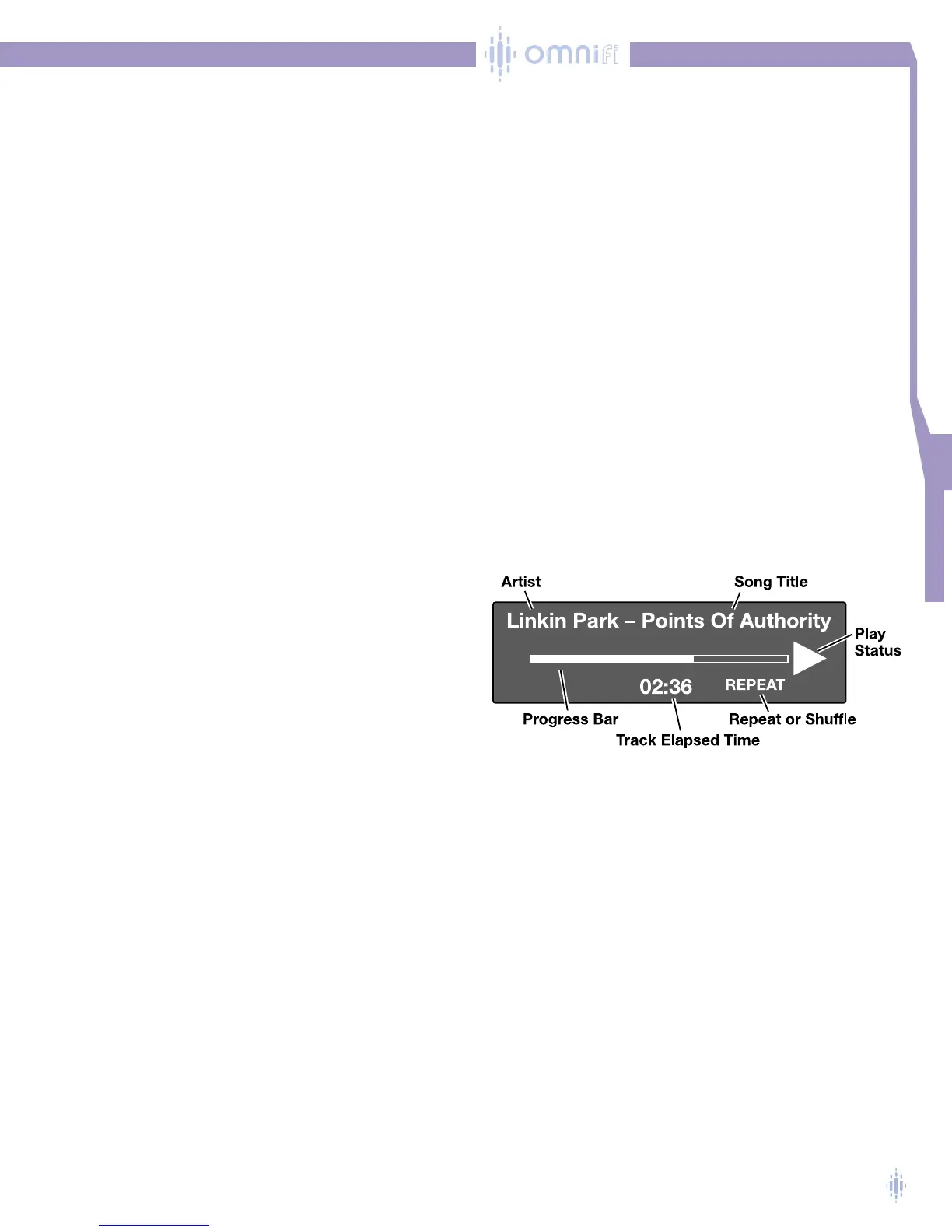
Omnifi displays the screen similar to figure 17.
The top line of the Omnifi display shows the artist and the track name. If these names
are too long to display completely the text will scroll to the left after a few seconds.
Browsing During Playback
You can browse the Media Library while your Omnifi is playing a track. If you
activate the Scroll Knob, Left Navigate, or jump buttons (Home,Artist,Album, Genre),
the display will move corresponding to the function of the button you activated.All the
while the current track will continue to play. For example, if you are playing a track and
you rotate the Scroll Knob, the display will change to show scrolling through the tracks
of the current playlist.
NOTE: Unless a button has been pressed, the display will revert back to the Play
screen in a few seconds.
Figure 17



 To Next Page