3 Check and start operation
3-1 The name and function for the operation and display
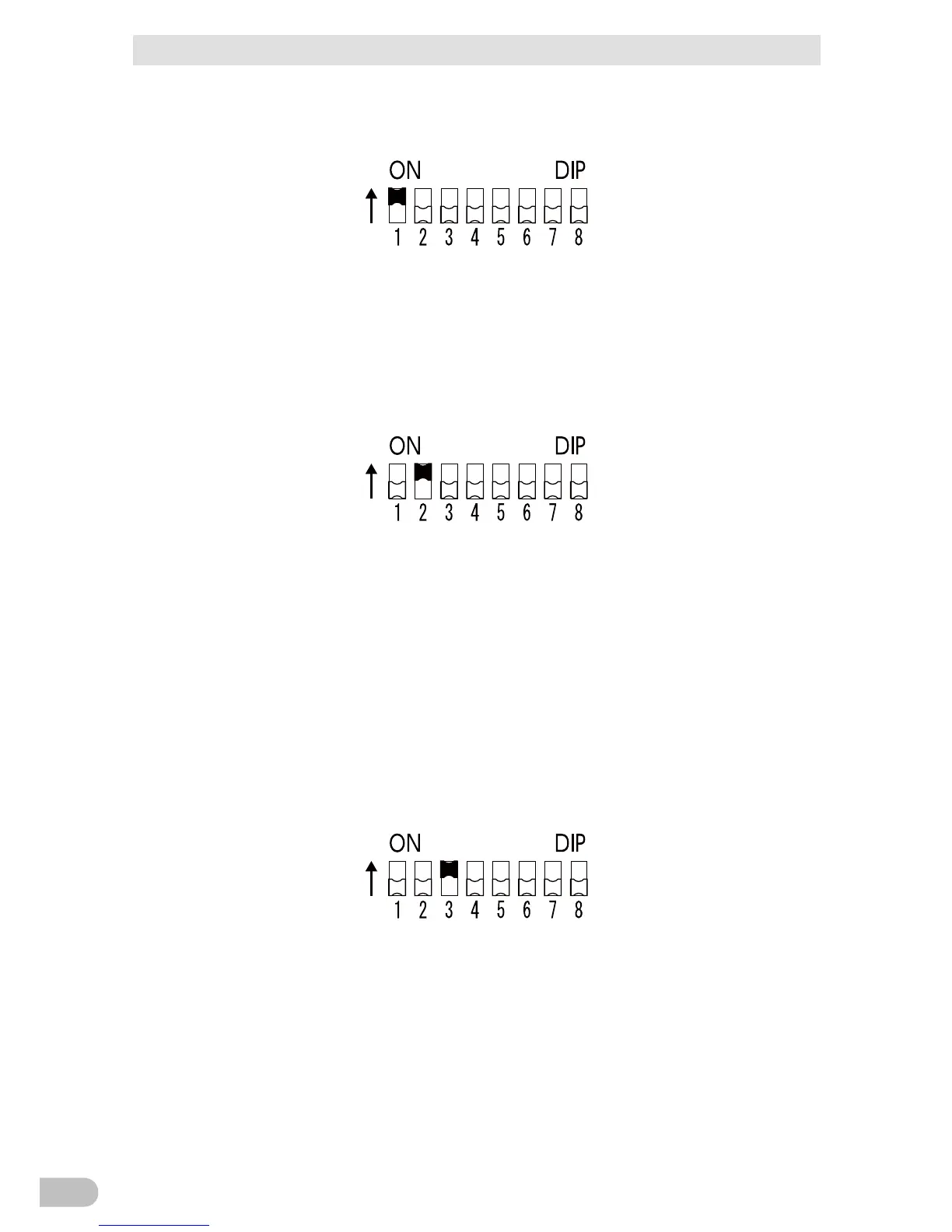
● Setting for beeper sound in the event of power failure, etc.
(“Setting” switch 1)... Factory setting: OFF
OFF: The beeper sounds when an alarm is necessary.
ON: The beeper does not sound for backup operation or battery replacement. The beeper
sounds for other errors (connection capacity exceeded, operation error, etc.).
● Auto startup setting after recovery from power failure
(“Setting” switch 2)... Factory setting: OFF
OFF: Automatically starts when power is restored.
After a power failure occurs and the unit shuts down using the shutdown software or
contact signal(BS signal), the unit automatically starts and begins to output when the
commercial power is restored.
ON: Does not automatically start when power is restored.
After the unit is shut down with the UPS monitoring software or contact signal (BS signal), it
does not start up when commercial power is restored. Startup is performed by turning the
“Power” switch OFF once, and then back ON again.
● Setting for whether or not to perform test once every 4 weeks
(“Setting” switch 3)... Factory setting: OFF
OFF: The self-diagnostic test is automatically executed once every 4 weeks.
ON: Does not perform the auto test once every 4 weeks.
Use this setting to disable Battery Mode for the regularly performed test.
BA75T/BA100T/BA100R
36



 To Next Page