9 Troubleshooting and Maintenance
9-48
CJ-series DeviceNet Units Operation Manual for NJ-series CPU Unit(W497)
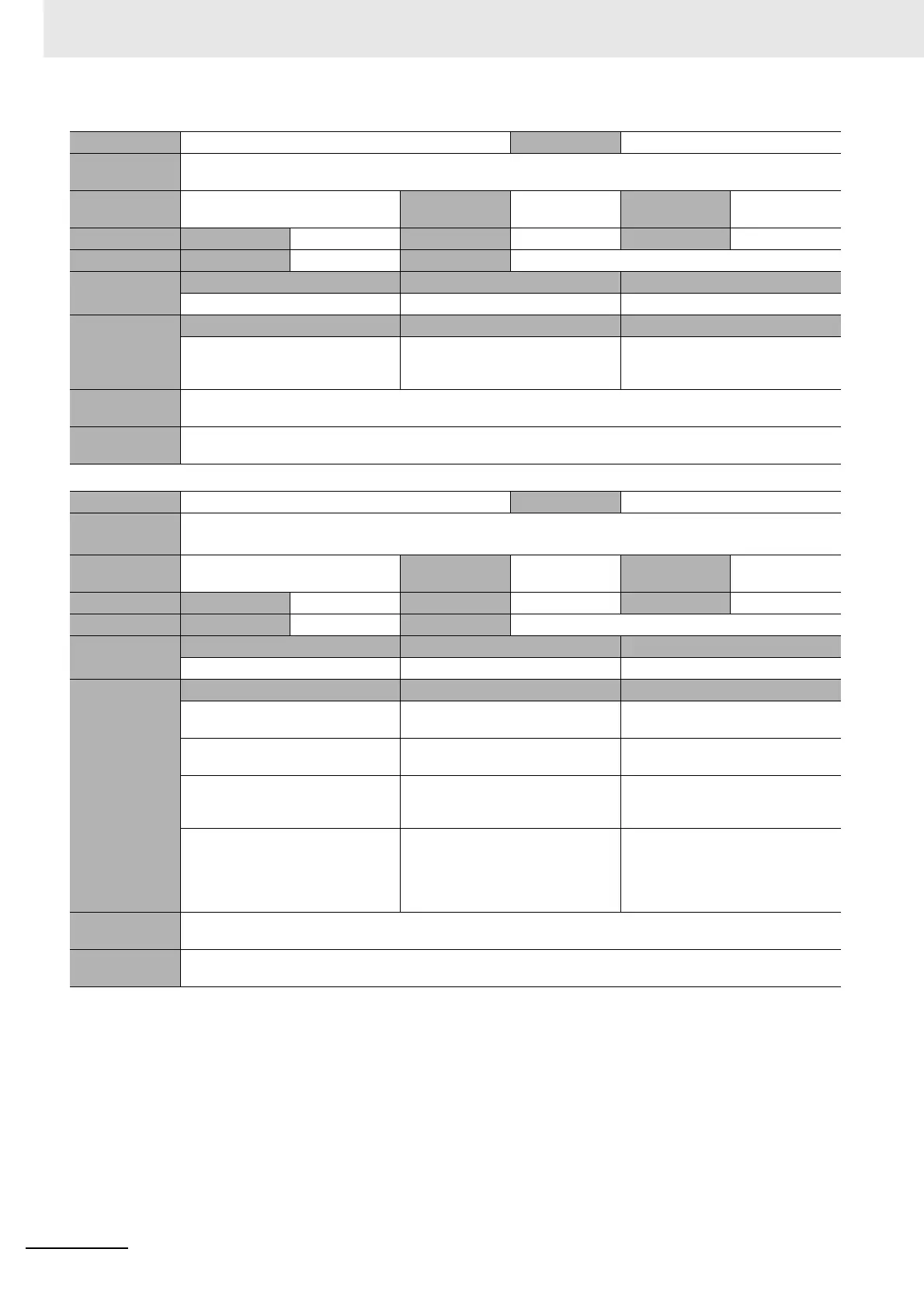
Event name Slave I/O Refresh Error Event code 34C20000 hex
Meaning The I/O memory in the destination CPU Unit for I/O refreshing could not be found when refreshing the slave function
data in the CPU Unit.
Source PLC Function Module Source details CJ-series Unit Detection
timing
At power ON or
Controller reset
Error attributes Level Minor fault Recovery Error reset Log category System
Effects User program Continues. Operation Remote I/O for the slave function
System-defined
variables
Variable Data type Name
None --- ---
Cause and
correction
Assumed cause Correction Prevention
I/O words are allocated in an EM
bank that does not exist.
Correct the I/O allocations so that
only I/O words that exist in the I/O
memory of a CPU Unit are allocated.
Allocate only I/O words that exist in
the I/O memory of a CPU Unit.
Attached
information
None
Precautions/
Remarks
None
Event name Slave User Allocation Area Setting Failed Event code 34C30000 hex
Meaning An error occurred in the following operation for user allocation of the slave.
• Slave user allocation setting switch (device variable *_Sw2SlavAlocCmd)
Source PLC Function Module Source details CJ-series Unit Detection
timing
At user operation
Error attributes Level Minor fault Recovery Error reset Log category System
Effects User program Continues. Operation Not affected.
System-defined
variables
Variable Data type Name
None --- ---
Cause and
correction
Assumed cause Correction Prevention
The slave function is not disabled. Disable the slave function. Disable the slave function to set slave
user allocations.
There is a mistake in the user alloca-
tions to a slave.
Use the correct settings. Check the settings.
CPU Unit is not in PROGRAM mode. Change the CPU Unit to PROGRAM
mode.
Change the CPU Unit to PROGRAM
mode before setting user allocations
for the slaves.
More than one software switch
changed to TRUE at the same time.
Or, another software switch changed
to TRUE before processing was com-
pleted for a previous software switch.
Execute the software switch opera-
tions one at a time.
Execute the software switch opera-
tions one at a time.
Attached
information
None
Precautions/
Remarks
None






 To Next Page