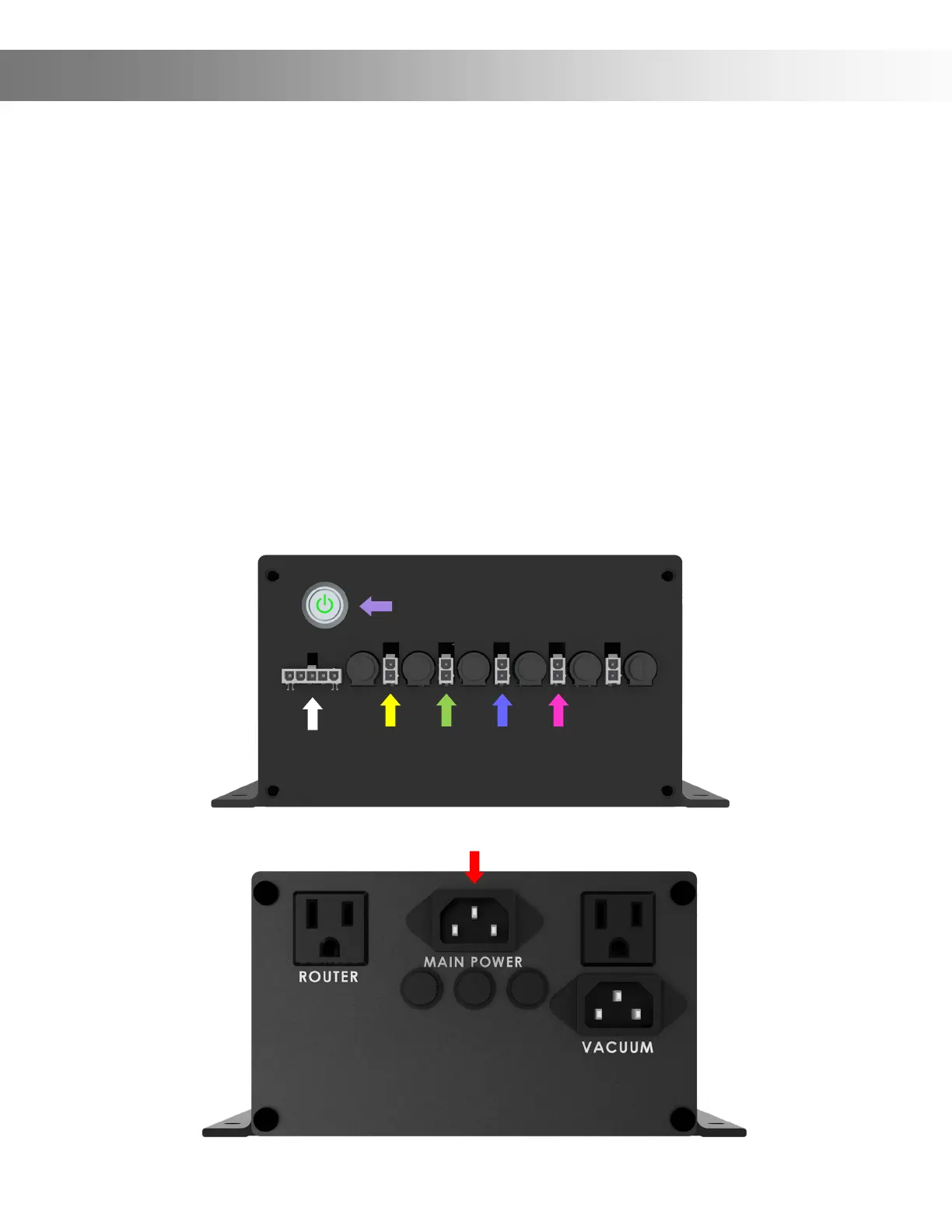
Step 17: We’ll now connect the Power Supply Controller Wires.
Plug the Power wire into the Power socket (White Arrow).
On the X1 Wire, Plug the 2 pin connector into the rst socket (Yellow Arrow).
On the Y1 Wire, Plug the 2 pin connector into the second socket (Green Arrow).
On the B1 Wire, Plug the 2 pin connector into the third socket (Blue Arrow).
On the Z1 Wire, Plug the 2 pin connector into the forth socket (Pink Arrow).
Plug the Power Supply Power Cord into the AC Power socket (Red Arrow).
Congratulations, you have now completed wiring your Onenity Elite CNC
You can now power up your machine by pressing the power button (Purple Arrow).
Assembly Instructions (Wiring)


 To Next Page