Connecting
Your
Components-Continued
1
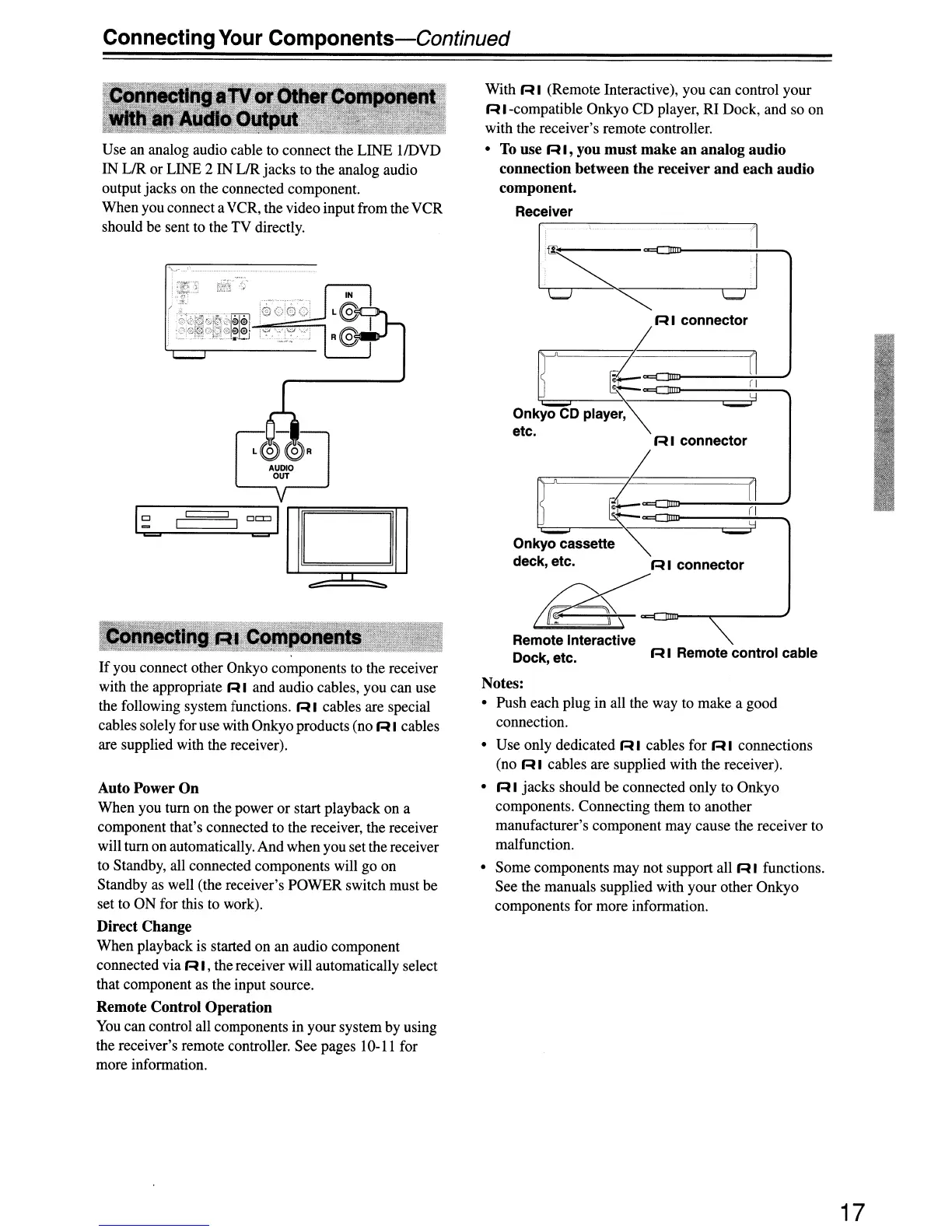
R I Remote control cable
[:;;:
Remote Interactive
Dock, etc.
With
RI
(Remote Interactive), you can control your
R I-compatible Onkyo CD player, RI Dock, and so on
with the receiver's remote controller.
•
To
use R I, you must make
an
analog audio
connection between the receiver
and
each audio
component.
Receiver
[
tR1
connemo,~
Onkyo
CD
Playe~
=
etc.
R I connector
[,
~
~
Onkyo
cassette~
=y
deck, etc. R I connector
tiF<~---,
Notes:
• Push each plug in all the way to make a good
connection.
• Use only dedicated
RI
cables for
RI
connections
(no R I cables are supplied with the receiver).
• R I jacks should be connected only to Onkyo
components. Connecting them to another
manufacturer's component may cause the receiver to
malfunction.
• Some components may not support all R I functions.
See the manuals supplied with your other Onkyo
components for more information.
.'\..
....
_,---
.-
---_.
__
.
-_
...
-.-
..
_--
AUDIO
OUT
Auto Power On
When you turn on the power or start playback on a
component that's connected to the receiver, the receiver
will turn on automatically. And when you set the receiver
to Standby, all connected components will go on
Standby as well (the receiver's POWER switch must be
set to ON for this to work).
Direct Change
When playback is started on an audio component
connected via R I, the receiver will automatically select
that component as the input source.
Remote Control Operation
You
can control all components in your system by using
the receiver's remote controller. See pages 10-11 for
more information.
Use an analog audio cable to connect the LINE IIDVD
IN LIR or LINE 2 IN LIR jacks to the analog audio
output jacks on the connected component.
When you connect aVCR, the video input from theVCR
should be sent to the TV directly.
If
you connect other Onkyo components to the receiver
with the appropriate R I and audio cables, you can use
the following system functions. R I cables are special
cables solely for use with Onkyo products (no R I cables
are supplied with the receiver).
17


 To Next Page