Connecting
Your
Components-Continued
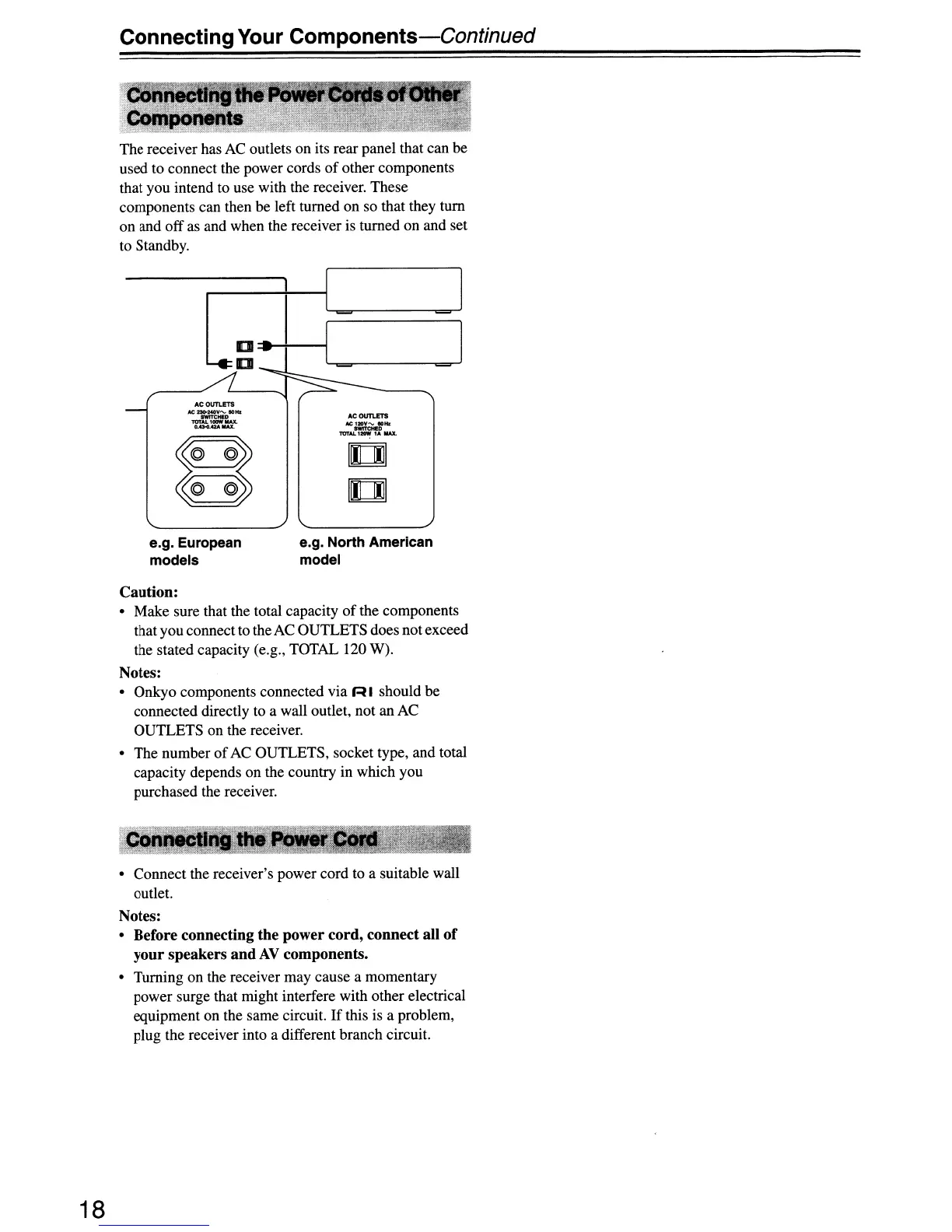
The receiver has
AC
outlets on its rear panel that can be
used to connect the power cords
of
other components
that you intend to use with the receiver. These
components can then be left turned on so that they tum
on and off as and when the receiver is turned on and set
to Standby.
ACOUTLETS
otez:».NOV
......
IO
..
OWITCHID
lOTAI..
10DW
MAX.
.............
ACOl1T1-ETlI
N:; nov
......
_Hz
.........
TOT
......
,_
1,f,
MAl.
u
u
=1
e.g. European
models
e.g. North American
model
18
Caution:
• Make sure that the total capacity
of
the components
that you connectto theACOUTLETS does not exceed
the stated capacity (e.g., TOTAL 120 W).
Notes:
• Onkyo components connected via R I should be
connected directly to a wall outlet, not an AC
OUTLETS on the receiver.
• The number
of
AC OUTLETS, socket type, and total
capacity depends on the country in which you
purchased the receiver.
• Connect the receiver's power cord to a suitable wall
outlet.
Notes:
• Before connecting the power cord, connect all
of
your speakers and
AV
components.
• Turning on the receiver may cause a momentary
power surge that might interfere with other electrical
equipment on the same circuit.
If
this is a problem,
plug the receiver into a different branch circuit.


 To Next Page