EasyManua.ls Logo

Onkyo TX-8511 - Connecting Antennas; AM Loop Antenna

Onkyo TX-8511
28 pages
Print Icon
To Next Page IconTo Next Page
To Previous Page IconTo Previous Page
Loading...
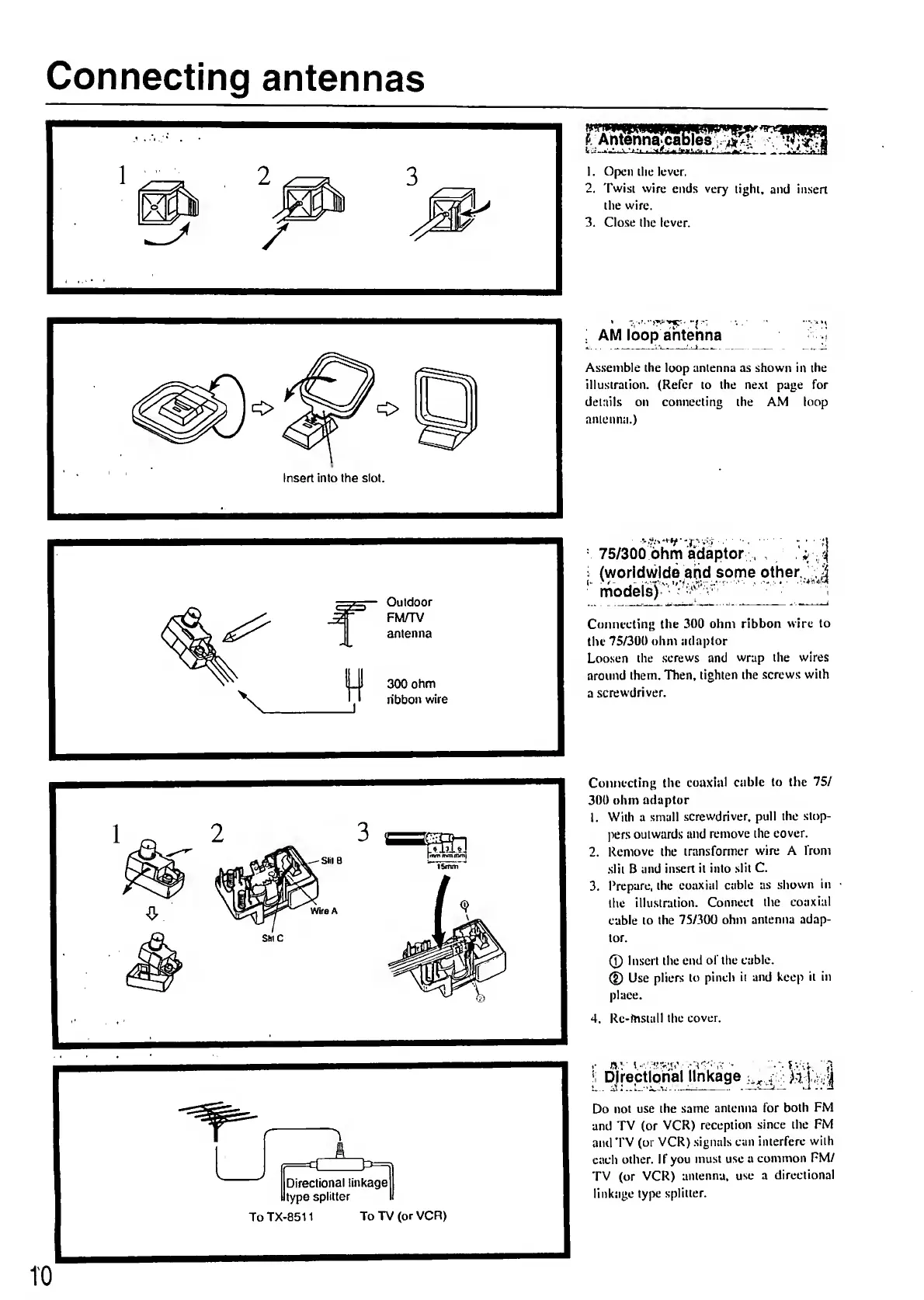
Connecting
antennas
;
AM
loop
antenna
-I
Assemble
the
loop
antenna
as
shown
in
the
illustration.
(Refer
to
the
ne.xt
page
for
details
on
connecting
the
AM
loop
antenna.)
75/300
ohm
adaptor
,
,
-
j
;
(worldwide
and
some
other.
models)
'^
Connecting
the
300
ohm
ribbon
wire
to
the
75/300
ohm
adaptor
Loosen
the
.screws
and
wrap
the
wires
around
them.
Then,
tighten
the
.screws
with
a
screwdriver.
Connecting
the
coaxial
cable
to
the
75/
300
ohm
adaptor
1.
With
a
small
screwdriver,
pull
the
stop¬
pers
outwards
and
remove
the
cover.
2.
Remove
the
transformer
wire
A
from
slit
B
and
insert
it
into
slit
C.
3.
Prepare,
the
coaxitil
cable
as
shosvn
in
the
illustration.
Connect
the
coaxial
cable
to
the
75/300
ohm
antenna
adap¬
tor.
®
Insert
the
end
of
the
cable.
®
Use
pliers
to
pinch
it
and
keep
it
in
place.
4.
Re-mstall
the
cover.
I
D|rectlphal
linkage
M
|
p;
Do
not
use
the
same
antenna
for
both
FM
and
TV
(or
VCR)
reception
since
the
FM
and
TV
(or
VCR)
signals
can
interfere
with
each
other.
I
f
you
must
use
a
common
FM/
TV
(or
VCR)
antenna,
use
a
directional
linkage
type
splitter.
TO

Related product manuals