OPTIMUM
MASCHINEN - GERMANY
Operation
Version 1.1.5 dated 2015-08-31Page 36 Original operating instructions
BF30VarioGB
4.13 Threading
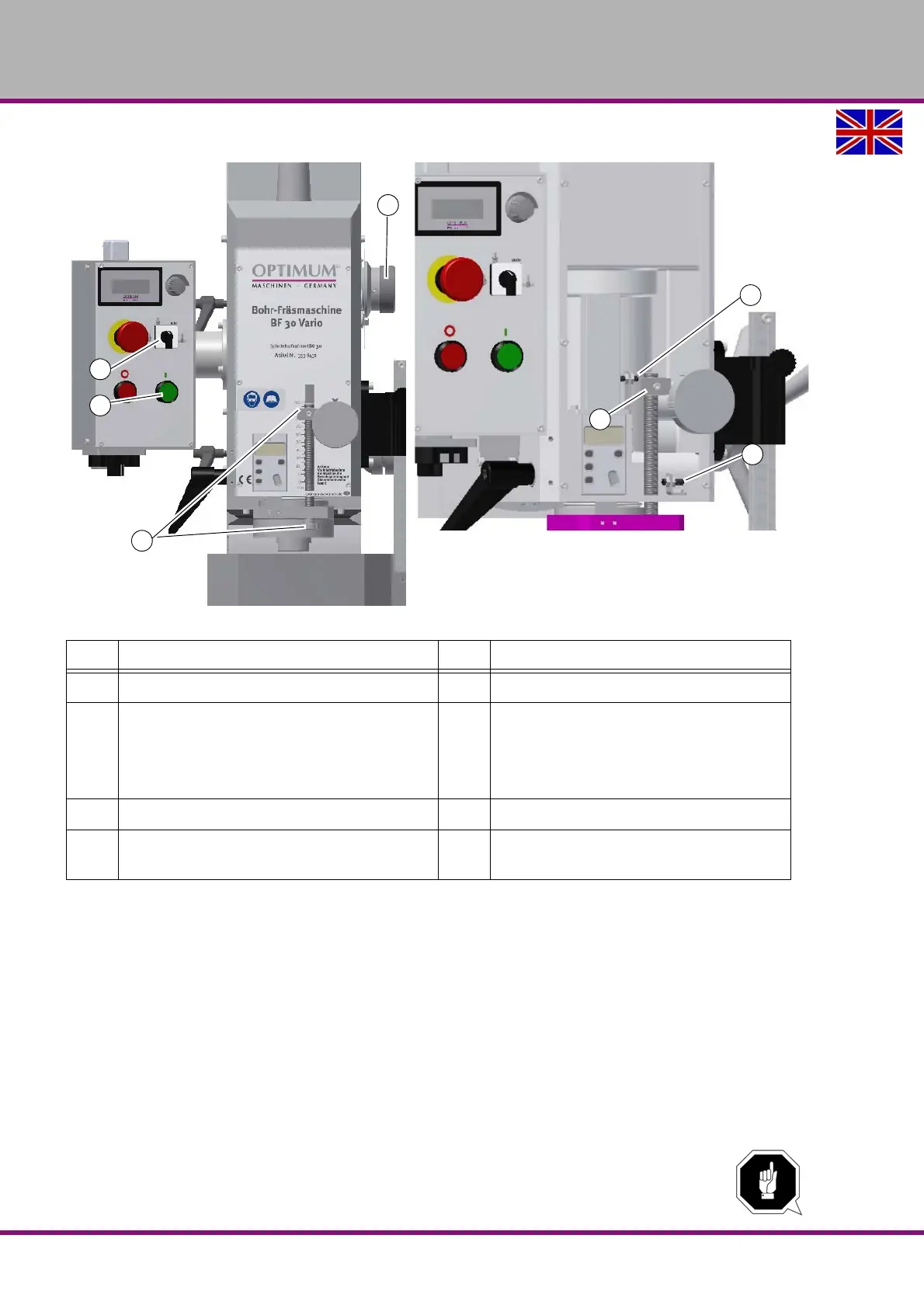
Img.4-7: Operation mode thread cutting
Set the selection switch mode (23) to "threading" or "automatic".
Set the depth stop (26) to the desired depth.
Select the smallest speed.
Close spindle protection system.
Start the rotation of spindle (24).
Move the sleeve downward with the sleeve lever until the machine tap cams in the work-
piece.
The machine tap turns into the workpiece. As soon as the preset depth is attained, the spindle
reverses the direction of rotation at the switch point (28). The machine tap turns out of the work-
piece. When the spindle sleeve is completely entered up to the switch point (27) in operation
mode "automatic" the rotation of the spindle is stopped. Then it is possible to proceed another
threading operation.
ATTENTION!
The spindle sleeve must be completely retracted in order to trigger the switch point (27).
Pos. Designation Pos. Designation
6 Selector switch for reduction stage 20 Speed control
23 Selection switch operating mode
automatic
threading
turning direction
24 Push button spindle rotation "ON"
26 Depth stop 27 Adjustable stop cycle end
28 End position switch turning direction
reversal




 To Next Page