Condential
5-12
HD20/HD200X/HD2200/HD20LV/HD21/HD23
5-2-4 8051 Firmware Upgrade
Procedure
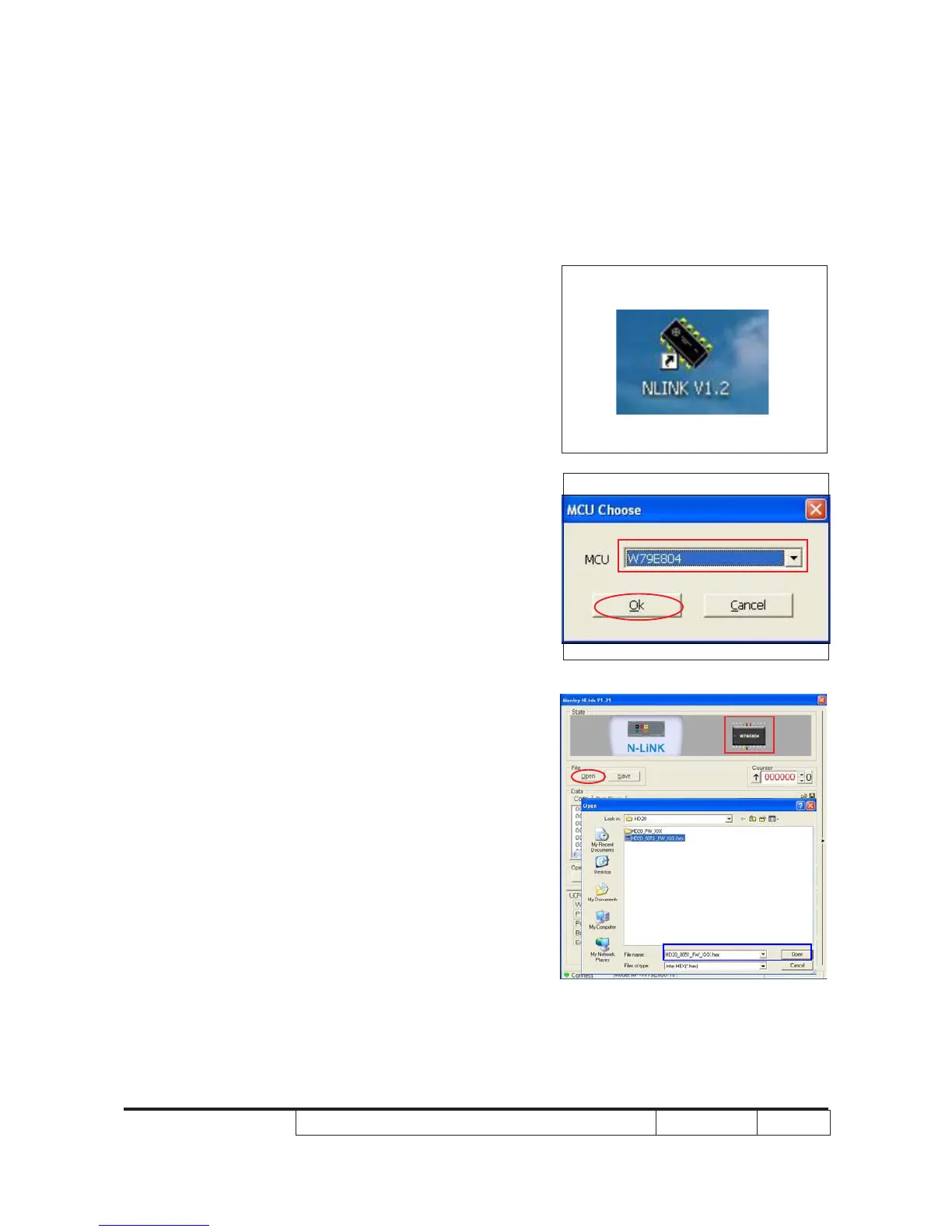
1. Execute 8051 FW Program
- Double click "NLINK V1.2" to execute
NLINK program.
Note: When we execute NLINK program, the
power LED and Fixture LED ash red.
2. Choose the right type of MCU
- "MCU Choose" picture will appear on the
screen, select "W79E804".
- Click "OK". "Manley Nlink" picture will
appear on the screen.
Note:HD20/HD200X/HD2200/HD20LV use
"W79E804" type of MCU.
HD21/HD23 use "N79A901R" type of
MCU.
3. Choose 8051 le (*.hex)
- Ensure "MCU" is the one you chose in the
last step (as red square).
- Click "Open".
- Select the 8051 le, then click "Open".



 To Next Page