Condential
5-13
HD20/HD200X/HD2200/HD20LV/HD21/HD23
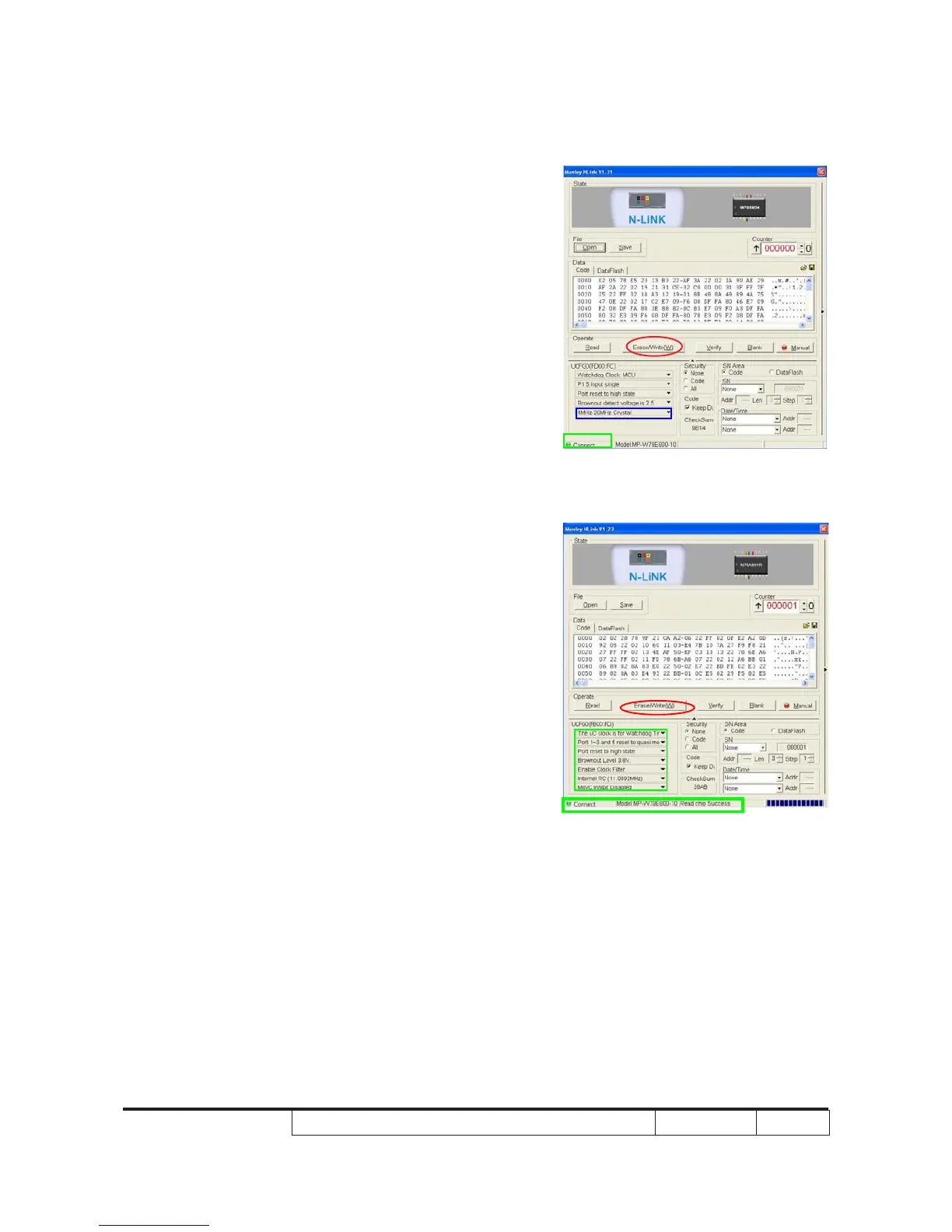
4. Program settings
4-1. For HD20/HD200X/HD2200/HD20LV
- Ensure NLlNK Fixture and PC are
securely connected: the indicator lights on
green, and the state is "Connect"(as
green square).
- Select "4MHz-20Mhz Crystal" (as blue
square).
- Click "Erase/Write(W)" to execute 8051
FW upgrade.
4-2. For HD21/HD23
- Ensure NLlNK Fixture and PC are securely
connected: the indicator lights on green,
and the state is “Connect” (as blue
square).
- Select “Brownout Level 3.8V” (as green
square).
- Select “Internel RC (11.0592MHZ)” (as
green square).
- Click “Erase/Write(W)” to execute 8051
FW upgrade (as red circle).



 To Next Page