S310e/X312
Condential
3-4
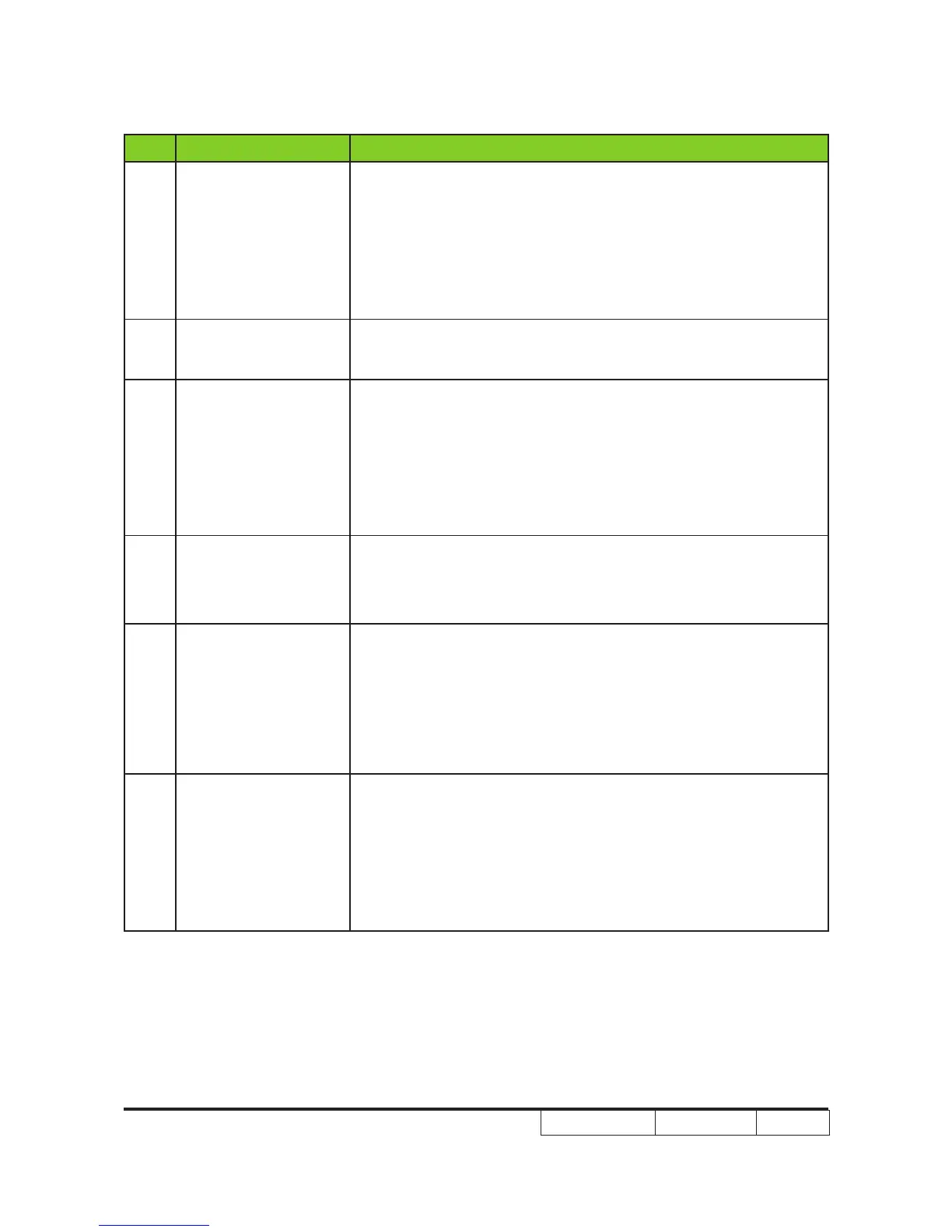
No Symptom Procedure
10
Dead Pixel/Dust
(Out of spec.)
- Ensure the projection screen without dirt
- Ensure the projection lens is clean
- Clean DMD Chip and Engine Module
- Check DMD Chip
- Check Engine Module
11
Garbage Image
- Ensure that the signal cables and source work as well
- Check Main Board
12
Remote Controller
Failed
- Remote Controller
a. Check Battery
b. Check Remote Controller
c. Check IR Sensor Board
d. Check Main Board
13 Function Abnormal
- Do "Reset (All data)" of the OSD Menu
- Check Main Board
- Daughter Board Daughter Board
14
Audio Abnormal
(For the projector has
speaker)
- Ensure that the signal cables and source are work as well
- Ensure that your Projector is not in “Mute” mode
- Check Main Board
- Daughter Board
- Check Speaker
15 3D Image Abnormal
- Ensure the using 3D glasses is good and you must face the Ensure the using 3D glasses is good and you must face the
projection.
- Ensure the signal source is 3D format.
- Ensure the 3D function of projector OSD is on and 3D sync
invert is on.
- Check Main Board.



 To Next Page