Condential
4-3
S310e/X312
4-5 I/O Port Test
4-5-1 VGA Port Test
Note:1.If you don’t have the professional equipments such as Quantum
Data 802B or CHROMA2327,please use the PC that support
HDTV resolution & Independent graphic card to output the
corresponding PC pattern.You can download the “test pattern by
PC” from website as right picture.
2.X312 the native resolution of test signal is 1024x768@60HZ.
S310e the native resolution of test signal is 800x600@60HZ.
We take S310e for example here.
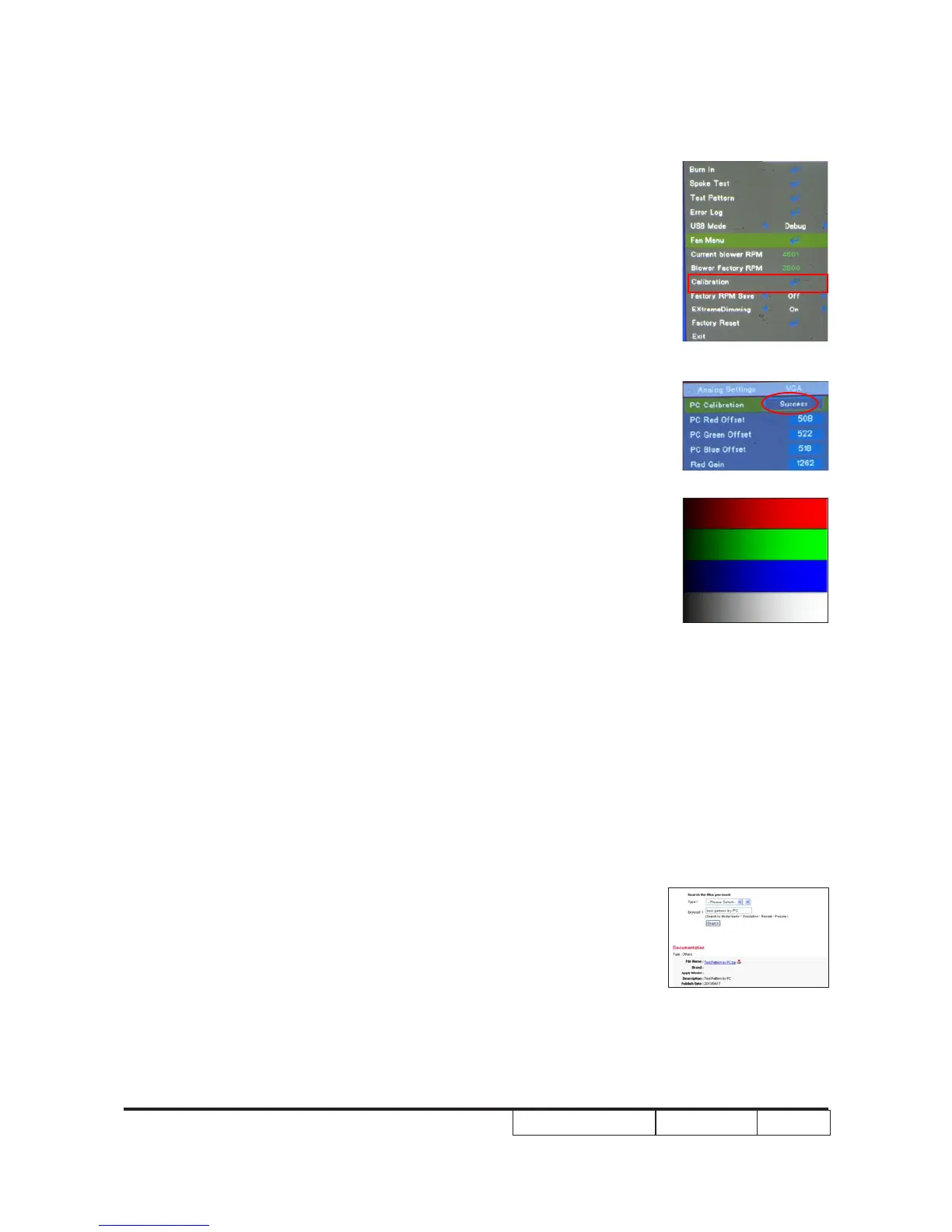
(2) Please press "power", “up”,”right”,”up”,"left",
"Menu" buttons sequentially to get into
service mode.
(3)Choose "Calibration", press "Enter"
button then select “PC Calibration”,When
the message “Success” appears, it means
“ADC Calibration”is OK. Choose “Menu” or
“Exit” to leave service mode.
Check pattern - Test signal: 800 x 600 @60Hz
- Test pattern: 64 gray RGBW
* After nishing ADC adjustment, check 64 gray
RGBW pattern.
Inspection item - Color saturation
Criteria - There should not have any lack of RGBW. The
color should appear normal and sort in right order.
- Color levels should be sufcient and normal. (the
unidentied color levels on both left and right sides
should not over 8 color levels.)
64 gray RGBW



 To Next Page