Condential
4-2
S310e/X312
4-3 Fan Calibration
After replacing main board, fan, or upgrading the
rmware, please follow steps as below:
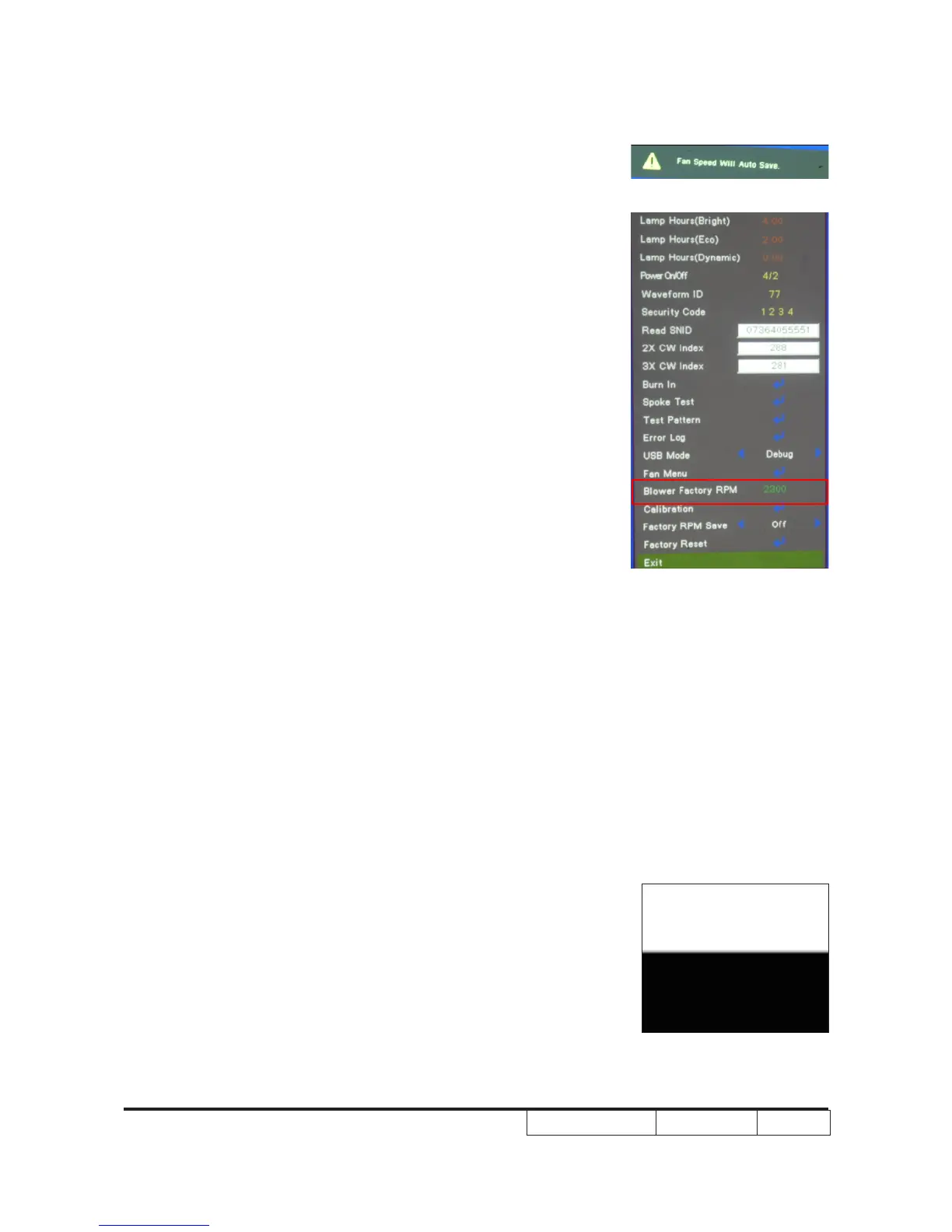
1. Power on the projector,after the “Logo” disappeared,then
press “power”,”left”,”left”,”right”,the Picture A will show.
2. After several minutes, you can check the fan RPM as red
circle:
a. Please get into Service Mode.
b. Select “Fan menu”, then press “Enter”, Fan detail information will
be shown.
Note:- If the factory fan value don’t show in service mode,
please repeat the step 1,2 again.
- Make sure the “Blower Factory RPM “is 1840-
2760.
Picture A
4-4 ADC Calibration
Note: X312 the native resolution of test signal is 1024x768@60HZ.
S310e the native resolution of test signal is 800x600@60HZ.
We take S310e for example here.
1. PC Calibration
Procedure - Test equipment: video generator
- Once Main Board is changed. PC Calibration
should be done as well.
(1) Test signal analog: 800 x 600@60Hz
(2) Test Pattern: 94%White(up)/6% Black (down)
- Note
(1) Calibration pattern should be in full screen
White/Black



 To Next Page