TECHNICAL MANUAL BLUE PAPER RISE · 202132 | ORBEA ORBEA | 33
EN
When you connect your Garmin unit to Rise, the data will
be displayed according to your saved selection.
If the unit was connected to Rise when you saved the
changes, you will see immediately the changes after you
synchronize your device.
GARMIN EXPRESS (PC AND MAC)
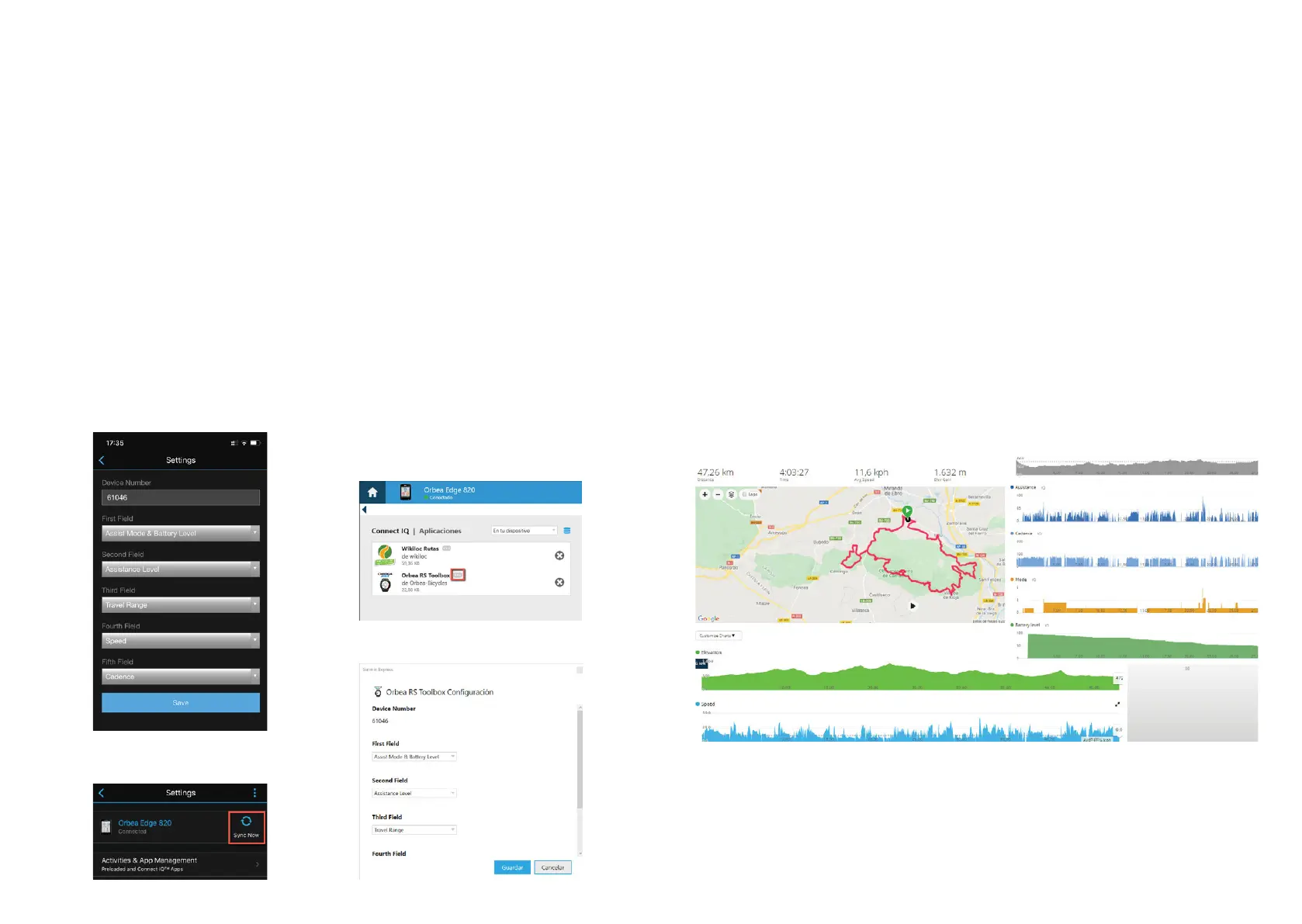
6JGFCVCƂGNFUECPCNUQDGEWUVQOK\GFWUKPIVJGEQORWVGT
application Garmin Express for PC and Mac.
Connect your Garmin unit to your computer using an USB
cable and access Installed Apps. Press the Orbea RS Tool-
box Setting button and select what information you want
VQUGGKPGCEJƂGNF
Save the changes and synchronize your device.
DATA FIELDS CUSTOMIZATION
The order in which the system data is shown in Toolbox
can be changed using Garmin Express (PC or Mac) or the
Garmin Connect app (smartphones).
1. Open Garmin Connect on your smartphone and connect
your Garmin device.
2. Access your device through the app and navigate to the
Orbea RS Toolbox Setting menu:
Apps Management > Data Fields > Orbea RS Toolbox>
Settings
5GNGEVYJCVFCVC[QWYCPVVQUGGKPGCEJƂGNFWUKPIVJG
drop menus and press Save.
4. Go back to the main app screen and select Sync Now.
ACTIVITY DATA RECORDING OF RISE
IN GARMIN CONNECT
When you record an activity using Orbea RS Toolbox in
your Garmin device, the data from Toolbox is recorded
along with the rest of the data from your device. Thus,
you can later access the Toolbox data, such as assistance
level, range, battery charge level, cadence, etc. as part of
the data from the recorded activity.
Access through Garmin Connect the data from Orbea
RS Toolbox during a recorded activity the same way you
access the rest of the data recorded by your device during
the activity.


 To Next Page