E-215-7-E
13
6.3 Output Functions
NOTE: For the information about the front panel display functions not described in this section, see
Section 6.1 on page 11 and Table 11.1 on page 30.
(1) Alarm Output
Upon detection of missing pulse, overmeasurement, or parameter error, the controller produces an alarm
output.
The LCD 1
ALM
then comes on (only upon detection of missing pulses or overmeasurement) and
completes a circuit across terminals 21 and 22 (Relay contact output Form “a” contact) (upon detection of
all alarms).
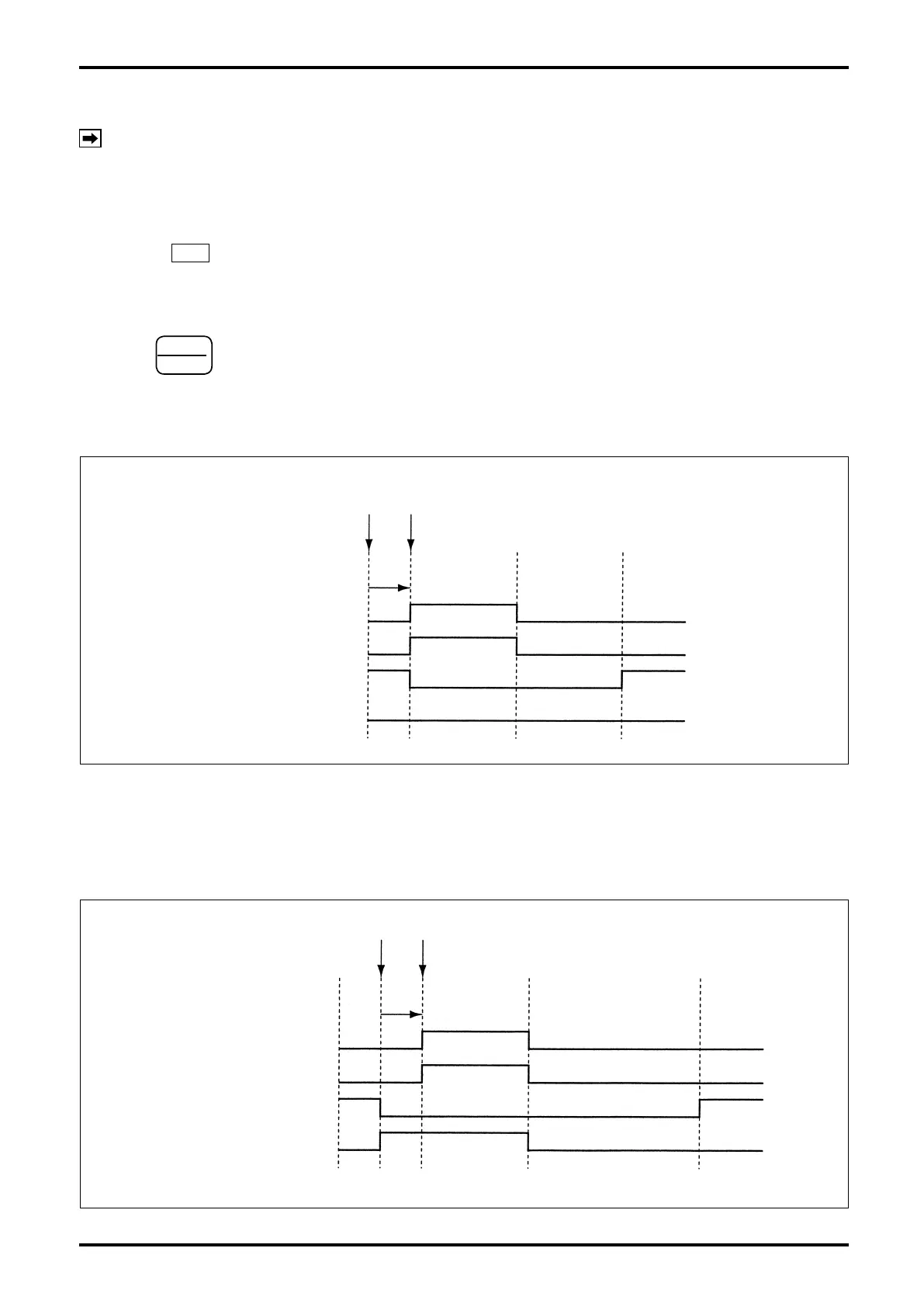
a. Missing pulse alarm detection (Fig. 6.2)
Following
START
▲
key depression to start a batching process, if no ow pulse signal (terminals 1-2-3)
arrives within the time preset for missing pulse detection, an alarm output is produced. Immediately after
startup, however, time measurement begins approximately 5 seconds later.
For the setup procedure, refer to Sec. 9.1.
[Batch in progress]
Flow pulse signal stop Missing pulse alarm detected
STOP key
(alarm reset)
START key
(Restart)
Missing pulse duration set
ALM indicator
Alarm output
SV, MV indicator/output
Batch end output
Fig. 6.2
b. Overmeasurement alarm detection (Fig. 6.3)
When a ow pulse signal arrives while a batch process is in progress, a target batch quantity will eventually
be reached and an end-of-batch signal is generated. If ow pulses continue to arrive at this point and
exceed a preset overmeasurement quantity, an alarm output is produced.
For the setup procedure, refer to Sec. 9.1.
RESET key
(alarm reset/
batch total reset)
START key
(Batch start)
Fig. 6.3
Batch end
Overmeasurement preset
Overmeasurement alarm detected
ALM indicator
Alarm output
SV, MV indicator/output
Batch end output


 To Next Page