73
Time-Lapse Search
While in Live mode, select the Search Mode icon and select Time-Laspe Search or Event Log Search.
1
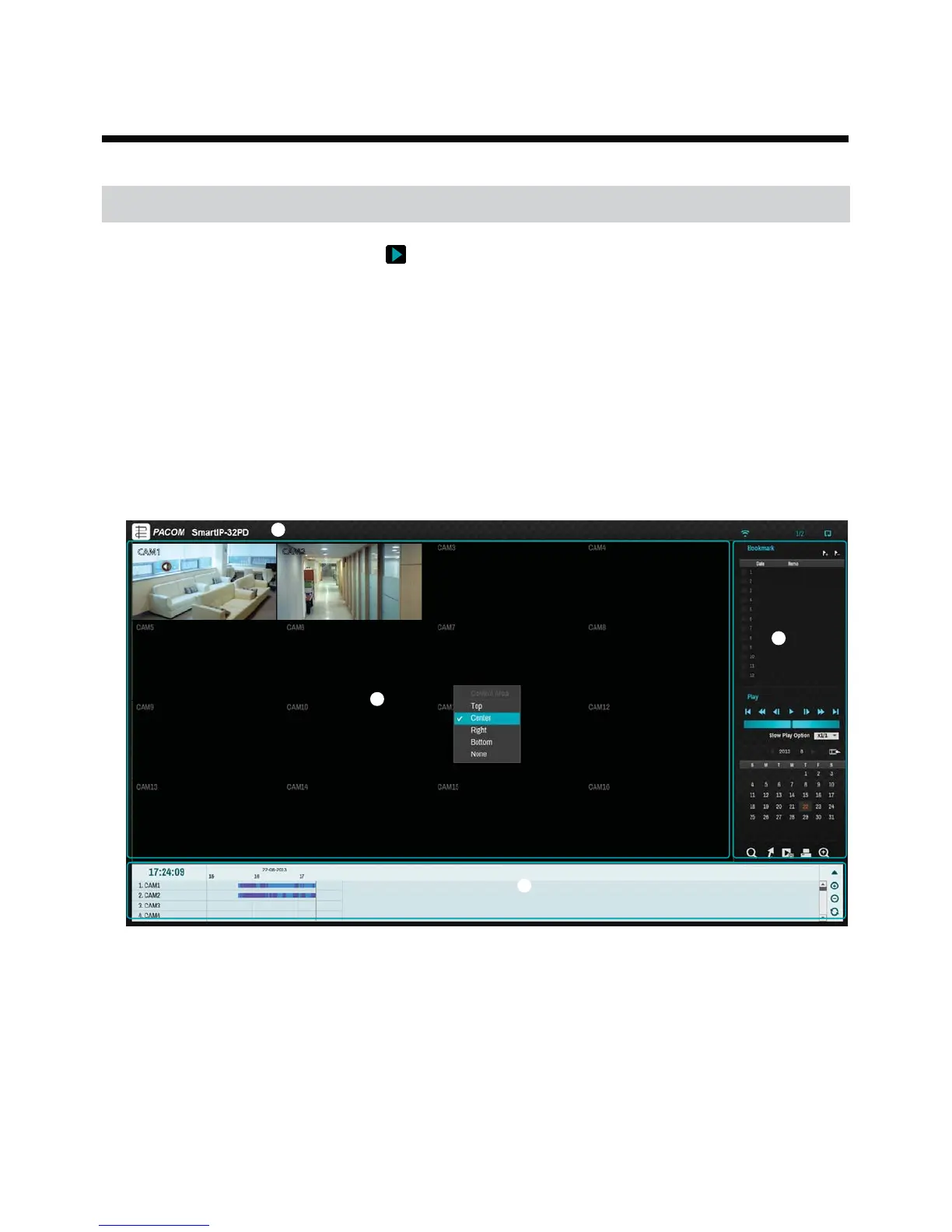
Select Setup while in Search mode to display a menu from which you can select Control Area.
2
Press Setup once more to move the Control Area.
3
In 2 seconds after moving the Control Area, the Control Area becomes selected and the corresponding menu
disappears.
4
After selecting the desired Control Area, use the arrow buttons on the front panel or the remote control to select
the menus and options. Search menu can also be displayed by placing the mouse cursor on the upper portion of
the screen.
CAM2
CAM1
1
2
3
4
The Control Area consists of Top , Center, Right, Bottom, and None.
1 Top: Activates top Search menu. Use the arrow buttons to select an option.
2 Center: Activates the middle screen section. Use the arrow buttons to select a camera.
3 Right: Activates the control buttons on the right. Use the arrow buttons to select Bookmark, Play, Calendar
Search, and other control buttons.
4 Bottom: Activates the bottom record table. Use the arrow buttons to select a record table.
5 None: Use the arrow buttons and playback controls to play back video
Part 4 - Search


 To Next Page