cod. 00 477 1480 - 12/2012 - Palazzetti - PN - Italy 55/164
ENGLISH
USE AND MAINTENANCE
When the room temperature reaches the
set point, the stove will adjust operation
while consuming the least possible fuel, and the
COMPRESSED MENU
EASY MENU
SCROLLING MENU
The two temperatures
displayed (room and set) will
First row: “MODULATION”
Second row: in addition to the
stove operating parameters,
the message “THERMOSTAT
ON” will be shown cyclically
7.3 ACCESSING THE MENUS
This paragraph illustrates the procedure for
accessing the menus and selecting the various
functions.
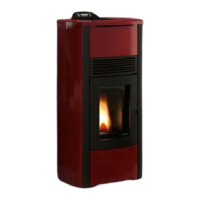
Fig 7.2 represents the display, highlighting the
elements that can be displayed.
Function: the description of the available function
or menu is shown in the centre in upper case.
Control: there may be a symbol (“
”/“+” and “ ”/”-”)
or letters in italics (“ok”, “x”) shown in the corners
(near any of the four buttons); the action in question
is activated by pressing the corresponding button.
Actions:
ok: pressing the
made.
x: pressing the
OFF
button exits the current display
and returns to the previous screen.
/+: pressing the button scrolls the various
screens of the display or increases the value
of the parameter.
/-: pressing the button scrolls the various
screens of the display or decreases the value
of the parameter.
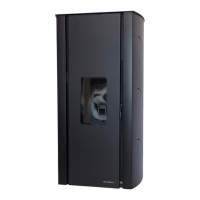
PROCEDURE FOR ACCESSING THE MENUS:
1) Press the
and buttons together; the
display will show: OPERATING SETTINGS
MENU Fig 7.3.
2) Press
to scroll the other menus: TIMER
MENU, STOVE SETTINGS MENU.
3) To ENTER the menu: scroll to the desired
menu and then press
(ok).
To exit the menu and return to the previous
screen: press
OFF
(x).
Fig. 7.2
Fig. 7.3





 To Next Page