- 51 -
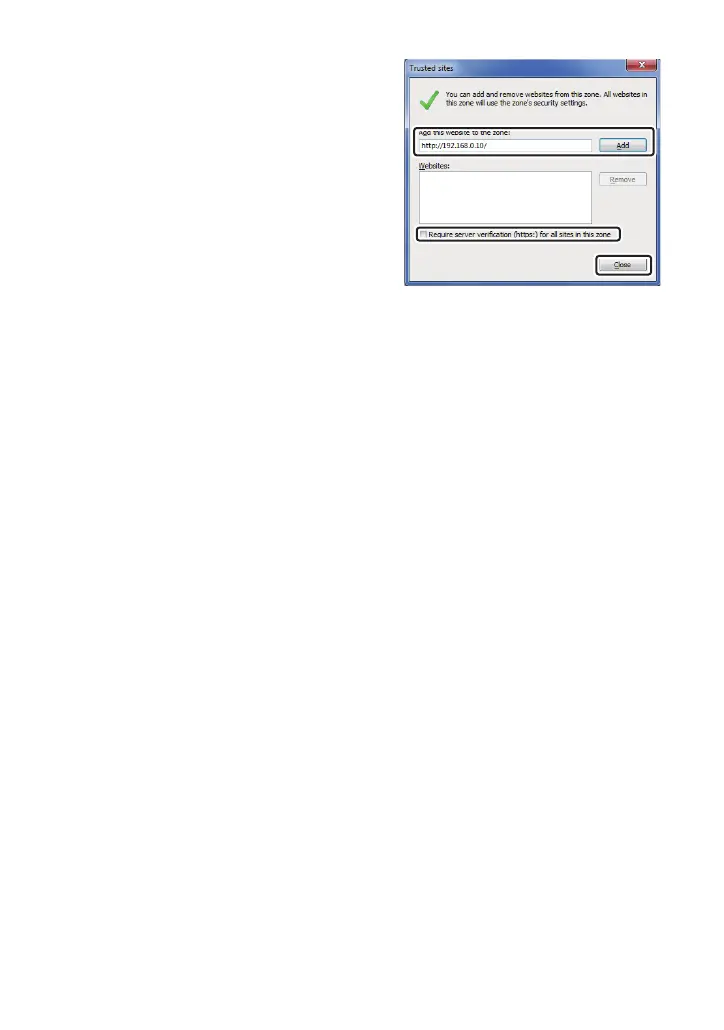
5) Enter [http:// the IP address for the unit/] in
[Add this website to the zone:], and click
[Add].
≥ Make sure [Require server verification (https:)
for all sites in this zone] is unchecked.
6) Click [Close].
∫ An unnecessary status bar or
scroll bar is displayed on the pop-
up window
1) In Internet Explorer, click [Tools] # [Internet Options].
2) Click the [Security] tab, and select the [Internet].
3) Click [Custom Level...].
4) Select [Enable] for [Allow script-initiated windows without size or position constraints]
under [Miscellaneous].
5) Click [OK].
6) When the warning window is displayed, click [Yes].



 To Next Page