- 52 -
∫ Easy IP Setup Software does not display the detected IP address.
Check the firewall settings. If firewall is activated, set the web browser or Easy IP
Setup Software to the [Allow a program through Windows Firewall] setting.
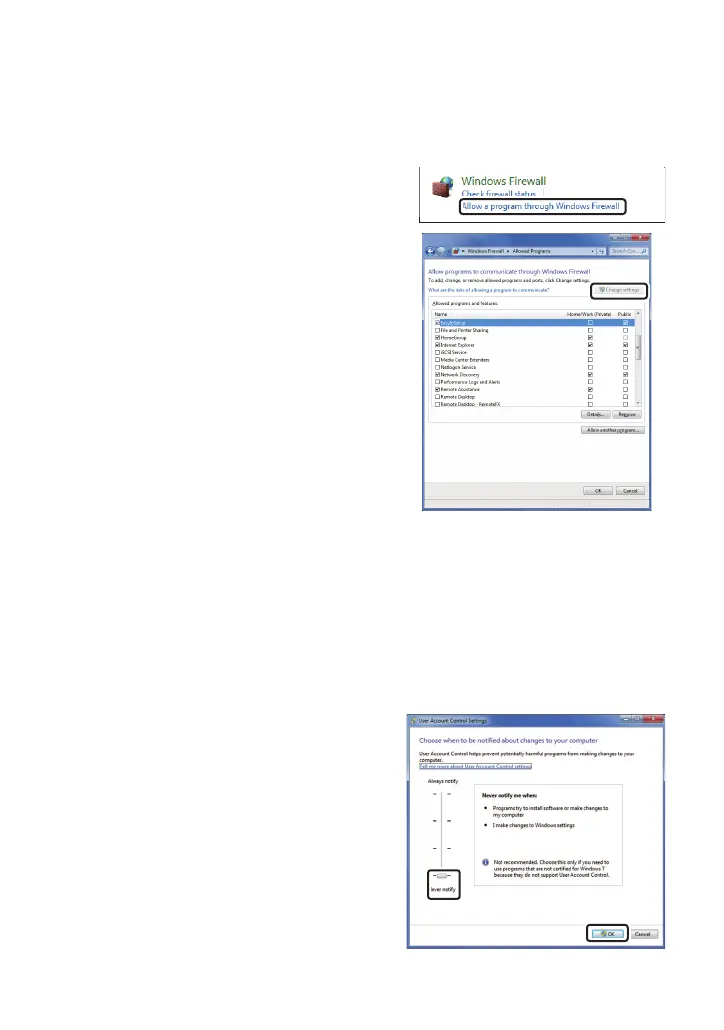
1) Open the control panel, and click [System and Security].
2) Click [Allow a program through Windows
Firewall] of [Windows Firewall].
3) Select the [Internet Explorer] or [EasyIPSetup]
line, and then click the [Change settings] button.
Check [Internet Explorer] or [EasyIPSetup].
4) Click the [OK] button.
∫ When starting the Easy IP Setup Software, a message is displayed to
request the password of administrator.
When exiting the Easy IP Setup Software, the message [This
program may have not been installed correctly] is displayed.
Turn off User Account Control from the control panel.
1) Open the control panel, and click [System and Security].
2) Click [Change User Account Control settings] on the [Action Center] window.
3) Slide the gauge of the slide bar to the [Never
notify] position, and click the [OK] button.



 To Next Page