KW8M Eco-POWER METER
27
MODE4 Setting flow chart
<MODE>
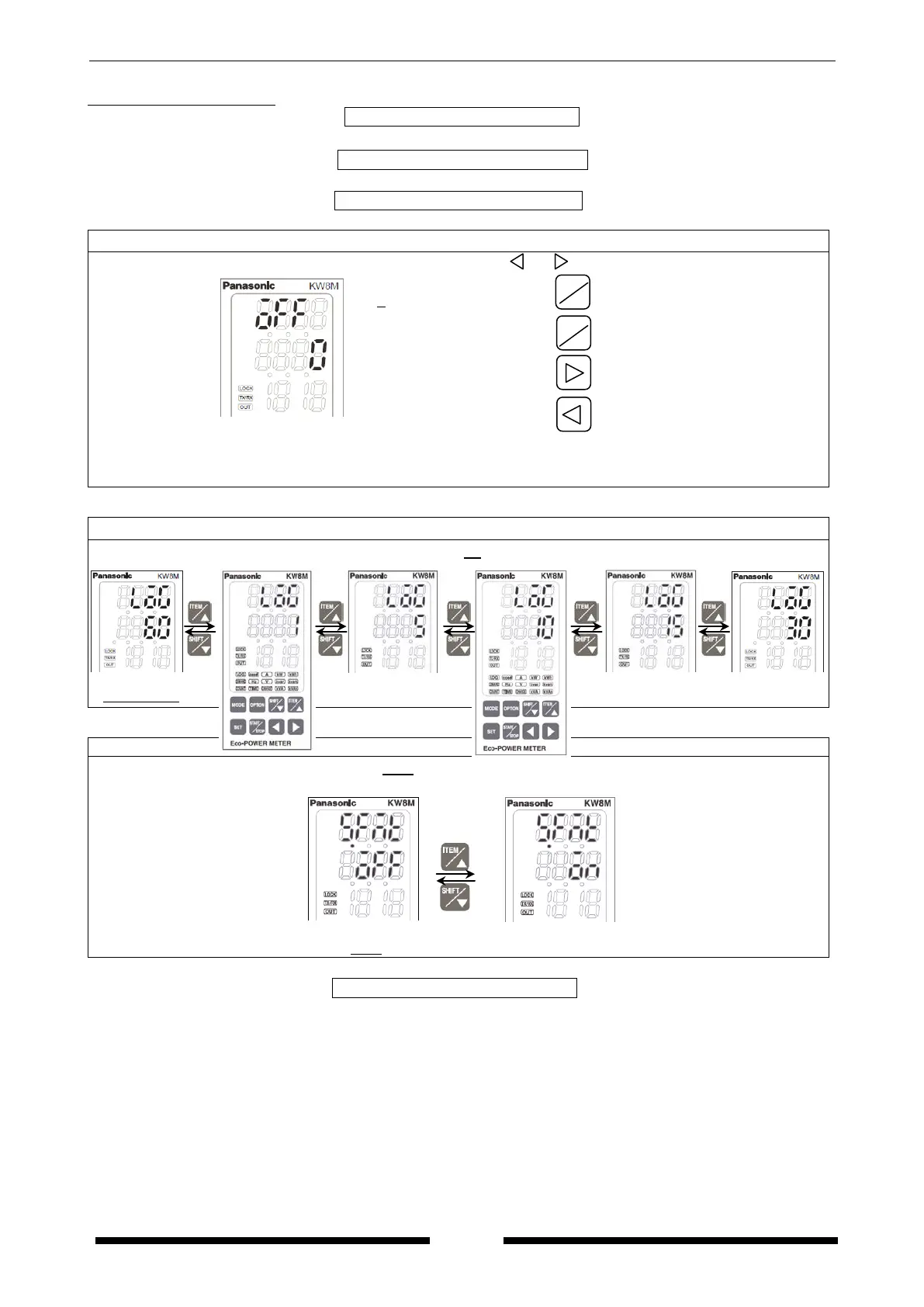
Auto-off setting mode
Set auto-off time by minute using <ITEM/△>, <SHIFT/▽>, < >, < >.
( 0 to 99 min.)
Increase value
Decrease value
Shift place to set
Shift place to set
“0” should be set to turn always light on.
“1 to 99” should be set to turn light off at setting time (minute).
While light off, press any key to light on.
Log cycle setting mode *Only AKW8111H
Press <ITEM/△>, <SHIFT/▽> to change save cycle, 60 ⇔ 1 ⇔ 5 ⇔ 10 ⇔ 15 ⇔ 30.
Initialize memory of main unit
Press <ITEM/△>, <SHIFT/▽> to change OFF/ON.
Set to ON and memory of main unit is initialized.
SHIFT
▽









 To Next Page