KW8M Eco-POWER METER
46
6.2.10 Counter
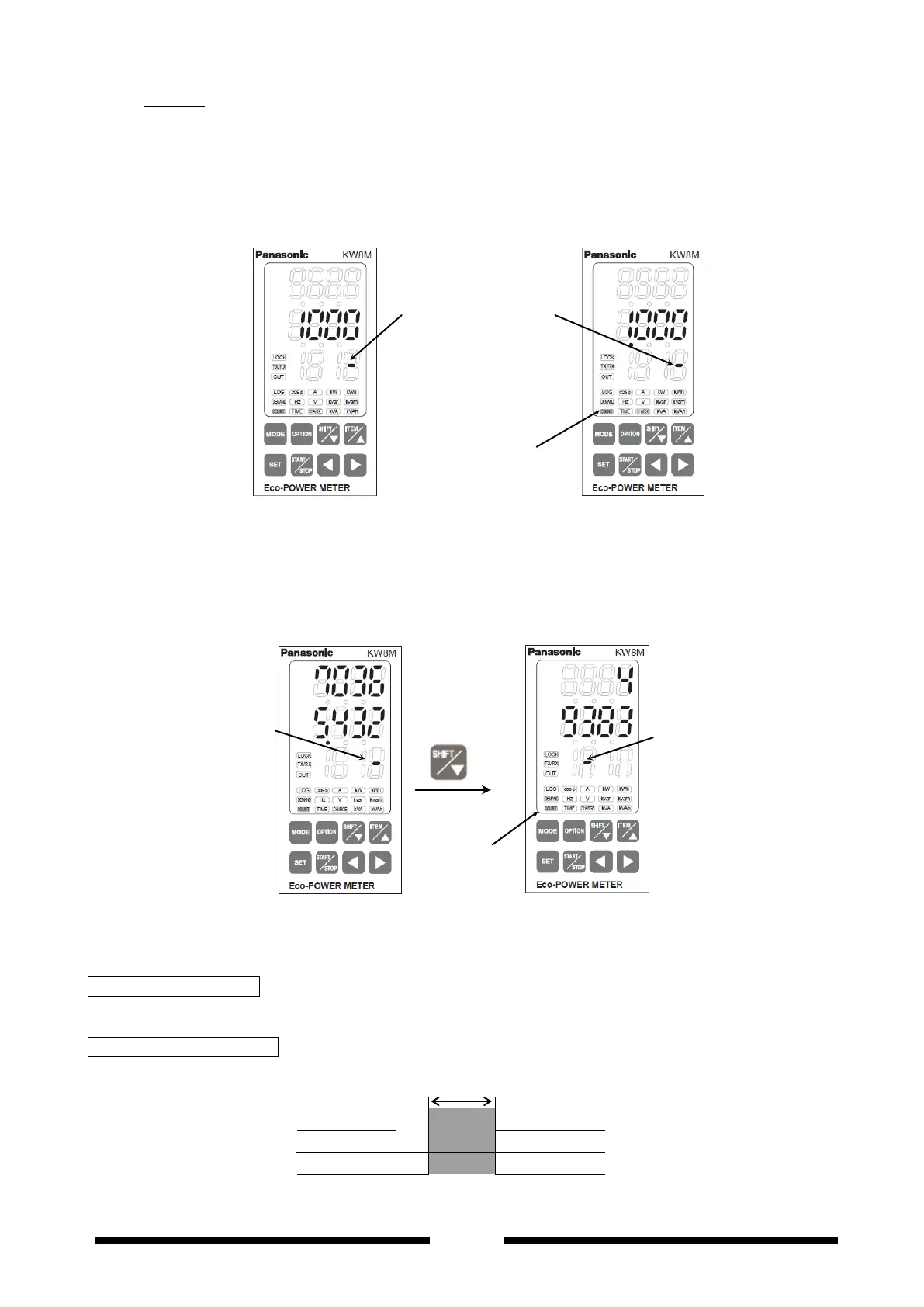
・It displays present count value (pulse input value).
*The position of decimal point for count-number and preset value is decided according to the setting
at ‘Pre-scale setting mode’. (Refer to Setting Mode Explanation.)
Prescale setting value: 1.000
Prescale setting value: 0.001
・When the count-number is 8 digits or more, press <SHIFT/▽> to change the upper digits and the
lower digits.
Pulse input number: 98765432
Prescale setting value: 50.001
4938370365.432
*After reaching the full scale (99999999 x prescale value), the value reverts to 0 but continues to
measure.
How to set preset value
・It is entered and set at preset setting mode of MODE1. (Refer to Setting Mode Explanation.)
How to Reset Count value
・Hold down <SET>key and press <MODE>key makes count value clear.
<SET>
OFF
<MODE>
ON
OFF
Lighting
indicate it shows lower
digits
indicate it shows upper
digits.
Lighting
indicate it shows lower
digits.









 To Next Page