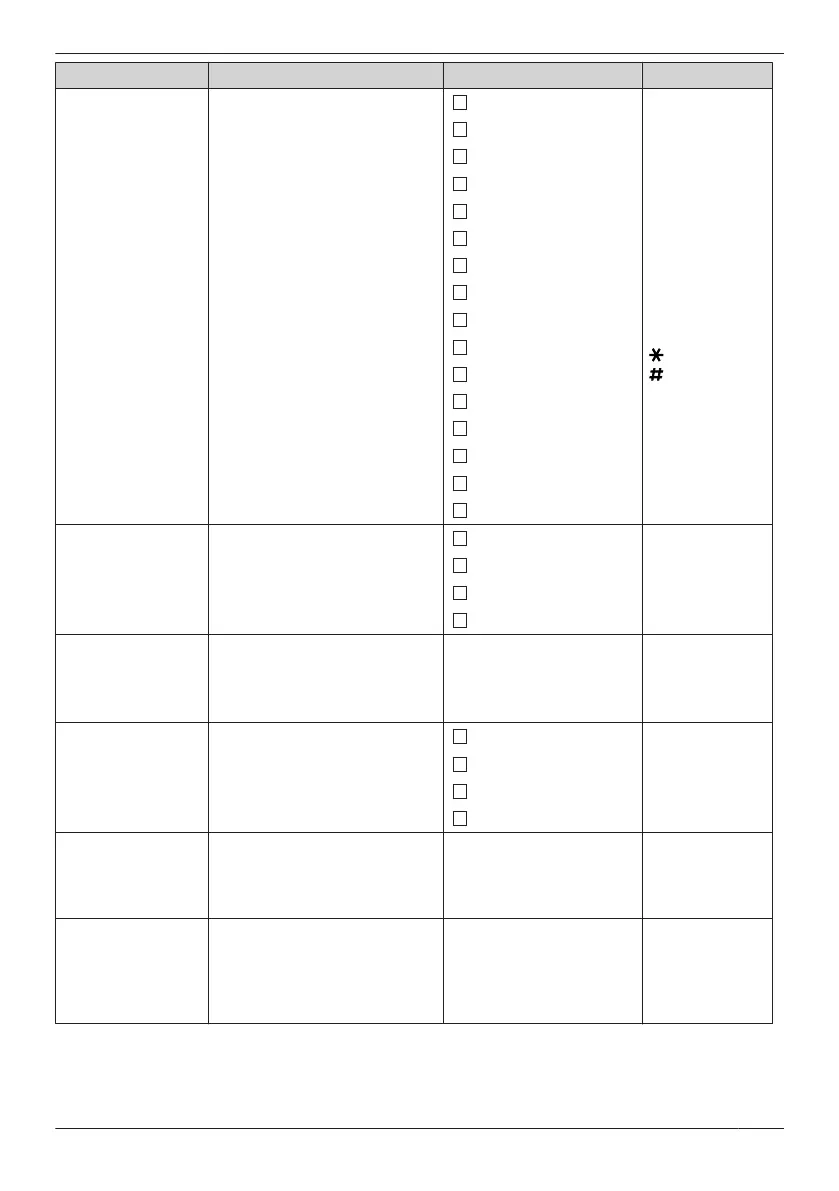
Sub Item Description Setting Default
Function Key
Edits the Function Key list.
Redial
1: Redial
2: Fwd/DND
3: Conference
4: Auto Answer
5: Flash/Recall
6: Pause
7: H/S
Phonebook
8: PBX
Phonebook
9: Ext
Phonebook
0: PBX Program
: Incoming Log
: Outgoing Log
Fwd/DND
Conference
Auto Answer
Flash/Recall
Pause
Auto Dial
Noise Reduction
H/S Phonebook
PBX Phonebook
Ext Phonebook
PBX Program
Incoming Log
Group Log
Outgoing Log
None
*1
Soft Key Edit
– Softkey A
– Softkey B
– Softkey C
Edits the soft keys.
– Standby
– Talking
Default
Not stored
Flexible Key
Function Key
Hot Key Dial
*2
Soft Key Name
– Softkey A
– Softkey B
– Softkey C
Edits the names of the soft
keys.
– Standby
– Talking
Max. 5 characters Not stored
Key Lock Type
Selects the type of key lock.
Manual
Manual
Manual&Password
*3*4
Auto
Auto&Password
*3*4
Auto Lock Time
Sets the number of seconds
before the handset key lock is
activated when "Auto" is
selected as the Key Lock Type.
0 s–60 s 10 s
Hot Key Time
Selects the number of seconds
before a call is automatically
made when a Hot Key
assigned to "Auto" is pressed
and held.
1 s–20 s 2 s
*1 Used to cancel the settings.
*2 Displayed only when "Standby" is selected.
*3 To avoid unauthorised access to this product:
– Set a password that is random and cannot be easily guessed.
67
Customising the Telephone





 To Next Page