14
Phonebook
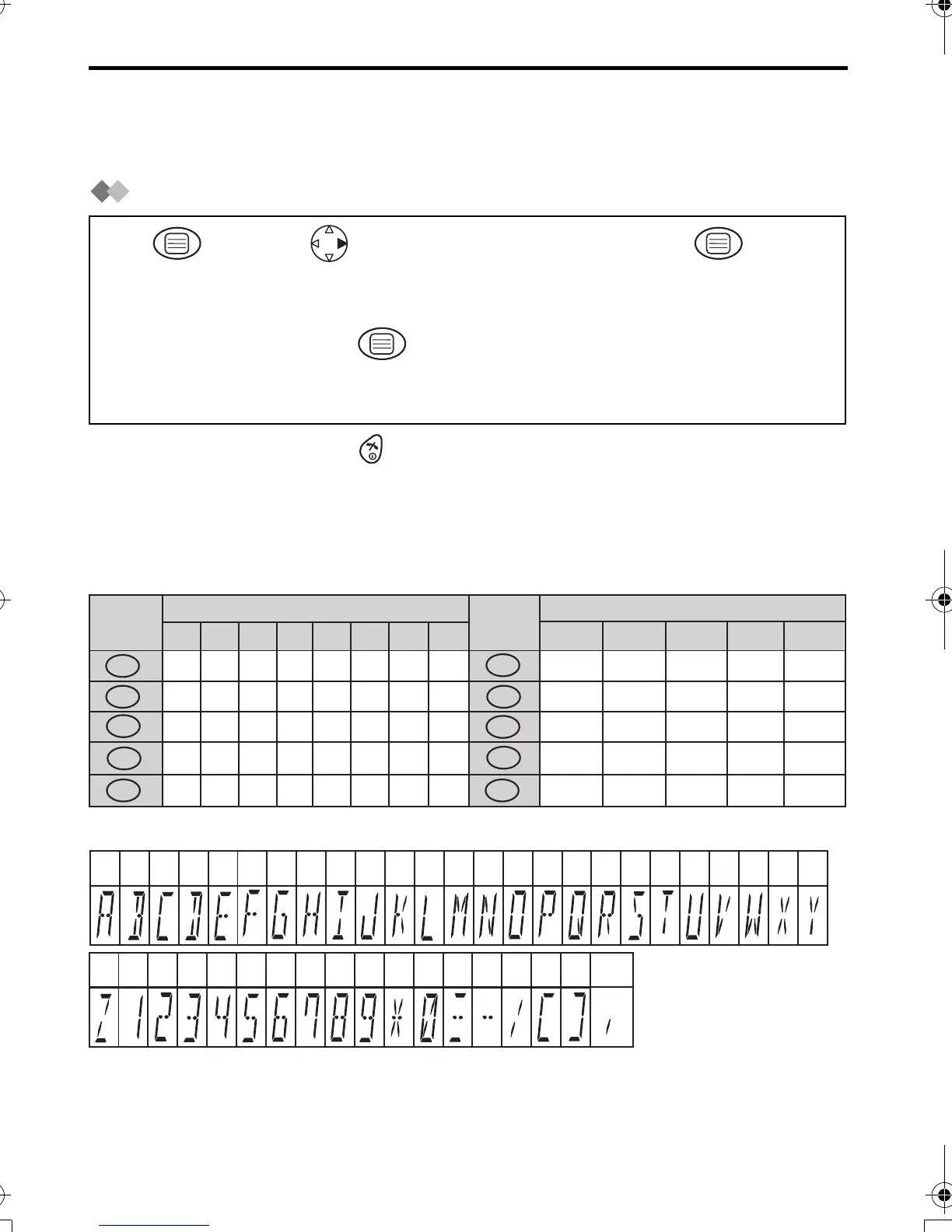
You can store up to 20 caller information in the phonebook. If you received a call from
the same phone number you stored with a name in the phonebook, the display will show
the caller’s name.
Storing a Caller Information
•
To exit the operation, press any time.
*1 If you need correction, press RIGHT or LEFT to move cursor then clear character by
pressing CLEAR, and/or enter characters. Characters are cleared or added to the left
of the flashing character. To enter characters, see Character Selection below.
*2 To continue storing another caller information, repeat the steps from 3.
Character Selection
Character Table
Enter phone number.
(max. 24 digits) *1
Press MENU.
Select
"NEW PHONE".
Press OK.
Phone Number
Press OK.*2
Enter name.
(max. 9 characters)*1
Name
1
56
23 4
Keys
Number of times key is pressed
2
X
Q
0
U
N
8
1
4
*
5
,
6
-
7
/
3
C
L
F
]
I
2
5
3
4
3
R
V
O
Y
1
P
T
M
W
5
7
9
4
S
8
6
Z
1
A
J
D
#
G
2
B
K
E
[
H
Number of times key is pressed
Keys
Blank
0
1
2
3
4
5
6
7
8
9
B
VW X Y
ACDEFGHIJKLMNOPQRSTU
#
Z123456789*0 -
[]
/
,
420E.book Page 14 Thursday, March 20, 2003 7:41 PM







 To Next Page